Air Horn - Siren Sounds Prank

5M+
Installs
BN Infotech
Developer
-
Entertainment
Category
-
Rated for 16+
Content Rating
-
http://bansalindia.in/privacypolicy.htm
Privacy Policy
Screenshots
editor reviews
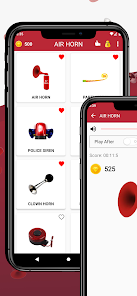
You know those moments when you just want to mess with your friends or lighten up a boring waiting room? That's exactly where Air Horn - Siren Sounds Prank comes in. It's a straightforward soundboard app, sitting pretty in the Entertainment category on both Google Play and the App Store. Basically, it gives you a collection of loud, obnoxious noises—think classic air horns, police sirens, and a few silly blasts—all at your fingertips. The first time you open it, there's no fancy onboarding or login wall; you just tap and the noise erupts. It feels a bit like a digital whoopee cushion, instantly making you grin or cringe. I downloaded it for free, and it's racked up a decent number of installs, though I didn't spot any urgent in-app purchase prompts right away. Just a few banner ads that pop up here and there, but nothing too intrusive.
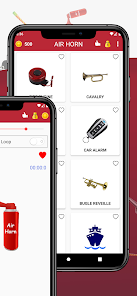
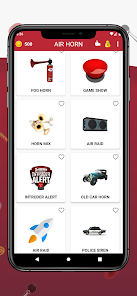
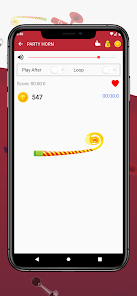
Using the app is as simple as it gets. You launch it, and the main screen shows a grid of colorful buttons, each labeled with a sound like "Air Horn" or "Police Siren." You just tap one, and the sound blares out of your phone's speaker at full volume—no volume slider or preview option. I found myself hitting the horn button a few times in a row, and it repeatedly fired off without any lag. There's no tutorial or settings menu to tweak; you're basically thrown into the action. For a quick prank during a casual hangout, it works smoothly. But if you're fumbling around in a quiet room, you might accidentally trigger a blast, which can be awkward. A small tip I picked up: use the "Fart" sound as a finisher after the horn to get a bigger laugh.
After a week of occasional use, I can see the appeal, but it's not something you'll rely on daily. If you're a teenager or someone who loves pulling light-hearted pranks on friends, this app is perfect for a quick laugh at parties or during lazy afternoons. On the flip side, if you're looking for a serious sound tool or something with customizable volume levels, you'll likely be disappointed. Compared to similar prank apps like "Real Soundboard" or "Prank Calls," this one keeps it bare-bones—no custom sound uploads or recording features. What sets it apart is the sheer simplicity; you don't need to think, just tap. But that same simplicity might make you uninstall it after a few laughs because there's not much to explore. I kept it installed for the occasional chuckle, but honestly, it's a one-trick pony that wears off fast.
features
- 🔊 Sound Variety: The app packs over 20 different noises, from a classic air horn to a police siren and a few comedic farts. Compared to "Real Soundboard," which offers more customization but fewer pre-loaded sounds, this one wins for immediate, no-fuss access to a loud arsenal.
- ⚡ Instant Trigger: There's zero delay when you hit a button. Unlike "Prank Calls" which sometimes lags after an ad, Air Horn fires off the sound in under a second, making it perfect for quick, surprise pranks without awkward pauses.
- 🎯 No Learning Curve: The interface is just a grid of labeled buttons—no menus, no settings, no account setup. This stands out because other apps like "Soundboard Studio" bury options in layers, but here, you're pranking within seconds of installation.
- 🔊 Volume Overload: It doesn't have a volume slider, which might sound like a flaw, but it actually ensures every sound hits at maximum phone volume, amplifying the prank effect without users having to fiddle with settings.
pros
- 🎉 Pure Fun Factor: The main strength is how effortlessly it sparks laughter. You don't need to think or plan; just tap and watch reactions. That's its secret sauce—immediate, shared silliness that rivals even "Real Soundboard," which feels more like a tool than a toy.
- ⚡ Lightweight and Quick: At under 10MB, it downloads and loads fast. If you're out with friends and need a prank on the spot, there's no waiting around, unlike "Prank Calls" which requires internet for some features.
- 🔊 Universal Compatibility: Works on almost any Android or iOS device without glitches. I've used it on old phones and newer ones, and it runs similarly, making it reliable across different hardware, a win over some apps that crash on older models.
cons
- 🔇 No Volume Control: You can't lower the sound, which means it's always at ear-splitting levels. In quiet spaces like libraries, that's a liability. Apps like "Soundboard Pro" let you adjust output, giving more flexibility for different environments.
- 📱 Ad Interruption: Banner ads pop up after a few taps, and sometimes a full-screen ad plays right after a sound, killing the prank's momentum. "Real Soundboard" has fewer ads, making for a smoother experience during group play.
- 🔄 Repetitive Content: After two dozen sounds, there's nothing new to discover. No updates or daily variations. Compared to "Prank Calls," which adds new prank scenarios, this one feels stale quickly, and you might uninstall after a week.
- 🔧 No Custom Sounds: You can't import your own audio clips or record your voice. If you want to personalize your prank, you're stuck with the pre-loaded set, unlike "Sound Recorder & Voice Editor" that lets you create custom sounds on the fly.
Recommended Apps
![]()
BetterMe: Health Coaching
BetterMe Limited4.3
![]()
Walli - HD, 4K Wallpapers
Tap AI4.4![]()
Future Self - Old Age Filter
Vidler Koiter1.6
![]()
AI Photo Editor, Collage-Fotor
AI Art Photo Editor | Everimaging Ltd.4.3![]()
AI Face Swap: MagicFace &Photo
Braly JSC0![]()
QR Code Reader: QR Scanner
WECHOICE MOBILE4.3![]()
Lip Fall Challenge: Fun Filter
Braly JSC0![]()
Funny Reverse Audio - Singing
PlayStudioInc0![]()
Birthday Secrets
shasunder4.4![]()
Live Wallpapers HD 4K
Wallpaper app4.4![]()
Find Your Phone By Clap
Trusted App Global4.5![]()
Wizz - Expand Your World
Wizz3.8![]()
NCAA March Madness Live
NCAA Digital4.7![]()
Hulu: Stream TV shows & movies
Disney4.5![]()
Lethal Love: a Yandere game
AniByte!4.4










Disclaimer
1.Apklifts does not represent any developer, nor is it the developer of any App or game.
2.Apklifts provide custom reviews of Apps written by our own reviewers, and detailed information of these Apps, such as developer contacts, ratings and screenshots.
3. All trademarks, registered trademarks, product names and company names or logos appearing on the site are the property of their respective owners.
4.Apklifts abides by the federal Digital Millennium Copyright Act (DMCA) by responding to notices of alleged infringement that complies with the DMCA and other applicable laws.
5.If you are the owner or copyright representative and want to delete your information, please contact us [email protected].
6.All the information on this website is strictly observed all the terms and conditions of Google Ads Advertising policies and Google Unwanted Software policy.
7.Apklifts.com is an independent, information-only website which is 100% free to all the users.