
Custom Skin Creator Minecraft

10M+
Installs
Blakzero
Developer
-
Productivity
Category
-
Rated for 3+
Content Rating
-
https://blakzero.com/privacy-policy/
Privacy Policy
Screenshots
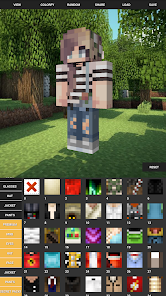
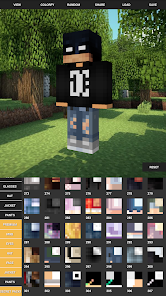
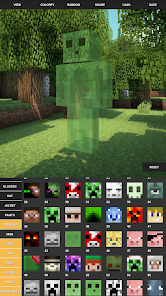
editor reviews
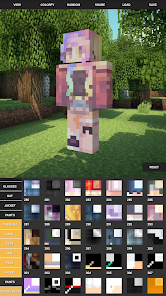
Custom Skin Creator Minecraft is an unofficial utility app designed for players of Mojang's sandbox game who want to personalize their in-game avatars without opening a desktop editor. Available on the Google Play Store with over a million installs, the app lets you download, create, and apply custom skins directly to your Minecraft account. The first time you launch it, the interface feels straightforward — a gallery of pre-made skins catches your eye right away, and there's a big "Create New" button that doesn't leave you guessing. What got me was how quickly I could swap out my default Steve skin for a dragon-themed design without any sign-up hassle. It's free to download, though you'll bump into ads between some actions, and there are optional in-app purchases to unlock premium skin packs.
Once you start using it, the app reveals its practical side. After tapping "Create," you're dropped into a pixel editor where you can paint directly on a 2D skin template, with the 3D preview updating in real-time as you draw. The controls are simple: zoom in with two fingers, pick a color from the palette, and tap to fill individual pixels. I found the mirror mode especially handy — it automatically duplicates your brush strokes on both arms, saving you from copying designs manually. The onboarding is quick, with a one-tap "Apply to Minecraft" button that logs you into your Mojang account and updates your skin in seconds. The only slightly confusing moment was figuring out how to save custom layers, but a brief tooltip sorted that out.
After spending a few days with it, I'd say this app hits a sweet spot for casual Minecraft players who want quick skin changes without learning a complex editor like NovaSkin or Scratch. It's less intimidating than Skinseed but lacks the community sharing features that Skinseed offers, so you're mostly working alone or browsing a modest gallery. The ads can feel intrusive when you're in the middle of designing, and the premium packs are tempting but not essential. For someone who just wants a fresh look every now and then, it's worth keeping installed. But if you're a dedicated skin artist or need layered templates, you might outgrow it fast. It is what it is: a lightweight tool that does one thing well, without pretending to be more.
features
- 🖌️ The pixel editor includes real-time 3D preview, mirror mode for symmetrical designs, and a color picker that feels responsive. Unlike NovaSkin's web-based tool, this one works fully offline after the initial download, which is a big plus when you are on a train or somewhere without signal.
- 🔓 One-tap skin application is where it shines — you log into your Mojang account once, and the app applies your new skin directly without needing to open the Minecraft launcher or use third-party websites that ask for passwords manually each time.
- 🖼️ The built-in skin gallery has a decent rotation of free designs updated weekly, covering themes like superheroes, animals, and fantasy characters. Skinseed has a much larger community gallery, but this one keeps things curated, so you are not wading through low-effort uploads.
- 📦 Premium pack bundles give you access to licensed-looking skins (like movie characters) for a small fee, which feels fair compared to random sketchy sites that charge subscription fees for the same thing.
pros
- 🔧 It requires no account registration beyond your existing Minecraft login. Skinseed pushes you to create an account for saving skins, but here you just open and go — less friction for a quick session.
- ⚡ The offline editor functionality is a standout. Many apps like Skincraft require constant internet for the editor to load, but this one saves your work locally and lets you edit without connectivity. Perfect for kids on long car rides.
- 🎨 The color palette is designed for pixel art specifically, with pre-sorted hues that avoid muddy blending. NovaSkin's advanced color wheel is more flexible but overkill for simple skin tweaks, while this app keeps choices clear and toddler-friendly.
- 📱 It runs smoothly on low-end Android devices without lagging during 3D preview rotation, which can't be said for heavier apps like Skins for Minecraft that stutter on older phones.
cons
- 📢 The ads are placed awkwardly — a full-screen video often pops up right after you finish a design, before you can save it. Skinseed handles this better by only showing ads on the main menu, not during active editing.
- 🔒 There is no cloud backup for your custom skins. If you uninstall the app or switch devices, your creations vanish unless you manually export them as PNGs. NovaSkin automatically syncs to your account, which feels more secure.
- 🎨 The skin layering system is basic — you can't work with multiple layers or import transparent overlays. Apps like Skincraft let you stack layers for complex armor designs, but here you are limited to single-layer pixel painting.
- 🌐 The in-app browser for the gallery has no search bar. You have to scroll through categories (like "Superheroes") rather than typing keywords. Skinseed's search is far more practical for finding specific themes.
Recommended Apps
![]()
Japevox - Funny Prank Sound
SecureTool4.3
![]()
AstroMatrix Birth Horoscopes
AstroMatrix4.7
![]()
Personalized Call from Santa (
www.PackageFromSanta.com4.3![]()
Prank Call - Fake Call & Chat
Bravestars Casual4.1![]()
Persona: Beauty Camera
TICKET TO THE MOON, INC.4.5![]()
Peacock TV: Stream TV & Movies
Peacock TV LLC4.5![]()
Instant Buttons Soundboard App
Snow Peak Apps2.1![]()
GPS Speedometer: Speed Tracker
SM Infotech3.2![]()
Subway®
SUBWAY Restaurants4.2![]()
Find Your Phone By Clap
Trusted App Global4.5![]()
Gorilla Skins for Monkey Arena
Dumitru Boico4![]()
Vimeo
Vimeo.com, Inc.3.8![]()
Vinted - Buy and sell clothes
Vinted4.6![]()
Galaxy Starry Keyboard Backgro
Fun Keyboard Theme for Android4.7![]()
Chat AI - Ask AI anything
AI Chat Bot, Ask AI4.4















Disclaimer
1.Apklifts does not represent any developer, nor is it the developer of any App or game.
2.Apklifts provide custom reviews of Apps written by our own reviewers, and detailed information of these Apps, such as developer contacts, ratings and screenshots.
3. All trademarks, registered trademarks, product names and company names or logos appearing on the site are the property of their respective owners.
4.Apklifts abides by the federal Digital Millennium Copyright Act (DMCA) by responding to notices of alleged infringement that complies with the DMCA and other applicable laws.
5.If you are the owner or copyright representative and want to delete your information, please contact us [email protected].
6.All the information on this website is strictly observed all the terms and conditions of Google Ads Advertising policies and Google Unwanted Software policy.
7.Apklifts.com is an independent, information-only website which is 100% free to all the users.













