

Life Palmistry - Palm & Aging

10M+
Installs
Bluewolf Technology Limited
Developer
-
Lifestyle
Category
-
Everyone
Content Rating
-
https://sites.google.com/view/life-palm-policy-en
Privacy Policy
Screenshots


editor reviews
Have you ever found yourself staring at your hands, wondering what the lines on your palm might say about you? Life Palmistry - Palm & Aging is a niche app from Bluewolf Technology Limited that blends traditional palm reading concepts with a modern, AI-driven twist. It's not your typical fortune-telling tool; instead, it focuses on analyzing your palm's lines, mounts, and signs to give insights into your personality and, more uniquely, how aging might affect your hand's appearance over time. When I first downloaded and installed it from the Google Play Store, I noticed it was free to download, though it does have in-app purchases. After launching the app, I was greeted by a clean, somewhat minimalist interface that asked me to snap a photo of my palm right away. The first impression was that it felt slightly gimmicky, but the idea of tracking how my palm might change as I get older hooked me enough to give it a try. Registration wasn't required at the start, which was a nice surprise.
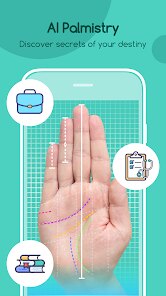
When I actually got into using the app, the experience was a mixed bag. The onboarding process is fairly straightforward: you place your palm flat on a surface, take a photo with your phone's camera, and let the app scan the image. It worked on the first try, but the lighting in my room was a bit dim, so the app prompted me to adjust. That was a practical tip I picked up early on. Once the scan was done, the app displayed an overlay of key lines like the head line and life line, then gave a short description of what each line supposedly indicates. Navigating through the main sections—like palm reading, age prediction, and trend tracking—was smooth overall, though some menus felt a bit cluttered with text. There were moments when the AI's explanations seemed repetitive, like telling me the same thing about my heart line twice. The "aging" feature, which simulates how your palm might look in 10 or 20 years, was visually interesting but didn't feel deeply useful in daily use.
After spending a few days with Life Palmistry, I can see why some people might enjoy it and why others would quickly uninstall it. If you're into alternative wellness, self-discovery tools, or just want a fun conversation starter at a party, this app could be a neat addition to your phone. But if you're looking for genuine, science-backed health insights or something more practical, you'd be better off with a fitness tracker or a meditation app. What really sets it apart from similar palmistry apps, like Palm Reader or simply Googling the meanings, is the aging simulation aspect—it's genuinely unique and tries to add a temporal dimension to something usually static. That said, the novelty wore off after a couple of uses, and I found myself wishing it had more depth in the reading itself, rather than leaning so heavily on the aging gimmick. I kept it installed for now, but it's one of those apps I'll probably open again only when I remember it exists.
features
- 🔍 AI-Powered Palm Scan vs. Manual Input in Similar Apps: Instead of making you type in palm details or select from a list like many old-school palmistry apps, this one uses your camera to automatically map your palm. For example, Palm Reader Pro asks you to manually identify lines, which can be inaccurate. Life Palmistry's scanning felt faster and more automated, though it struggled with very wrinkled hands.
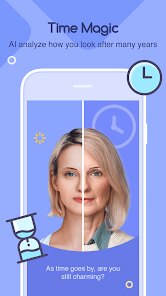
- 👴 Aging Simulation Feature (Unique Selling Point): The standout is the aging simulation that shows how your palm lines might change over decades. Competing apps like Palmistry Guide only offer static readings. This feature uses machine learning to predict crease deepening and line shifts, making it feel more dynamic, even if it's not scientifically proven.
- 📱 Clean Onboarding with No Mandatory Signup: Unlike apps like Fortune Palm that nag you to create an account or subscribe immediately, Life Palmistry lets you do a full scan without registration. It only asks for payment when you want to unlock detailed analyses such as mount interpretations, which is a much friendlier approach for casual users.
pros
- 🌐 No Account Friction: Many palmistry apps like Mystic Hand require a login before even seeing the interface. Life Palmistry skips that entirely, letting you snap your palm and get results in under 30 seconds. It respects your time and privacy better.
- 🎨 Visual Aging Predictions: No other app tries to show your palm at different ages. Apps like Palm Reader just describe static meanings. The visual simulation here adds a layer of fun and reflection, even if it's not medically accurate. It makes the experience feel personalized.
- 📉 Lightweight and Fast: Compared to bloated options like Palmistry Pro that load tons of ads and slow down, this app runs smoothly on older phones. The scans take only a few seconds, and there's no lag when switching between the aging timeline views.
cons
- 🔋 Limited Reading Depth: While apps like Palm Reader offer detailed breakdowns of each line, mount, and finger shape, Life Palmistry oversimplifies. For example, its explanation of the fate line was a single sentence, whereas competitors give multiple paragraphs. You get a gloss over rather than a deep dive.
- 📸 Camera Sensitivity Issues: The scanning works well only in perfect lighting. In dim rooms or with shaky hands, it often prompts retakes. Apps like Hand Reader rely on manual selection, which avoids this. It's frustrating when you're trying to use it quickly on the go.
- 💸 Paywall for Essential Features: Unlocking the aging simulation or detailed reports requires a steep in-app purchase. Other apps like Palmist Free give more for nothing. You feel like the free version is just a teaser, and the paid features aren't robust enough to justify the cost.
Recommended Apps
![]()
BetterMe: Health Coaching
BetterMe Limited4.3
![]()
Walli - HD, 4K Wallpapers
Tap AI4.4![]()
Future Self - Old Age Filter
Vidler Koiter1.6
![]()
AI Photo Editor, Collage-Fotor
AI Art Photo Editor | Everimaging Ltd.4.3![]()
AI Face Swap: MagicFace &Photo
Braly JSC0![]()
QR Code Reader: QR Scanner
WECHOICE MOBILE4.3![]()
Lip Fall Challenge: Fun Filter
Braly JSC0![]()
Funny Reverse Audio - Singing
PlayStudioInc0![]()
Birthday Secrets
shasunder4.4![]()
Live Wallpapers HD 4K
Wallpaper app4.4![]()
Find Your Phone By Clap
Trusted App Global4.5![]()
Wizz - Expand Your World
Wizz3.8![]()
NCAA March Madness Live
NCAA Digital4.7![]()
Hulu: Stream TV shows & movies
Disney4.5![]()
Lethal Love: a Yandere game
AniByte!4.4















Disclaimer
1.Apklifts does not represent any developer, nor is it the developer of any App or game.
2.Apklifts provide custom reviews of Apps written by our own reviewers, and detailed information of these Apps, such as developer contacts, ratings and screenshots.
3. All trademarks, registered trademarks, product names and company names or logos appearing on the site are the property of their respective owners.
4.Apklifts abides by the federal Digital Millennium Copyright Act (DMCA) by responding to notices of alleged infringement that complies with the DMCA and other applicable laws.
5.If you are the owner or copyright representative and want to delete your information, please contact us [email protected].
6.All the information on this website is strictly observed all the terms and conditions of Google Ads Advertising policies and Google Unwanted Software policy.
7.Apklifts.com is an independent, information-only website which is 100% free to all the users.














