

Future You: See your old face

1M+
Installs
Future Self Studio
Developer
-
Lifestyle
Category
-
Rated for 3+
Content Rating
-
https://sites.google.com/view/faceart-privacy
Privacy Policy
Screenshots

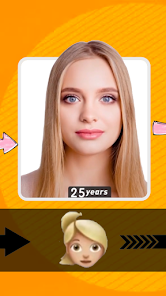
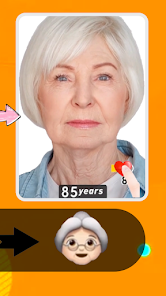

editor reviews
Future You is a mobile app that uses AI to show you what you might look like as you age. It falls under the category of entertainment or novelty apps, more in the realm of face-aging simulators than serious health tools. People usually download it out of pure curiosity—you feed it a selfie, and it spits out an older version of yourself. The first time you open it, the interface is pretty straightforward: a clean, white screen with a central button to snap or upload a photo. There is no signup wall, which is a relief, and it runs entirely offline after the initial download. As of my last check, it sat around 10 million downloads on Google Play and the App Store, and yes, it is free to install. But you will quickly notice the in-app purchase prompts if you want to see more than the basic age-progression. No forced registration, though, which is a nice touch for a casual try.
After you take a photo, the app processes it locally, so there is no weird wait time or cloud upload anxiety. It will ask you to pick a starting age (like 20 or 30) and then a target age (say 60 or 70). The aging effect is the main show: it adds wrinkles, gray hair, and sagging skin around the jawline. The first result is usually hilarious or mildly disturbing, depending on who you are. You can also toggle between male and female aging patterns, which feels like a thoughtful detail. Swiping between the original and the aged version is smooth, and you can save the image to your gallery or share it instantly. One small tip: lighting matters a lot. A well-lit selfie gives a much more convincing result than a dim one. If you are trying to prank a friend, use a front-facing shot with even lighting.
After using it for a week, I found it fun in short bursts but not something I would keep on my home screen. The novelty definitely wears off after showing three friends what they will look like at 80. People who enjoy quick, shareable content or love photo-editing gimmicks will get a kick out of it. It is simpler than apps like FaceApp, which does aging plus a dozen other filters, but that is also its weakness—once you have aged one face, you have seen the whole app. It is not a tool you use daily, and the premium version (which adds aging to group photos or removes watermarks) feels a bit overpriced for what it offers. I ended up uninstalling it after a few days, but if you are planning a silly group chat moment or just want to scare your mom, it nails that one job.
features
- 😮 One-tap aging: Unlike FaceApp's multiple-step filter process, Future You simplifies it to just one tap after picking the target age. The output is a single, focused transformation, no extra frills like swapping gender or adding smiles. It is simpler for a quick laugh.
- 😮 Offline processing: This is the hidden gem. Most similar apps like AgingBooth upload your face to a server, which is both slower and a privacy risk. Future You processes everything on your phone, so you can use it on a plane or in a spotty area without any lag.
- 😮 Realistic wrinkles and skin texture: The aging effect here is not just a filter overlay. It actually recalculates the face structure, creating deeper nasolabial folds and realistic eye bags. FaceApp's aging tends to look more like a soft blur, while this app aims for a sharper, more detailed old-age look.
- 😮 No account needed: You can open it on a friend's phone, snap a pic, and delete the app without ever entering an email. Many free trials of other apps require signing up first, which kills the spontaneous fun.
pros
- 👍 Instant results: The whole process from photo to aged version takes under three seconds. Apps like FaceApp or Remini sometimes buffer or crash under load, but Future You stays snappy because it is offline.
- 👍 Privacy-first design: It does not ask for camera roll access unless you manually grant it, and it never saves your photo to a cloud server. That is a major plus compared to many free face-editing tools that quietly store your data.
- 👍 Clean, minimal interface: There is no cluttered menu or confusing slider bar. Just a photo area, an age slider, and a save button. Great for older users who just want to see a quick result.
cons
- 👎 No undo button: If you mess up the age slider or crop the photo wrong, you have to start over with a new selfie. FaceApp has a history feature that lets you roll back, but Future You lacks any version control.
- 👎 Single feature only: You get exactly one trick—aging. There is no de-aging, no baby filter, no gender swap, and no hair color change. Apps like YouCam Perfect offer a whole toolbox, so Future You feels shallow in comparison.
- 👎 Watermark on free version: Every saved image gets a small Future You logo in the corner. To remove it, you need to pay a few dollars. That feels a bit sneaky for an app that markets itself as free.
- 👎 No group photo support: You can only age one face at a time. If you want to age a whole family picture, you have to crop each person individually, which ruins the fun. FaceApp can handle multiple faces in one shot.
Recommended Apps
![]()
BetterMe: Health Coaching
BetterMe Limited4.3
![]()
Walli - HD, 4K Wallpapers
Tap AI4.4![]()
Future Self - Old Age Filter
Vidler Koiter1.6
![]()
AI Photo Editor, Collage-Fotor
AI Art Photo Editor | Everimaging Ltd.4.3![]()
AI Face Swap: MagicFace &Photo
Braly JSC0![]()
QR Code Reader: QR Scanner
WECHOICE MOBILE4.3![]()
Lip Fall Challenge: Fun Filter
Braly JSC0![]()
Funny Reverse Audio - Singing
PlayStudioInc0![]()
Birthday Secrets
shasunder4.4![]()
Live Wallpapers HD 4K
Wallpaper app4.4![]()
Find Your Phone By Clap
Trusted App Global4.5![]()
Wizz - Expand Your World
Wizz3.8![]()
NCAA March Madness Live
NCAA Digital4.7![]()
Hulu: Stream TV shows & movies
Disney4.5![]()
Lethal Love: a Yandere game
AniByte!4.4















Disclaimer
1.Apklifts does not represent any developer, nor is it the developer of any App or game.
2.Apklifts provide custom reviews of Apps written by our own reviewers, and detailed information of these Apps, such as developer contacts, ratings and screenshots.
3. All trademarks, registered trademarks, product names and company names or logos appearing on the site are the property of their respective owners.
4.Apklifts abides by the federal Digital Millennium Copyright Act (DMCA) by responding to notices of alleged infringement that complies with the DMCA and other applicable laws.
5.If you are the owner or copyright representative and want to delete your information, please contact us [email protected].
6.All the information on this website is strictly observed all the terms and conditions of Google Ads Advertising policies and Google Unwanted Software policy.
7.Apklifts.com is an independent, information-only website which is 100% free to all the users.














