FishAngler: Fishing Guide App

1M+
Installs
FishAngler, LLC
Developer
-
Sports
Category
-
Teen
Content Rating
-
support@fishangler.com
Developer Email
-
https://www.fishangler.com/privacy/
Privacy Policy
Screenshots
editor reviews
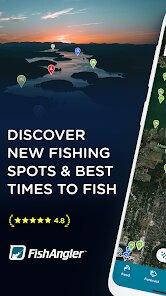
FishAngler is a social network and mapping tool rolled into one, built specifically for people who fish. It's not a simple tide chart or a basic fish identifier; instead, it functions as a location-based guide where users can log catches, scout spots, and check recent activity from other anglers in the area. A first-time user would probably download it from Google Play or the App Store, and the app has been installed over a million times with a free download model. After launching it, the first impression is a map full of pins and icons, which can feel a bit overwhelming but also promising for anyone who's tired of guessing where the fish might be. There is a registration step, but you can skip it initially and still explore some public data. In-app purchases exist, mainly for premium tiers or specific region packs, and I noticed ads popping up occasionally, though not too aggressively.
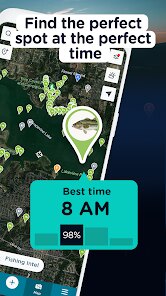
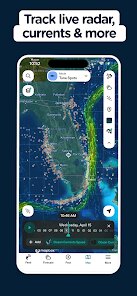
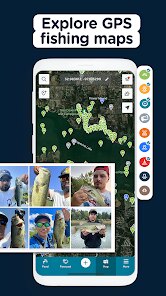
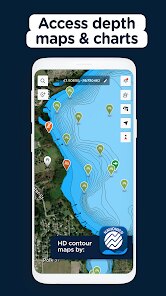
Once you start using FishAngler, the hands-on experience revolves around the map. You zoom into a lake, reservoir, or coastal area, and pins show where people have reported catches recently. Tapping a pin brings up details like species, bait used, and sometimes a photo. The onboarding asks you to pick your target fish and local waters, and then suggests hotspots based on that. For everyday use, you'd open the app before heading out, check recent catches near your planned spot, and maybe log your own catch after a trip. The app walks you through entering species, size, weather conditions, and a photo, which takes under a minute. The interface is decent overall, but the map can lag a bit on older phones. A small tip: if you turn off the social feed notifications, the app feels less noisy and more focused on the mapping part, which is where it really shines.
After spending a few weeks with it, I think FishAngler is best for casual to intermediate anglers who like to explore new water bodies and want real-time intel from other people. It's less useful for someone who only fishes private ponds or the same spot every weekend, because the value comes from crowd-sourced data. Compared to apps like Fishbrain, FishAngler feels more map-heavy and less flashy, but it also seems to have decent free-tier access. I can see someone keeping it installed if they travel and fish different places often. On the flip side, if you hate ads or don't want to pay for full species coverage in your region, you might uninstall it after a month. It does what it promises, though, and the community data feels genuinely useful, especially during the first few trips to unfamiliar locations.
features
- 🐟 Real-time catch maps with species, bait, and weather data logged by other users, giving you a clear picture of what's biting right now rather than relying on old forum posts.
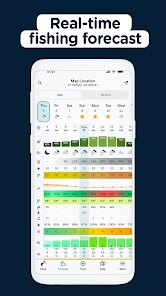
- 🐟 Personalized fishing forecast that factors in moon phase, barometric pressure, and historical catch patterns from your area, which feels more tailored than the generic tide tables you get in many weather apps.
- 🐟 Tackle box log and trip journal built into the app, so you can track which lures perform best across different waters without needing a separate notebook or spreadsheet.
pros
- ✅ The free tier is more generous than what you get with Fishbrain. You can view recent catches and basic maps without immediately hitting a paywall for basic features like location filtering.
- ✅ The map interface loads detailed spot data faster than Fishbrain, especially in less crowded freshwater regions where other apps often show blank areas with little to no user content.
- ✅ The weather and moon phase integration is directly tied to catch reports, not just generic forecasts. You can see how pressure changes affected catches last weekend, which is something most fishing apps barely touch.
cons
- ❌ The ad frequency is higher than expected, especially after logging a catch. Fishbrain handles ad placement more sparingly during the actual recording workflow, which makes for a smoother experience.
- ❌ Premium features like advanced species filters and offline maps are locked behind a subscription, whereas similar tools in Fishbrain are sometimes available as one-time add-ons for specific lakes.
- ❌ The social feed feature feels underdeveloped compared to Fishbrain's community posts. Notifications about random catches from distant users clutter the feed, and there's no easy way to only see local activity without adjusting map filters every time.
Recommended Apps
![]()
Daily Horoscope
KADO Apps4.4
![]()
FOX Sports: Watch Live Games
Fox Digital Services, LLC3.7
![]()
Fake Call from Santa Claus
ThunderClap4.2![]()
Google Maps
Google LLC4.2![]()
PhotoLayers-Superimpose,Eraser
handyCloset Inc.4.6![]()
Healthy Benefits+
Solutran, Inc.4.5![]()
SuperMe - Avatar Maker Creator
THE.DEMON3.7![]()
Air Horn
Tenoku4.8![]()
Football Wallpaper HD 4K
Orange Infotech Studio4.6![]()
Artplay - AI Photo & Video
Hideaway Technology Limited4.5![]()
Horoscopes – Daily Zodiac Horo
Mail.Ru Group4.1![]()
Passport Parking
Passport Labs, Inc.2.5![]()
ParkMobile: Park. Pay. Go.
Parkmobile, LLC4.3![]()
FestAI: Ghost Detector App
Now Tech3.2![]()
Photo Tool
COLIFER LAB4