
Notes - Notepad, Secure Notes

100K+
Installs
PANCHHI SOLUTION
Developer
-
Productivity
Category
-
Everyone
Content Rating
-
https://sites.google.com/view/panchhisolution-notes
Privacy Policy
Screenshots
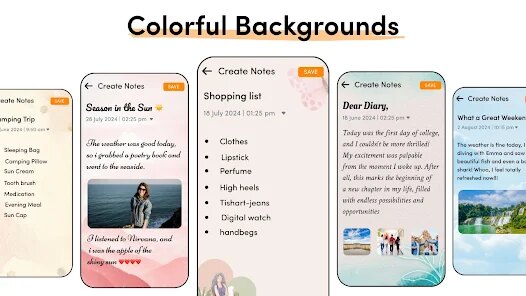
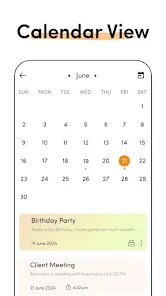
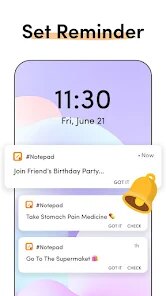
editor reviews
Notes - Notepad, Secure Notes is a straightforward note-taking app from PANCHHI SOLUTION, a niche developer with a handful of utility tools on Google Play. It's meant for jotting down quick thoughts, keeping lists, or storing private information with an extra layer of security. With over 100,000 installs, it seems to have found a small but dedicated audience, and it's free to download without any forced account creation. The first time I opened it, I was struck by how barebones everything felt—there was no splash screen, no tutorial, just a blank canvas with a simple interface. For someone who hates apps that demand sign-ups or bombard you with ads right away, this was a refreshing change, though the dated design immediately made me wonder if it would hold up under daily use.
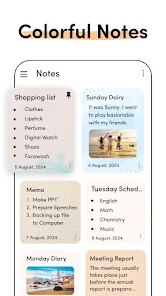
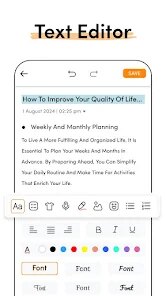
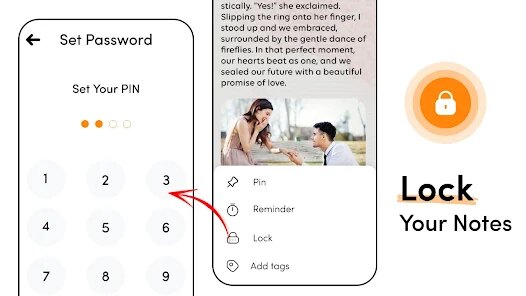
After spending a few days using it, the real experience is a mixed bag. The home screen shows a list of notes with a floating + button to create a new one, and tapping that opens a basic text editor. You can add a title and start typing, but there's no rich text formatting—no bold, italics, or bullet points—which feels limiting even for simple notes. A standout feature is the "Secure Note" option: when you save a note, you can choose to lock it with a PIN. This works smoothly, requiring a password to view or edit the locked note, and it's handy for things like passwords or diary entries without needing a separate app. The search function works well enough, sorting notes by time or title, but I noticed the app occasionally lags when switching between locked and unlocked notes. A practical tip: always tap the back button instead of the home button to avoid accidentally closing a note without saving, since there's no autosave prompt if you exit abruptly.
After a few weeks, I can see who this app is for and who should skip it. It's ideal for someone who wants a no-fuss, offline note-taker with basic security—think students jotting down class snippets or users who dislike bloated apps like Evernote. But if you need features like cloud sync, image attachments, or handwriting support, you'll quickly outgrow it. Compared to Keep Notes, which offers tags and reminders, Notes - Notepad feels outdated and rigid. I ended up keeping it on my phone for locking sensitive data, but I still rely on Google Keep for everyday notes because of its cross-device convenience. It's not bad for what it promises, but the lack of updates from PANCHHI SOLUTION makes me worry about long-term support or bugs.
features
- 📝 Password lock for each note: Unlike most free note apps, this one lets you lock individual notes with a PIN, while Google Keep doesn't have a built-in lock feature at all. It feels more private than just slapping a lock on the whole app.
- 📝 Offline-only storage: All data stays on your device without any cloud sync. This contrasts with apps like Microsoft OneNote, which constantly push cloud backup. It's good for privacy, but risky if you lose your phone.
- 📝 Simple list view: The notes are sorted by time or title in a clean list, with no clutter like tags or folders. This is easier to navigate than Samsung Notes, which buries everything in categories you might not use.
pros
- 🌍 No account or sign-up required: You can start typing immediately after install without giving away an email. This is a big win compared to Keep Notes, which asks for a Google account, or Evernote, which nags you about cloud limits.
- 🌍 Lightweight and fast: The app is only a few megabytes and launches instantly even on old phones. In contrast, apps like Notion feel sluggish and are overkill for simple lists.
- 🌍 Basic but functional security: The PIN lock works reliably without any internet, offering a solid layer of protection. This beats ColorNote, which also has a lock but often glitches after updates.
cons
- ⚠️ No backup or sync options: If your phone dies, all your notes vanish immediately. Google Keep synced across devices, and even basic apps like Simplenote offer cloud exports, but this app forces you to be manual and vigilant.
- ⚠️ No advanced formatting: You can't add images, bold text, or checkboxes. This makes it unusable for shopping lists or project planning compared to Todoist or any modern note app.
- ⚠️ Outdated interface with lag: The design feels stuck in 2015, and switching between locked notes sometimes freezes for a second. Apps like Notes by Microsoft are far smoother and more polished.
Recommended Apps
![]()
Japevox - Funny Prank Sound
SecureTool4.3
![]()
AstroMatrix Birth Horoscopes
AstroMatrix4.7
![]()
Personalized Call from Santa (
www.PackageFromSanta.com4.3![]()
Prank Call - Fake Call & Chat
Bravestars Casual4.1![]()
Persona: Beauty Camera
TICKET TO THE MOON, INC.4.5![]()
Peacock TV: Stream TV & Movies
Peacock TV LLC4.5![]()
Instant Buttons Soundboard App
Snow Peak Apps2.1![]()
GPS Speedometer: Speed Tracker
SM Infotech3.2![]()
Subway®
SUBWAY Restaurants4.2![]()
Find Your Phone By Clap
Trusted App Global4.5![]()
Gorilla Skins for Monkey Arena
Dumitru Boico4![]()
Vimeo
Vimeo.com, Inc.3.8![]()
Vinted - Buy and sell clothes
Vinted4.6![]()
Galaxy Starry Keyboard Backgro
Fun Keyboard Theme for Android4.7![]()
Chat AI - Ask AI anything
AI Chat Bot, Ask AI4.4















Disclaimer
1.Apklifts does not represent any developer, nor is it the developer of any App or game.
2.Apklifts provide custom reviews of Apps written by our own reviewers, and detailed information of these Apps, such as developer contacts, ratings and screenshots.
3. All trademarks, registered trademarks, product names and company names or logos appearing on the site are the property of their respective owners.
4.Apklifts abides by the federal Digital Millennium Copyright Act (DMCA) by responding to notices of alleged infringement that complies with the DMCA and other applicable laws.
5.If you are the owner or copyright representative and want to delete your information, please contact us [email protected].
6.All the information on this website is strictly observed all the terms and conditions of Google Ads Advertising policies and Google Unwanted Software policy.
7.Apklifts.com is an independent, information-only website which is 100% free to all the users.













