Photo Collage Maker & Editor

100M+
Installs
Lyrebird Studio
Developer
-
Video Players & Editors
Category
-
Rated for 3+
Content Rating
-
lyrebirdstudio@gmail.com
Developer Email
-
http://lyrebirdstudio.net/privacy_policy.htm
Privacy Policy
Screenshots
editor reviews
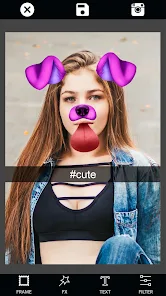
So you've taken a bunch of photos on your phone, and now you want to turn them into something a bit more shareable or maybe just a nice memory layout. That's where Photo Collage Maker & Editor from Lyrebird Studio comes in. It's basically a straightforward collage app you can grab from Google Play or the App Store. Once you download and install it, you're not forced into signing up right away, which is a relief. The first impression after launching? It's surprisingly clean. No endless pop-ups begging for a subscription or throwing ads in your face every second. You just pick your photos from the gallery, and it instantly drops them into a grid. For someone who just wants to quickly group vacation snaps or make a birthday greeting, this feels like the right tool.
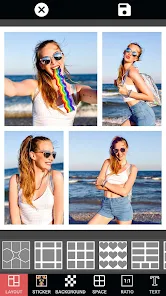
Actually using it is pretty uncomplicated. After the app opens, you tap the big “Create Collage” button, select a few images, and you're in the editing screen. The interface puts all the tools right below the preview—things like borders, backgrounds, stickers, and text. I found myself tapping through the layout options first, because they've got a decent range from simple grids to more scattered, scrapbook-style frames. Adding text was smooth; you just click on the “Text” button, type, and adjust the font and color. There is a moment where you accidentally exit the editing screen and lose your progress, and that's annoying. But overall, the daily routine for someone using this app would be: pick photos, choose a layout, add a bit of flair, and save. The saving is fast, too, which matters when you're impatient.
After using it for a few weeks, I think this app nails the “quick collage” need without overcomplicating things. It's designed for someone who doesn't want to learn a full photo editor just to stitch a few pictures together. Maybe you're a parent who wants to make a weekly memory grid, or someone who posts on social media frequently. The app does have ads, but they're pushable. Compared to something like PicCollage, this one feels more to the point and less pushy with subscriptions. The thing that really makes it different is how easy it is to turn a batch of random photos into something that looks intentionally designed in under a minute. Some might uninstall it because they don't make collages often, but I'd keep it around for those moments when you just need a pretty layout fast.
features
- 🎨 The standout feature here is the layout library. Unlike other popular apps like Canva which hide half its collage templates behind a paywall, this app gives you a huge range of grid styles from classic squares to creative angled frames right off the bat. You can switch between them instantly and see the preview update live without any lag.
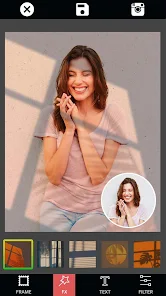
- 🖼️ The background customization is surprisingly deep. In apps like PicCollage, you're often limited to solid colors or a few patterns. Here, you can pick from their preset backgrounds, upload your own image, adjust the blur, or even apply a gradient that matches your photo's mood. It makes the final collage feel much more polished.
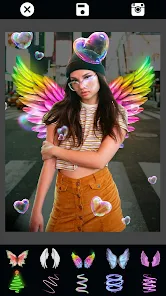
- ✏️ The sticker and text editor includes some fun extras like shadow effects and neon glow on the text. In many similar editors, basic text is free but the good effects cost extra. Here, the glow and shadow adjustments are included without any extra payment. That really stands out for a free download.
pros
- ✅ The biggest strength is that it's genuinely free to use the core features. You don't hit a paywall after making one collage. Other apps like Layout from Instagram limit you to their set grids, but this one lets you adjust margins, corner radius, and spacing freely.
- ✅ The export quality is another winner. You can save in high resolution without a watermark. Compared to FotoJet or Fotor, which stamp their brand on the free version, this app respects your work and gives you a clean image.
- ✅ The app loads quickly and crashes almost never. That might sound basic, but some collage apps like Moldiv can stall when you try to load six photos at once. This one handles a dozen without a hitch.
cons
- ❌ The font library is quite limited. If you're used to the hundreds of typefaces in apps like Canva or Phonto, you'll be disappointed. There are only about 20 basic fonts, and you can't download more. For someone who loves typography, this is a deal breaker.
- ❌ There is no undo button that works reliably. You mess up a sticker placement, and you have to delete it and redo everything. That's a huge frustration compared to PicCollage, which has a proper history panel.
- ❌ The sticker pack is very generic. They're mostly simple icons and shapes, with no themed sets for holidays or events. Apps like PicsArt have massive sticker libraries. Here, you quickly run out of options and end up using the same few stickers.
- ❌ The app doesn't support layer reordering well. If you want text behind an image or a sticker between two photos, you're out of luck. That level of control just isn't there, making it less flexible than more advanced editors.
Recommended Apps
![]()
Daily Horoscope
KADO Apps4.4
![]()
FOX Sports: Watch Live Games
Fox Digital Services, LLC3.7
![]()
Fake Call from Santa Claus
ThunderClap4.2![]()
Google Maps
Google LLC4.2![]()
PhotoLayers-Superimpose,Eraser
handyCloset Inc.4.6![]()
Healthy Benefits+
Solutran, Inc.4.5![]()
SuperMe - Avatar Maker Creator
THE.DEMON3.7![]()
Air Horn
Tenoku4.8![]()
Football Wallpaper HD 4K
Orange Infotech Studio4.6![]()
Artplay - AI Photo & Video
Hideaway Technology Limited4.5![]()
Horoscopes – Daily Zodiac Horo
Mail.Ru Group4.1![]()
Passport Parking
Passport Labs, Inc.2.5![]()
ParkMobile: Park. Pay. Go.
Parkmobile, LLC4.3![]()
FestAI: Ghost Detector App
Now Tech3.2![]()
Photo Tool
COLIFER LAB4