
Flower Language Keyboard

500K+
Installs
SOKAR
Developer
-
Productivity
Category
-
Rated for 3+
Content Rating
-
http://sokar.site/privacy-policy.html?app=Flower%20Language%20Keyboard&store=SOKAR
Privacy Policy
Screenshots
editor reviews
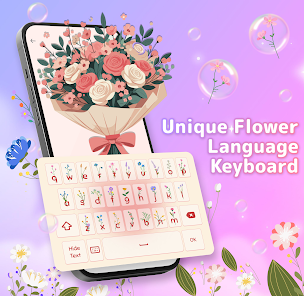
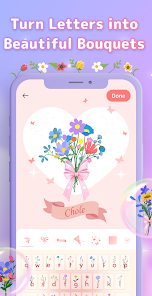
The Flower Language Keyboard is a niche customization tool available on the Google Play Store that lets you type with floral-themed symbols and icons instead of standard letters or emojis. It's more of a decorative or novelty keyboard than a daily driver, designed for people who want to add a poetic, nature-inspired touch to their messages or social media captions. After downloading and installing it (it's free, but you'll run into ads and prompts for in-app purchases to unlock full symbol sets), the first thing you notice is the splashy, pastel interface with petals and leaves. It feels a bit like stepping into a garden-themed sticker book, but the excitement can fade quickly once you realize the keyboard isn't replacing your usual typing—it's more of a complementary tool for occasional, stylized text.
When you actually start using the app, the experience is a mixed bag. The onboarding walks you through enabling the keyboard in your system settings, which is straightforward if you've used third-party keyboards before. Once it's active, you're greeted with a standard QWERTY layout, but tapping a key brings up a small flower or leaf symbol instead of a letter. For example, typing “hello” might show a rose, a tulip, and a daisy sequence. It's charming for a few messages, but the novelty wears thin because the symbols don't translate well into normal conversations—friends might not understand what you're saying unless they also have the app. There's no predictive text or swipe typing, and the keyboard lags a bit if you're typing quickly. A practical tip: you'll want to switch back to your default keyboard for work or serious chats, so having the flower symbols as a quick toggle is handy, but the app doesn't make that transition seamless.
After spending a week with it, I'd say the Flower Language Keyboard is a cute gimmick for romantics or artists who want to send playful, symbolic notes, maybe on Valentine's Day or for a special occasion. But for anyone who values speed, clarity, or everyday functionality, it feels more like a toy than a tool. Compared to keyboards like Gboard or SwiftKey, it lacks core features like autocorrect, emoji search, or multilingual support—so it's not competing in the same league. What makes it different is its unique visual language, but that also limits its practical use. I ended up keeping it installed for the occasional fun message, but I uninstalled it after realizing how rarely I actually opened it. It's enjoyable in short bursts, but not a replacement for a proper keyboard.
features
- 🌸 Unique floral symbol system: Instead of emojis or standard text, each key outputs a flower or leaf icon, creating a poetic, nature-inspired typing style. Compared to Gboard's emoji suggestions or SwiftKey's stickers, this is a completely different approach—it turns every message into a visual puzzle, which is charming but also confusing for recipients.
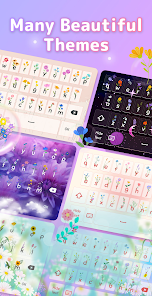
- 🎨 Themed visual design: The keyboard comes with multiple pastel and garden-themed skins, and you can unlock more via in-app purchases. While apps like Microsoft SwiftKey also offer themes, Flower Language's designs are more cohesive and whimsical, focusing entirely on floral aesthetics, which appeals to users who want a cohesive look without mixing emojis or stickers.
- 🎵 Background music and sounds: The app includes soft nature sounds and floral-themed typing clicks, which adds to the immersive experience. This is rare among standard keyboards, which usually only offer basic click sounds. It's a standout feature for creating a relaxing typing atmosphere, though it can be distracting in public settings.
pros
- 🌸 Highly original aesthetic: Unlike generic keyboard apps like Gboard or SwiftKey, Flower Language offers a truly unique, garden-inspired visual language that stands out in messaging or social media. It's perfect for users who want to express creativity or romance without using common emojis.
- 🎨 No learning curve for basic use: The keyboard layout stays standard QWERTY, so you don't need to memorize anything—just tap keys and see floral symbols. This is much simpler than apps like Font Keyboard or Emoji Switcher, which require menu navigation or copying and pasting.
- 🎵 Immersive sound experience: The built-in nature sounds and typing tones make it feel more like a mindfulness app than a keyboard, giving it an edge over competitors that only focus on text input without sensory customization.
cons
- 🌸 Limited practical communication: The flower symbols don't replace real words, so recipients without the app can't understand your messages. This makes it far less functional than Gboard or SwiftKey, which work universally with standard characters and emojis.
- 🎨 Frequent ads and paywalls: Free usage bombards you with ads, and unlocking full symbol sets or themes requires in-app purchases. Competitors like Grammarly Keyboard or Chrome Keyboard offer robust free features without such aggressive monetization.
- 🎵 No autocorrect or predictions: Unlike SwiftKey's intelligent text prediction or Gboard's glide typing, this app offers zero correction or word suggestions, making it frustrating for fast typing. It's essentially a one-trick pony for decorative text only.
Recommended Apps
![]()
Japevox - Funny Prank Sound
SecureTool4.3
![]()
AstroMatrix Birth Horoscopes
AstroMatrix4.7
![]()
Personalized Call from Santa (
www.PackageFromSanta.com4.3![]()
Prank Call - Fake Call & Chat
Bravestars Casual4.1![]()
Persona: Beauty Camera
TICKET TO THE MOON, INC.4.5![]()
Peacock TV: Stream TV & Movies
Peacock TV LLC4.5![]()
Instant Buttons Soundboard App
Snow Peak Apps2.1![]()
GPS Speedometer: Speed Tracker
SM Infotech3.2![]()
Subway®
SUBWAY Restaurants4.2![]()
Find Your Phone By Clap
Trusted App Global4.5![]()
Gorilla Skins for Monkey Arena
Dumitru Boico4![]()
Vimeo
Vimeo.com, Inc.3.8![]()
Vinted - Buy and sell clothes
Vinted4.6![]()
Galaxy Starry Keyboard Backgro
Fun Keyboard Theme for Android4.7![]()
Chat AI - Ask AI anything
AI Chat Bot, Ask AI4.4















Disclaimer
1.Apklifts does not represent any developer, nor is it the developer of any App or game.
2.Apklifts provide custom reviews of Apps written by our own reviewers, and detailed information of these Apps, such as developer contacts, ratings and screenshots.
3. All trademarks, registered trademarks, product names and company names or logos appearing on the site are the property of their respective owners.
4.Apklifts abides by the federal Digital Millennium Copyright Act (DMCA) by responding to notices of alleged infringement that complies with the DMCA and other applicable laws.
5.If you are the owner or copyright representative and want to delete your information, please contact us [email protected].
6.All the information on this website is strictly observed all the terms and conditions of Google Ads Advertising policies and Google Unwanted Software policy.
7.Apklifts.com is an independent, information-only website which is 100% free to all the users.













