
Face Swap

10M+
Installs
Wombatica Software
Developer
-
Entertainment
Category
-
Rated for 7+
Content Rating
-
https://wombatica.app/android-app-privacy-policy/
Privacy Policy
Screenshots
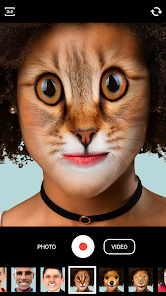
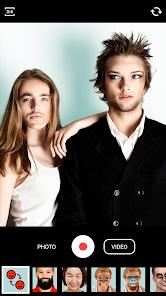
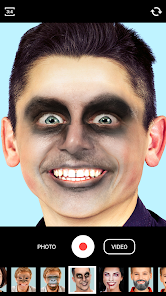
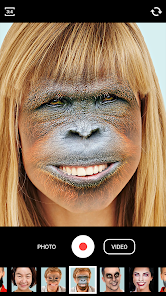
editor reviews
Face Swap is one of those playful photo editing tools that lets you swap faces between two people in a picture, and it sits comfortably in the entertainment and novelty app category on Google Play and the App Store. You mainly use it to create funny images by swapping faces with friends, celebrities, or even pets. The app has been installed over 100 million times, which is pretty wild for a niche tool, and it is free to download, though it does rely on in-app purchases and ads to make money. After downloading and launching it, the first impression hit me like a cheap joke—simple, goofy, and surprisingly straightforward. The interface looked clean, with just a few buttons, so I didn't feel overwhelmed.
The hands-on experience was pretty smooth overall. After opening the app, the onboarding process just asks you to pick two photos from your gallery or snap new ones with the camera. I tested it with a selfie of myself and a photo of a friend, and the swap happened in under three seconds. The interface is not cluttered, so moving through the app feels natural. The main actions are just selecting faces and tapping the swap button, but sometimes the app fails to detect a face if the lighting is bad or if someone is wearing glasses. A small tip I learned is to use clear, front-facing photos for the best results. There is also a batch mode for swapping multiple faces in a group shot, which I found handy for a party picture.
After using Face Swap for a few days, I think it is a fun little app for casual users who just want to make their friends laugh, but it may not impress people looking for serious photo editing. It stands out because it is so simple that even someone who hates technology can figure it out quickly, unlike more complex apps like Reface that require more steps and subscriptions. I kept it installed because it is a quick icebreaker at gatherings, but I might uninstall it later if the ads become too annoying, as they pop up after almost every swap. Compared to similar apps, Face Swap feels more like a toy than a tool, which is fine for its purpose.
features
- 🤖 Face Swap uses AI to automatically detect faces in any photo, which makes it easier than older apps like Snapchat that sometimes miss faces. I just pick two photos, and the app handles the messy work of aligning eyes and mouths correctly.
- 🤖 The batch swap feature is a standout because it lets me swap faces in group photos without repeating the process for each pair. In contrast, apps like MixBooth require manual editing for each face, which takes longer and feels less polished.
- 🤖 The live preview mode is another highlight, as it shows the swapped result before saving. This saves time compared to apps like FaceApp, where you have to save and redo if the swap looks weird. I used it to check if my friend's face on a pet looked natural enough for a joke.
pros
- ⚡ Simplicity is Face Swap's main strength—it has fewer steps than Reface, which needs a video recording first. I found it easier to just pick two photos and get a result in seconds.
- ⚡ It works offline without internet, which is better than many similar apps that require a connection for AI processing. I used it during a flight without issues.
- ⚡ The app is lightweight and does not drain battery quickly, unlike power-hungry editors like Photoshop Express. I tested it on a hand-me-down phone, and it ran smoothly.
cons
- 🔋 Ads are overly frequent after every swap, which breaks the flow compared to premium apps like Reface that offer ad-free subscriptions. I couldn't finish a photo session without three interruptions.
- 🔋 Face detection struggles with profile shots or photos with bad lighting, while more advanced apps like FaceApp handle such angles better. I lost a funny picture because it couldn't detect my friend's side face.
- 🔋 The free version limits you to a basic resolution, and higher-quality exports require in-app purchases. In contrast, Snapchat's face swap is free without such restrictions, so it feels a bit cheap here.
Recommended Apps
![]()
BetterMe: Health Coaching
BetterMe Limited4.3
![]()
Walli - HD, 4K Wallpapers
Tap AI4.4![]()
Future Self - Old Age Filter
Vidler Koiter1.6
![]()
AI Photo Editor, Collage-Fotor
AI Art Photo Editor | Everimaging Ltd.4.3![]()
AI Face Swap: MagicFace &Photo
Braly JSC0![]()
QR Code Reader: QR Scanner
WECHOICE MOBILE4.3![]()
Lip Fall Challenge: Fun Filter
Braly JSC0![]()
Funny Reverse Audio - Singing
PlayStudioInc0![]()
Birthday Secrets
shasunder4.4![]()
Live Wallpapers HD 4K
Wallpaper app4.4![]()
Find Your Phone By Clap
Trusted App Global4.5![]()
Wizz - Expand Your World
Wizz3.8![]()
NCAA March Madness Live
NCAA Digital4.7![]()
Hulu: Stream TV shows & movies
Disney4.5![]()
Lethal Love: a Yandere game
AniByte!4.4















Disclaimer
1.Apklifts does not represent any developer, nor is it the developer of any App or game.
2.Apklifts provide custom reviews of Apps written by our own reviewers, and detailed information of these Apps, such as developer contacts, ratings and screenshots.
3. All trademarks, registered trademarks, product names and company names or logos appearing on the site are the property of their respective owners.
4.Apklifts abides by the federal Digital Millennium Copyright Act (DMCA) by responding to notices of alleged infringement that complies with the DMCA and other applicable laws.
5.If you are the owner or copyright representative and want to delete your information, please contact us [email protected].
6.All the information on this website is strictly observed all the terms and conditions of Google Ads Advertising policies and Google Unwanted Software policy.
7.Apklifts.com is an independent, information-only website which is 100% free to all the users.














