
Video Call from Killer Clown -

1M+
Installs
Dualverse, Inc.
Developer
-
Entertainment
Category
-
Rated for 12+
Content Rating
-
http://dualverse.com/privacy-policy/
Privacy Policy
Screenshots
editor reviews
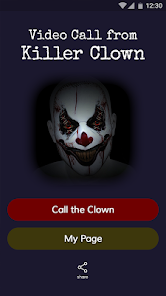
I first stumbled upon 'Video Call from Killer Clown' when a friend sent me a link, laughing about how ridiculous it sounded. It's essentially a prank call simulation app, designed to look like a fake incoming video call from a horror movie-style clown. You download it from the Google Play Store or App Store, and installation takes just a few seconds since it's a fairly lightweight app, free to download with some optional in-app purchases for extra characters or call scenarios. When you launch it for the first time, the screen immediately shows a "ringing" animation, which feels surprisingly convincing. You don't even need to register an account, which I appreciated. The first impression is honestly a bit jarring, the clown's face appears with this static, glitchy effect, and if you're not expecting it, it could startle anyone nearby.
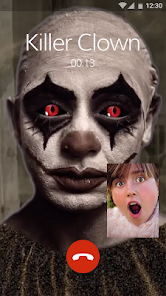
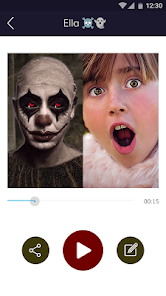
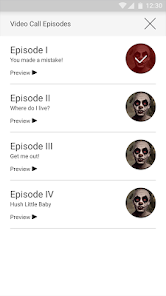
Once you get past the initial shock, the app is pretty straightforward to use. The interface is minimal, just a list of pre-set characters (the killer clown is the default, but there are a few others locked behind that paywall I mentioned). You tap on a character, hit the "call" button, and it mimics an incoming video call. During the call, the clown moves, blinks, and sometimes leans into the camera, which is genuinely creepy at first. The audio is a mix of distorted laughter and static, so it's best used in a prank context. There's also a timer feature where you can set a delay before the fake call starts, which is clever for surprising someone without tipping them off. I did notice sometimes the animation loops a bit too obviously after a minute or two, which breaks the illusion slightly. A small tip, set your phone's volume low if you're trying not to be discovered.
After spending a few days with it, I can see why some people get a kick out of this app. It's perfect for pulling quick pranks on friends or family who are easy to spook, especially around Halloween. But honestly, if you're not into horror or jump scares, it gets old pretty fast because there's no real gameplay or progression. Compared to something like 'Fake Call' apps that offer more variety or pretend business calls, this one's niche appeal is very specific. I ended up keeping it installed because it's funny to show new people, but I can easily see someone uninstalling after one or two uses. It's not an app you use daily, more like a party trick. The clown design is effective, but the overall lack of depth means it won't hold your attention for long.
features
- 🤡 Pre-recorded video call simulation with a terrifying clown character that moves and reacts realistically during the fake call, making it highly convincing for pranks compared to simpler apps like 'Prank Caller' which rely on static images or robotic voices.
- 🤡 No account or registration needed, so you can start using it immediately after download, which is much more user-friendly than 'Fake Call Free' which often forces you through a lengthy setup process before you can access the main prank features.
- 🤡 A customizable delay timer lets you set when the fake call triggers, allowing you to hand the phone to someone unsuspecting and watch as the clown suddenly appears, a standout feature missing from basic alternatives like 'ScareCall' that require manual activation.
pros
- 👍 The jump scare effect is genuinely intense because the clown's facial animations are detailed and unsettling, far surpassing the static scares in apps like 'Horror Prank Call' which offer no movement during the call.
- 👍 The app is extremely lightweight and loads instantly, so it doesn't drain your battery or storage space, unlike 'Prank Master' which often bloats with ads and takes forever to open.
- 👍 There's no subscription required for basic use, you get full access to the main clown character for free, whereas 'Fake Video Call' hides its best scares behind a monthly paywall.
cons
- 👎 The character variety is very limited without paying, as only one clown is free and other options like a zombie or ghost are locked behind in-app purchases, while 'Prank Call Simulator' gives you multiple characters from the start.
- 👎 After a minute or two, the animation becomes obviously repetitive with the same blinking and leaning loop, breaking immersion quickly, whereas 'Scare Simulator' changes the scene every few seconds to keep things fresh.
- 👎 There is no background customization or call scenario options, so every prank feels the same over time, unlike 'Fake Call Pro' which lets you set fake locations or caller names for varied experiences.
Recommended Apps
![]()
BetterMe: Health Coaching
BetterMe Limited4.3
![]()
Walli - HD, 4K Wallpapers
Tap AI4.4![]()
Future Self - Old Age Filter
Vidler Koiter1.6
![]()
AI Photo Editor, Collage-Fotor
AI Art Photo Editor | Everimaging Ltd.4.3![]()
AI Face Swap: MagicFace &Photo
Braly JSC0![]()
QR Code Reader: QR Scanner
WECHOICE MOBILE4.3![]()
Lip Fall Challenge: Fun Filter
Braly JSC0![]()
Funny Reverse Audio - Singing
PlayStudioInc0![]()
Birthday Secrets
shasunder4.4![]()
Live Wallpapers HD 4K
Wallpaper app4.4![]()
Find Your Phone By Clap
Trusted App Global4.5![]()
Wizz - Expand Your World
Wizz3.8![]()
NCAA March Madness Live
NCAA Digital4.7![]()
Hulu: Stream TV shows & movies
Disney4.5![]()
Lethal Love: a Yandere game
AniByte!4.4















Disclaimer
1.Apklifts does not represent any developer, nor is it the developer of any App or game.
2.Apklifts provide custom reviews of Apps written by our own reviewers, and detailed information of these Apps, such as developer contacts, ratings and screenshots.
3. All trademarks, registered trademarks, product names and company names or logos appearing on the site are the property of their respective owners.
4.Apklifts abides by the federal Digital Millennium Copyright Act (DMCA) by responding to notices of alleged infringement that complies with the DMCA and other applicable laws.
5.If you are the owner or copyright representative and want to delete your information, please contact us [email protected].
6.All the information on this website is strictly observed all the terms and conditions of Google Ads Advertising policies and Google Unwanted Software policy.
7.Apklifts.com is an independent, information-only website which is 100% free to all the users.














