

Notepad, Notes, Easy Notebook

10M+
Installs
Simple Design Ltd.
Developer
-
Productivity
Category
-
Everyone
Content Rating
-
https://simpledesign.ltd/privacypolicy.html?pkg=notes.notepad.checklist.calendar.todolist.notebook
Privacy Policy
Screenshots
editor reviews
Easy Notebook is a straightforward note-taking app, sitting squarely in the productivity category. It's designed for anyone who wants to quickly jot down thoughts, create shopping lists, or save random bits of information without dealing with a ton of bells and whistles. You'd normally grab something like this from Google Play or the App Store when you're tired of bloatware or just want a clean space to write. The first time you launch it, the impression is almost minimalist to a fault—a blank page and a keyboard, with no tutorials or pop-ups getting in the way. It's free to download, though there are optional in-app purchases and ads that pop up occasionally, which can be a bit jarring after the initial clean feel.
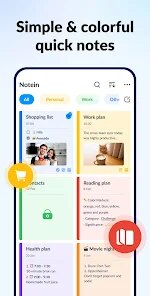
Once you start actually using Easy Notebook, the experience is mostly about getting out of your own way. You tap the big plus button to create a new note, type or paste your text, and hit save. The interface is very simple, with a plain white background and basic formatting tools for things like bold, italic, or bullet points. There is no onboarding wizard, so you figure things out as you go. A smooth moment is how quickly you can capture a thought, but a confusing one is that there is no search function by default, making it hard to find older notes. A practical tip is to use the color-coding feature for different categories, which helps organize things a bit, though it still feels a little barebones for heavy users.
After using Easy Notebook for a while, I'd say it's perfect for someone who just needs a digital scratchpad—maybe a student jotting down lecture snippets or a busy parent making quick grocery lists. It's not for people who manage complex projects or need to sync across multiple devices seamlessly, as that feature feels clunky. Compared to apps like Google Keep or Notion, it's far less powerful, but that simplicity is also its charm. You might keep it installed if you hate feature-heavy apps, but you'll likely uninstall it if you need robust organization or collaboration tools. It does what it says, but nothing more.
features
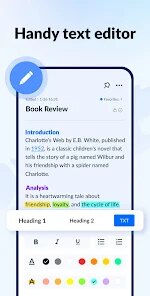
- 📝 The app focuses purely on note creation with a simple text editor, unlike Google Keep which also offers checklists and drawing tools, making Easy Notebook more straightforward for plain text notes.
- ✏️ The standout feature is the distraction-free interface that lets you start typing immediately, which feels faster than Evernote's cumbersome setup process for quick captures.
- 📂 Basic folder organization is available, but it lacks the tagging system found in OneNote, so you have to rely on color codes instead for sorting.
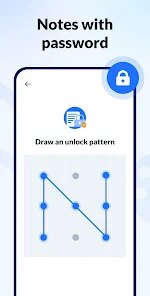
- 🔒 There is a lock feature for individual notes, which is rare in free apps like Apple Notes, giving you a bit more privacy control without extra cost.
pros
- 🌟 The minimal design makes it incredibly easy to use for casual users, unlike Notion which has a steep learning curve for simple tasks.
- 🚀 It launches and loads notes instantly, which is a big improvement over the often sluggish performance of Evernote on older devices.
- 💾 Notes are saved automatically as you type, so you don't have to worry about losing data, similar to Google Keep but with less reliance on internet connection.
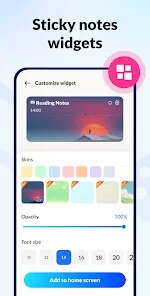
- 🎨 Color coding for notes is intuitive and visual, making it easier to categorize than in Apple Notes where you only have folders.
cons
- 🔍 There is no search function, which is a major drawback compared to Google Keep's instant search, making it hard to find old notes quickly.
- ☁️ Syncing across devices is unreliable and often slow, unlike Notion's smooth cloud integration, so you might lose edits if you switch phones.
- 📄 Rich text formatting is very limited—no tables or images, which OneNote handles easily, so complex notes feel cramped.
- 📢 Ads appear frequently, which can be disruptive during use, whereas paid apps like Bear offer an ad-free experience from the start.
Recommended Apps
![]()
Japevox - Funny Prank Sound
SecureTool4.3
![]()
AstroMatrix Birth Horoscopes
AstroMatrix4.7
![]()
Personalized Call from Santa (
www.PackageFromSanta.com4.3![]()
Prank Call - Fake Call & Chat
Bravestars Casual4.1![]()
Persona: Beauty Camera
TICKET TO THE MOON, INC.4.5![]()
Peacock TV: Stream TV & Movies
Peacock TV LLC4.5![]()
Instant Buttons Soundboard App
Snow Peak Apps2.1![]()
GPS Speedometer: Speed Tracker
SM Infotech3.2![]()
Subway®
SUBWAY Restaurants4.2![]()
Find Your Phone By Clap
Trusted App Global4.5![]()
Gorilla Skins for Monkey Arena
Dumitru Boico4![]()
Vimeo
Vimeo.com, Inc.3.8![]()
Vinted - Buy and sell clothes
Vinted4.6![]()
Galaxy Starry Keyboard Backgro
Fun Keyboard Theme for Android4.7![]()
Chat AI - Ask AI anything
AI Chat Bot, Ask AI4.4















Disclaimer
1.Apklifts does not represent any developer, nor is it the developer of any App or game.
2.Apklifts provide custom reviews of Apps written by our own reviewers, and detailed information of these Apps, such as developer contacts, ratings and screenshots.
3. All trademarks, registered trademarks, product names and company names or logos appearing on the site are the property of their respective owners.
4.Apklifts abides by the federal Digital Millennium Copyright Act (DMCA) by responding to notices of alleged infringement that complies with the DMCA and other applicable laws.
5.If you are the owner or copyright representative and want to delete your information, please contact us [email protected].
6.All the information on this website is strictly observed all the terms and conditions of Google Ads Advertising policies and Google Unwanted Software policy.
7.Apklifts.com is an independent, information-only website which is 100% free to all the users.













