
Draw Glow Comics

5M+
Installs
ColorJoy
Developer
-
Art & Design
Category
-
Rated for 3+
Content Rating
-
http://coloring.hk/colorjoy_privacy.html
Privacy Policy
Screenshots
editor reviews
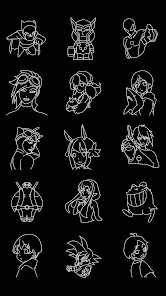
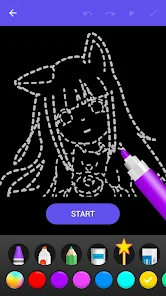
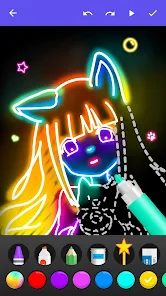
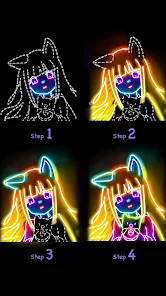
Draw Glow Comics is a niche drawing app that focuses on creating artwork with neon and glow effects, falling somewhere between a full-featured illustration tool and a fun, effects-driven sketchpad. From what I've seen on Google Play, it has a modest install count, which makes sense for such a specific tool, and it's free to download with some in-app purchases and optional ads. A normal user might download it for making eye-catching comic panels, glowing doodles, or light-up art for social media, especially if they enjoy a cyberpunk or retro-futuristic aesthetic. The first impression after launching it is pretty straightforward: the interface centers on glow brushes, and it feels like a streamlined environment meant for fast, colorful creation rather than complex, layered editing.
After using the app for a bit, the hands-on experience is more about experimenting than mastering detailed tools. The onboarding is minimal, so you just pick a brush and start drawing right away. The main actions involve selecting a neon color, adjusting the glow radius, and then sketching or painting on the canvas. I found it smooth for quick pieces, though sometimes switching between brushes feels a little clunky if you're used to apps with more fluid gestures. A practical tip is to use a dark background to make the glow effects really pop, as they can look washed out on lighter canvases. Daily usage is best for short sessions where you want to create something visually striking without overthinking composition.
After spending some time with it, my personal view is that Draw Glow Comics is a great pick for people who love stylized, glowing art and want a quick way to produce it, but it's not for anyone needing precision or realistic shading. Compared to apps like Ibis Paint or Clip Studio, it lacks a ton of features, which can feel limiting if you're a more advanced artist. What makes it stand out is its singular focus on glow effects, making it perfect for specific projects like album covers or neon sign mockups. I'd probably keep it installed for fun, spontaneous sketches, but I could see someone uninstalling it if they find it too restrictive for regular comic work or if the ads get in the way of a smooth workflow.
features
- 🎨 Draw Glow Comics focuses entirely on neon and glow effects, while a popular app like Ibis Paint offers a broad range of brushes but lacks that specialized, vibrant glow look. The standout feature here is how the glow automatically blends and bleeds, which is hard to achieve manually in other apps.
- 🖌️ The app comes with pre-set glow brushes that are ready to use without much adjustment, which is a big time-saver compared to apps like Sketchbook where you'd have to tweak layer effects to get a similar result. For quick, light-up art, this is much more convenient.
- 🎯 It has a simple, no-fuss interface that's great for beginners or casual users who just want to draw something cool without a steep learning curve. In contrast, Procreate can be overwhelming with its endless options, so Draw Glow Comics wins on accessibility for specific glow-based projects.
pros
- ✨ The app excels at creating instant visual impact with its glow tools, something you'd struggle to do as easily in apps like MediBang Paint, which are more focused on manga and lack specialized lighting effects.
- 📱 It's lightweight and runs smoothly on lower-end devices, which is a big plus over more demanding software like Clip Studio, making it accessible for users with older phones.
- 🔄 Drawing with glow effects feels fluid and responsive, without lag, which can be an issue in more complex apps when layering multiple effects together.
cons
- 🛑 The selection of brushes and tools is very limited, so if you need variety like in Ibis Paint, you'll quickly feel constrained by the narrow focus on glow effects.
- 📉 It lacks advanced features like layers with blend modes or text tools that are standard in apps like Procreate, making it hard to create detailed, multi-element comic pages.
- 🔇 There's no export feature for common formats like vector or layered PSD files, which limits its use in professional workflows compared to tools like Clip Studio.
Recommended Apps
![]()
BetterMe: Health Coaching
BetterMe Limited4.3
![]()
Walli - HD, 4K Wallpapers
Tap AI4.4![]()
Future Self - Old Age Filter
Vidler Koiter1.6
![]()
AI Photo Editor, Collage-Fotor
AI Art Photo Editor | Everimaging Ltd.4.3![]()
AI Face Swap: MagicFace &Photo
Braly JSC0![]()
QR Code Reader: QR Scanner
WECHOICE MOBILE4.3![]()
Lip Fall Challenge: Fun Filter
Braly JSC0![]()
Funny Reverse Audio - Singing
PlayStudioInc0![]()
Birthday Secrets
shasunder4.4![]()
Live Wallpapers HD 4K
Wallpaper app4.4![]()
Find Your Phone By Clap
Trusted App Global4.5![]()
Wizz - Expand Your World
Wizz3.8![]()
NCAA March Madness Live
NCAA Digital4.7![]()
Hulu: Stream TV shows & movies
Disney4.5![]()
Lethal Love: a Yandere game
AniByte!4.4















Disclaimer
1.Apklifts does not represent any developer, nor is it the developer of any App or game.
2.Apklifts provide custom reviews of Apps written by our own reviewers, and detailed information of these Apps, such as developer contacts, ratings and screenshots.
3. All trademarks, registered trademarks, product names and company names or logos appearing on the site are the property of their respective owners.
4.Apklifts abides by the federal Digital Millennium Copyright Act (DMCA) by responding to notices of alleged infringement that complies with the DMCA and other applicable laws.
5.If you are the owner or copyright representative and want to delete your information, please contact us [email protected].
6.All the information on this website is strictly observed all the terms and conditions of Google Ads Advertising policies and Google Unwanted Software policy.
7.Apklifts.com is an independent, information-only website which is 100% free to all the users.














