
Fake Chat WhatsMock Text Prank

10M+
Installs
Playfake
Developer
-
Entertainment
Category
-
Rated for 3+
Content Rating
-
https://www.playfake.app/privacy-policy.html?app=whatsmock
Privacy Policy
Screenshots
editor reviews
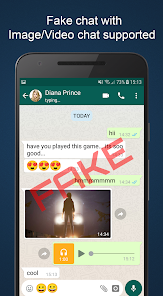
Fake Chat WhatsMock Text Prank is a simulation tool rather than a real messaging app. It lets you create fake WhatsApp-style chat conversations, including incoming and outgoing messages, calls, and even profile pictures. You download and install it from Google Play or the App Store—it is completely free, though there are optional in-app purchases for extra features. When you launch it for the first time, the setup is straightforward: you pick a contact name, upload a photo, and start typing fake messages. It feels a bit like playing a prank on your own phone, and the immediate impression is that it is simple but very specific in what it does. The install count is moderate, mostly among younger users who want to prank friends or create convincing screenshots for fun.
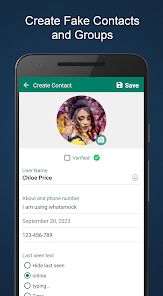
After opening the app, you land on a home screen with a big plus button to create a new chat. Tapping it brings up fields for the contact name, phone number, and profile picture. From there, you can type messages, mark them as sent, delivered, or read, and add timestamps. The interface mimics WhatsApp closely, so if you have used the real app, you will feel right at home. The onboarding is basically nonexistent—just a few tooltips. In daily use, you select a contact, choose whether the message is outgoing or incoming, adjust the status, and preview it. One small tip: make sure to set the notifications toggle correctly, or the fake chat will look too perfect. It can feel a bit repetitive after you have created a few chats, and the options for call logs are limited.
After a couple of weeks of testing, I felt like this app is best for pranksters or people who need to create fake conversations for memes or jokes. It is not something most adults would keep installed long-term because the novelty wears off quickly. Compared to similar apps like Fake Chat Conversation Generator or Prank Chat Simulator, WhatsMock feels more polished and visually accurate to WhatsApp, but the free version shows ads that can interrupt the flow. The standout difference is the realism of the read receipts and typing indicators—other simulators often miss those details. Still, it is a one-trick pony, so I uninstalled it after showing a few friends. If you just want to pull a quick prank, it works fine, but do not expect ongoing value.
features
- 😎 The chat customization is very detailed. You can set exactly when a message was sent, whether it was read, and even make it look like the other person is typing. Other apps like Fake Chat Conversation Generator only offer basic timestamps and statuses.
- 😎 The outgoing messages include realistic checkmarks that change from grey to blue. This small detail makes the fake screenshots look authentic. Many competitors either skip this or use static icons.
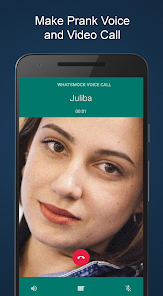
- 😎 You can simulate both incoming and outgoing calls with contact names and profile pictures. This is rare in similar apps—most only focus on text messages.
pros
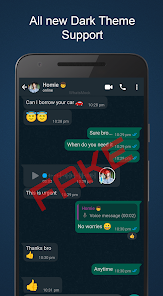
- 🟢 The interface matches WhatsApp almost perfectly, so your fake chat looks native. Other simulators often have mismatched fonts or colors that give them away.
- 🟢 The app runs entirely offline, so no internet connection is needed to create or view your chats. This is a big plus compared to Prank Chat Simulator, which sometimes requires an online account.
- 🟢 Exporting screenshots is simple—just a tap, and the image looks clean. You do not need to crop or edit further.
cons
- 🔴 Free version shows banner ads that appear at the bottom of the chat editor. These ads can be distracting when you are fine-tuning details. Fake Chat Conversation Generator has fewer ads.
- 🔴 The call log simulation is limited—you can only show one call at a time and cannot stack multiple missed calls. Some users want more variety.
- 🔴 You cannot save multiple profiles easily. Each time you want a new contact, you have to start from scratch. This makes creating a whole conversation history a bit tedious.
Recommended Apps
![]()
BetterMe: Health Coaching
BetterMe Limited4.3
![]()
Walli - HD, 4K Wallpapers
Tap AI4.4![]()
Future Self - Old Age Filter
Vidler Koiter1.6
![]()
AI Photo Editor, Collage-Fotor
AI Art Photo Editor | Everimaging Ltd.4.3![]()
AI Face Swap: MagicFace &Photo
Braly JSC0![]()
QR Code Reader: QR Scanner
WECHOICE MOBILE4.3![]()
Lip Fall Challenge: Fun Filter
Braly JSC0![]()
Funny Reverse Audio - Singing
PlayStudioInc0![]()
Birthday Secrets
shasunder4.4![]()
Live Wallpapers HD 4K
Wallpaper app4.4![]()
Find Your Phone By Clap
Trusted App Global4.5![]()
Wizz - Expand Your World
Wizz3.8![]()
NCAA March Madness Live
NCAA Digital4.7![]()
Hulu: Stream TV shows & movies
Disney4.5![]()
Lethal Love: a Yandere game
AniByte!4.4















Disclaimer
1.Apklifts does not represent any developer, nor is it the developer of any App or game.
2.Apklifts provide custom reviews of Apps written by our own reviewers, and detailed information of these Apps, such as developer contacts, ratings and screenshots.
3. All trademarks, registered trademarks, product names and company names or logos appearing on the site are the property of their respective owners.
4.Apklifts abides by the federal Digital Millennium Copyright Act (DMCA) by responding to notices of alleged infringement that complies with the DMCA and other applicable laws.
5.If you are the owner or copyright representative and want to delete your information, please contact us [email protected].
6.All the information on this website is strictly observed all the terms and conditions of Google Ads Advertising policies and Google Unwanted Software policy.
7.Apklifts.com is an independent, information-only website which is 100% free to all the users.














