

Doodle Art: Magic Drawing App

5M+
Installs
Peaksel Games
Developer
-
Art & Design
Category
-
Rated for 3+
Content Rating
-
https://www.peaksel.com/privacy-policy-for-free-apps/
Privacy Policy
Screenshots
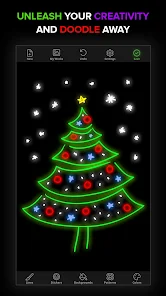
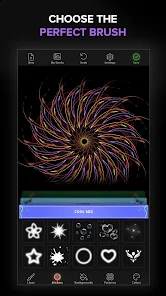
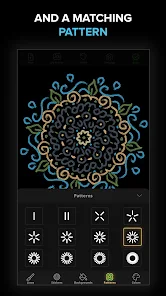
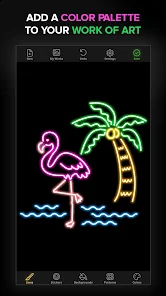
editor reviews
Doodle Art: Magic Drawing App from Peaksel Games is basically a digital coloring book for your phone. You download it from Google Play or the App Store, install it, and launch it to find hundreds of black-and-white line art images waiting to be filled in. The app is completely free to download, though you will encounter ads and some sections that prompt in-app purchases for extra content. The first impression after opening the app is pretty straightforward: a clean menu with categories like animals, mandalas, flowers, and fantasy themes. There is no registration required, which makes hopping in and starting to color immediate. For someone who just wants to unwind without a big setup process, this feels welcoming right away.
Once you pick a picture, the actual experience is simple but satisfying. You tap on a section, choose a color from the palette, and the area fills in instantly. There is no manual precision needed, which is great for doodling while watching TV or commuting. The interface keeps things basic: you have a color wheel, a few brush effects, a zoom tool for small spots, and an undo button in case you mess up. The onboarding is quick, just a one-time tip about how to fill areas. A small tip I found useful: use the zoom feature for tiny sections so you don't accidentally color outside the lines. The only confusing moment comes from the ad frequency. After finishing a picture or switching categories, a video ad pops up every few actions, which can interrupt the flow if you are in a focused coloring mood. Still, the core loop of pick, tap, color, and relax works smoothly.
After using Doodle Art for a while, I would say it is best for people who want a no-brainer, low-stress creative outlet. It is not for someone looking for advanced drawing tools or complex shading options, as compared to something like Procreate or Adobe Fresco. The app focuses purely on filling pre-made designs, and that is its charm and its limit. What makes it stand out from similar apps like Color by Number or Zen Color is the lack of number-matching pressure. You simply pick any color your feel like without needing to follow a guide. Why someone might keep it installed? It is good for killing time in a relaxing way, especially during commutes or before bed. But if ads annoy you or you crave more control over your artwork, you might uninstall it within a week. Overall, it is a fair trade-off for a free coloring app that does exactly what it says.
features
- 🎨 Unlimited color freedom: Unlike Color by Number apps that force you to stick to a numbered palette, Doodle Art lets you use any color from the wheel for every section. No restrictions, no matching mistakes, just pure creative choice.
- 🖌️ Instant fill and zoom: The one-tap fill works without lag, which feels smoother than similar apps like Zen Color. The zoom tool helps with detailed areas, making sure small spaces get filled evenly without spilling over.
- ✨ Wide variety of themes: With categories from mandalas to cute animals and fantasy scenes, there is more diversity than what you get in apps like Happy Color, which often repeats styles. Each category has fresh designs, so boredom does not hit quickly.
pros
- ✅ Free with no mandatory subscriptions: Compared to Pigment, which locks many pages behind a monthly fee, Doodle Art gives you a solid collection for free. You only pay if you want extra packs, not for basic access.
- ✅ No skill required: Unlike Sketchbook or even simple drawing apps, Doodle Art requires zero artistic ability. Anyone can produce a finished, colorful image in minutes. This lowers the barrier for casual users.
- ✅ Offline mode works: Once you download a page, you can color without an internet connection. This beats apps like Colorfly, which often need constant Wi-Fi to load new content.
cons
- ❌ Too many ads: After saving or finishing each picture, you get a full-screen video ad every few actions. Apps like Zen Color have fewer interruptions, making the flow more relaxing.
- ❌ Limited creative control: You cannot draw your own lines, adjust brush sizes, or create custom images. Compared to Infinite Painter, this app feels more like a digital color book than a true drawing tool.
- ❌ No gradient or texture options: Unlike Pigment, which offers shading, textures, and gradient fills, Doodle Art only gives flat colors. The result can look a bit boring after a while, especially for detailed pictures.
Recommended Apps
![]()
BetterMe: Health Coaching
BetterMe Limited4.3
![]()
Walli - HD, 4K Wallpapers
Tap AI4.4![]()
Future Self - Old Age Filter
Vidler Koiter1.6
![]()
AI Photo Editor, Collage-Fotor
AI Art Photo Editor | Everimaging Ltd.4.3![]()
AI Face Swap: MagicFace &Photo
Braly JSC0![]()
QR Code Reader: QR Scanner
WECHOICE MOBILE4.3![]()
Lip Fall Challenge: Fun Filter
Braly JSC0![]()
Funny Reverse Audio - Singing
PlayStudioInc0![]()
Birthday Secrets
shasunder4.4![]()
Live Wallpapers HD 4K
Wallpaper app4.4![]()
Find Your Phone By Clap
Trusted App Global4.5![]()
Wizz - Expand Your World
Wizz3.8![]()
NCAA March Madness Live
NCAA Digital4.7![]()
Hulu: Stream TV shows & movies
Disney4.5![]()
Lethal Love: a Yandere game
AniByte!4.4















Disclaimer
1.Apklifts does not represent any developer, nor is it the developer of any App or game.
2.Apklifts provide custom reviews of Apps written by our own reviewers, and detailed information of these Apps, such as developer contacts, ratings and screenshots.
3. All trademarks, registered trademarks, product names and company names or logos appearing on the site are the property of their respective owners.
4.Apklifts abides by the federal Digital Millennium Copyright Act (DMCA) by responding to notices of alleged infringement that complies with the DMCA and other applicable laws.
5.If you are the owner or copyright representative and want to delete your information, please contact us [email protected].
6.All the information on this website is strictly observed all the terms and conditions of Google Ads Advertising policies and Google Unwanted Software policy.
7.Apklifts.com is an independent, information-only website which is 100% free to all the users.














