

Makerblox - Create Skins

10M+
Installs
White Platform Studio
Developer
-
Entertainment
Category
-
Everyone
Content Rating
-
https://pandarobotstudio.wixsite.com/websiteplatfoms
Privacy Policy
Screenshots
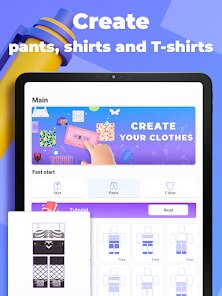
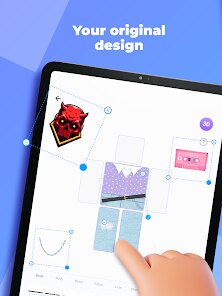
editor reviews
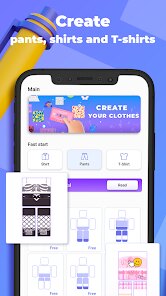
Makerblox is a mobile app that lets you design custom skins for characters and worlds, mainly aimed at fans of blocky sandbox games like Minecraft. You download it from Google Play or the App Store, and the install count is decent for a niche tool, though it's free with some in-app purchases and occasional ads. When you first launch it, the interface feels straightforward—bright, clean, and not overwhelming. The main screen asks you to pick a template, either a character or an object, and you're dropped right into the editor. Honestly, my first impression was positive because it didn't bombard me with tutorials or paywalls; I could just start tinkering right away.
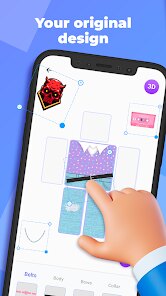
After using it for a bit, the hands-on experience is pretty smooth. The editor uses a simple grid system where you tap squares to change their color, and there's a palette of pre-set hues plus a custom picker. You move around by swiping, which is intuitive on a phone screen. Onboarding is minimal—just a quick pop-up explaining the basic controls. I found myself making a few skins in about ten minutes, and the process felt natural, like digital coloring by numbers. One small tip: use the "copy layer" feature to mirror details, which saves time. The only confusing moment was figuring out how to save my work without an account, but it let me export directly to a photo album, which was fine. Daily use flows well if you're into tweaking designs, though the interface can lag slightly with complex patterns.
After a week of messing around, I think this app is best for younger players or casual creators who want a no-fuss way to personalize their game avatars. It's not for hardcore designers who need advanced tools like custom brushes or 3D previews—those folks might prefer apps like Skinseed or NovaSkin. What sets Makerblox apart is its simplicity and focus on mobile ease, but it lacks depth for serious work. I kept it installed because it's fun for quick projects, but I could see someone uninstalling it if they crave more control. Compared to similar apps, it feels like a friendly starter tool rather than a powerhouse—fine for making a goofy skin for a friend, but not for a full skin pack.
features
- 🎨 Skin Editor: The main editor uses a block-by-block system where you tap each pixel to paint. It supports layers, so you can design front, back, and sides separately. Unlike Skinseed, which offers more complex brushes, Makerblox focuses on simplicity—great for beginners who don't want to mess with advanced settings.
- 📦 Template Library: You get a bunch of pre-made templates, from standard player skins to mobs and items. This speeds up creation because you can edit an existing design rather than start from scratch. Apps like NovaSkin have more templates, but Makerblox's selection is decent for casual use.
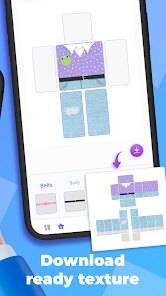
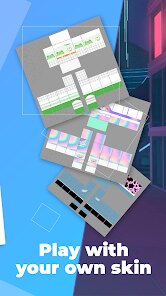
- 📲 Export Options: You can save your skin as a PNG file directly to your device, then import it into games manually. Some competitors make you use a proprietary format, so this straightforward export is a big plus for compatibility.
- 🔍 Zoom and Pan: The editor lets you zoom way in for precise pixel work and pan around without losing your place. It's responsive on most phones, though high-zoom can get a bit choppy—something Skinseed does better with smoother scrolling.
pros
- 🧩 User-Friendly for Newbies: The learning curve is gentle, unlike Skinseed which has a busier interface. You can make a skin in under five minutes without any guides.
- ✨ No Account Hassle: You don't need to sign up to save or export, which is more convenient than NovaSkin's forced login for full features.
- 📱 Lightweight Performance: The app runs fine on older phones without draining battery, while some competitors like Skindex lag more on budget devices.
- 🎯 Structured Workflow: The step-by-step layer system feels logical for beginners, whereas other apps sometimes dump too many options at once.
cons
- 🌀 Limited Brush Customization: There's no freehand tool or pressure sensitivity, so detailed designs take longer. Skinseed has a pencil tool that allows more organic shapes.
- 📉 No 3D Preview Without Export: You can't see your skin on a 3D model in-app, which means you have to guess how it looks from different angles. NovaSkin offers a live 3D view.
- 📊 Template Library is Small: Compared to Skindex's massive collection, Makerblox only has a few dozen templates, so you might run out of inspiration quickly.
- 🔒 Export Quality Issues: Sometimes the PNG export has minor color shifts or compression artifacts, which are less common in paid apps like PixelStudio.
Recommended Apps
![]()
BetterMe: Health Coaching
BetterMe Limited4.3
![]()
Walli - HD, 4K Wallpapers
Tap AI4.4![]()
Future Self - Old Age Filter
Vidler Koiter1.6
![]()
AI Photo Editor, Collage-Fotor
AI Art Photo Editor | Everimaging Ltd.4.3![]()
AI Face Swap: MagicFace &Photo
Braly JSC0![]()
QR Code Reader: QR Scanner
WECHOICE MOBILE4.3![]()
Lip Fall Challenge: Fun Filter
Braly JSC0![]()
Funny Reverse Audio - Singing
PlayStudioInc0![]()
Birthday Secrets
shasunder4.4![]()
Live Wallpapers HD 4K
Wallpaper app4.4![]()
Find Your Phone By Clap
Trusted App Global4.5![]()
Wizz - Expand Your World
Wizz3.8![]()
NCAA March Madness Live
NCAA Digital4.7![]()
Hulu: Stream TV shows & movies
Disney4.5![]()
Lethal Love: a Yandere game
AniByte!4.4















Disclaimer
1.Apklifts does not represent any developer, nor is it the developer of any App or game.
2.Apklifts provide custom reviews of Apps written by our own reviewers, and detailed information of these Apps, such as developer contacts, ratings and screenshots.
3. All trademarks, registered trademarks, product names and company names or logos appearing on the site are the property of their respective owners.
4.Apklifts abides by the federal Digital Millennium Copyright Act (DMCA) by responding to notices of alleged infringement that complies with the DMCA and other applicable laws.
5.If you are the owner or copyright representative and want to delete your information, please contact us [email protected].
6.All the information on this website is strictly observed all the terms and conditions of Google Ads Advertising policies and Google Unwanted Software policy.
7.Apklifts.com is an independent, information-only website which is 100% free to all the users.














