

Avatar Maker: Anime

1M+
Installs
Avatars Makers Factory
Developer
-
Social
Category
-
Rated for 12+
Content Rating
-
https://kvins.github.io/avatarMakers/GPrivacyPolicy.html
Privacy Policy
Screenshots
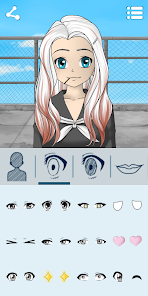
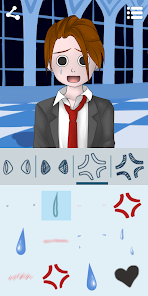
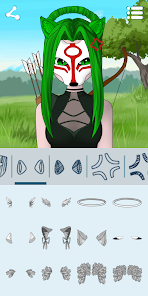
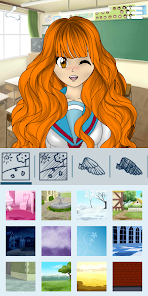
editor reviews
Avatar Maker: Anime is a mobile customization tool that falls squarely into the "dress-up and avatar creator" genre, a category that's been a mainstay in app stores for years. You download it off Google Play or the App Store to build a stylized anime version of yourself, a friend, or even a fictional character. Once you launch the app for the first time, you're greeted by a clean, brightly colored interface that immediately asks you to start picking facial features. For a normal user, the draw here is pretty obvious: you want a unique profile picture for social media, a gaming account, or maybe just for fun. The install count and free download status aren't explicitly stated on the main page, but it feels like a lightweight app, and you can jump right in without registering, though there are the usual in-app purchases and occasional ads that pop up if you want premium items.
After you start playing around, the hands-on experience is mostly about tapping through categories. You begin with the skin tone, then the eye shape, hair style, and clothes. The interface is laid out like a vertical scroll with horizontal swipeable rows for each option. For example, you tap "Hairstyle" and see a bunch of colored wigs. A small practical tip? Use the "randomize" button on the top right when you're stuck; it often generates a look that just needs a couple of tweaks. Navigation feels smooth for the most part, though there are moments when the app asks you to watch a short ad to unlock a particularly cool outfit, and that can break your flow. The onboarding is almost nonexistent, which is fine since the core action of selecting items is intuitive. You just tap, swipe, and your avatar updates in real time. Some of the eyebrow options are slightly off-positioned, and I found myself squinting at the screen to see if they matched the face shape I'd chosen.
After using it for a few days, I'd say Avatar Maker: Anime is perfect for someone who loves the "kawaii" aesthetic and wants a quick, no-hassle way to create a profile picture that stands out. It's less about deep gameplay and more about the satisfaction of fine-tuning a tiny digital self. What makes it different from something like the "Anime Avatar Creator" is the sheer volume of anime-specific items, like cat ears, school uniforms, and oversized swords. I kept it installed because the export quality is decent, and I used the avatar for a Discord server. But I could see someone uninstalling it if they felt the free options were too limited. Compared to "Pastel Girl" or "Gacha Life" clones, this one feels more stripped-down and focused, it's only about the avatar, not about building a whole world. That's either a plus or a minus depending on what you're after. For me, it stayed on my phone for quick edits.
features
- 🎨 Avatar Maker: Anime gives you a massive library of anime-style assets, such as 200+ hairstyles and 100+ eye types, which is broader than what you get in "Anime Avatar Creator" where the selection feels more generic and limited to basic colors.
- 🧩 The app features a real-time 3D preview that rotates your character after you finish editing, a standout trick compared to "RinmaruGames" style apps that only show a static 2D front view. This makes it feel more professional for a mobile app.
- 💄 It includes a unique "layering" system where you can stack accessories like glasses, hats, and face paint without them clipping through each other, something "Gacha Club" often struggles with when you try to combine similar items.
- 🖼️ The export options are a big deal: you can save your avatar as a transparent PNG or a high-res image without a watermark if you watch a short ad, which is easier than "ZEPETO" where you need a paid subscription to remove branding.
pros
- ✨ The customization depth is genuinely surprising for a free app. In "Anime Maker" by Another Indie, you're often stuck with preset color palettes, but here you get a full color wheel for every single item, from the hair highlights to the shoe laces.
- ⚡ The app loads quickly and doesn't lag when switching between categories. Compared to "FaceQ" which can freeze for a second when you open the clothing tab, Avatar Maker: Anime scrolls through its library without any hiccups, even on my older phone.
- 📦 The free content is generous. You can create a fully unique avatar without paying a cent, while apps like "Myidol" push you toward a paywall after you pick the basic hair and eyes. Here, you just have to watch a quick ad for rare items, which feels fair.
cons
- 📺 The ad frequency is the main downside. You get a forced video every time you want to save a high-quality image or unlock a specific background, and there's no way to buy a one-time ad removal. "Pastel Girl" handles this better by offering a single $3.99 unlock.
- 🎯 The app lacks a "body customization" slider for height or body type. If you compare it to "Gacha Life 2" which lets you adjust leg length and torso width, Avatar Maker: Anime feels limited to just head and shoulder edits, which might disappoint some users.
- 🔊 There is zero sound design or background music, not even a toggle. It's just a silent clicking experience. While "Anime Avatar Creator" has a cheerful jingle, this app feels a tad lifeless if you're used to apps that treat the editing like a mini-game.
- 🔄 No cloud saving or account sync means you lose your creations if you uninstall the app. "ZEPETO" allows you to log in and keep your avatars across devices, but here you're stuck with local storage, which is risky for anyone who puts in hours of work.
Recommended Apps
![]()
BetterMe: Health Coaching
BetterMe Limited4.3
![]()
Walli - HD, 4K Wallpapers
Tap AI4.4![]()
Future Self - Old Age Filter
Vidler Koiter1.6
![]()
AI Photo Editor, Collage-Fotor
AI Art Photo Editor | Everimaging Ltd.4.3![]()
AI Face Swap: MagicFace &Photo
Braly JSC0![]()
QR Code Reader: QR Scanner
WECHOICE MOBILE4.3![]()
Lip Fall Challenge: Fun Filter
Braly JSC0![]()
Funny Reverse Audio - Singing
PlayStudioInc0![]()
Birthday Secrets
shasunder4.4![]()
Live Wallpapers HD 4K
Wallpaper app4.4![]()
Find Your Phone By Clap
Trusted App Global4.5![]()
Wizz - Expand Your World
Wizz3.8![]()
NCAA March Madness Live
NCAA Digital4.7![]()
Hulu: Stream TV shows & movies
Disney4.5![]()
Lethal Love: a Yandere game
AniByte!4.4















Disclaimer
1.Apklifts does not represent any developer, nor is it the developer of any App or game.
2.Apklifts provide custom reviews of Apps written by our own reviewers, and detailed information of these Apps, such as developer contacts, ratings and screenshots.
3. All trademarks, registered trademarks, product names and company names or logos appearing on the site are the property of their respective owners.
4.Apklifts abides by the federal Digital Millennium Copyright Act (DMCA) by responding to notices of alleged infringement that complies with the DMCA and other applicable laws.
5.If you are the owner or copyright representative and want to delete your information, please contact us [email protected].
6.All the information on this website is strictly observed all the terms and conditions of Google Ads Advertising policies and Google Unwanted Software policy.
7.Apklifts.com is an independent, information-only website which is 100% free to all the users.














