

Prank Call Voice Changer App

1M+
Installs
Ownage Labs Apps
Developer
-
Entertainment
Category
-
Rated for 12+
Content Rating
-
https://www.ownagepranks.com/tos-privacy-policy
Privacy Policy
Screenshots
editor reviews
You know those moments when you want to mess with your friends or just have a good laugh by yourself? That's exactly what the Prank Call Voice Changer app from Ownage Labs tries to deliver. It's a utility and entertainment app, sitting somewhere between a practical tool and a joke generator. After downloading it from the Play Store – it's free to install, though I noticed it comes with ads – the first thing that hit me was how serious the app looks. The interface isn't flashy or cartoonish; it's clean and almost professional, which feels a bit unexpected for a prank tool. You launch it, and before you can start fooling anyone, the app asks you to set up a few permissions, mostly for microphone access, which makes sense given what it does.
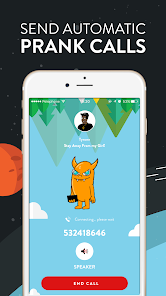
Once you get past the setup, the actual hands-on experience is pretty straightforward. The main screen shows you a big red button, which is your go-to for starting a call. What I found useful is the soundboard underneath, where you can load pre-recorded sound clips or play around with various voice presets like a robot, a celebrity impersonation, or a deep monster voice. Navigating through the app definitely has its smooth moments – tapping a voice preset to hear a demo is instant – but there are some confusing points too. For example, I accidentally triggered a prank call on my own number because the dial pad layout wasn't obvious at first. A small practical tip I learned: always test your voice effect on the built-in preview before calling someone, because some presets sound completely different when transmitted over a real phone line. The app also lets you record calls, which is a nice touch for sharing your pranks later, though you have to manually hit the record button each time.
After using the Prank Call Voice Changer for a few weeks, I'd say it's a solid pick for anyone who loves pulling lighthearted jokes on family or close friends. It's not the kind of app you'd use daily, but for party laughs or breaking the ice, it works. Compared to something like Funny Voice Changer or Celebrity Voice Changer, Ownage Labs' version feels more robust because it actually integrates with the phone dialer, so your prank calls feel more realistic. But honestly, the ads can get annoying – you see one after every call you make, which pushes you to either tolerate them or pay for the pro version. The app stays installed on my phone mostly because the voice quality is surprisingly good, but I can see why someone might uninstall it after the initial novelty wears off. It handles the job, just don't expect a polished daily driver.
features
- 🎭 Real-time voice transformation – Unlike many competitors that only record and then modify the audio, Ownage Labs' app shifts your voice live during the call. You can go from a deep male tone to a high-pitched female voice or a cartoon character without any noticeable delay, which makes the prank feel authentic. Apps like Funny Voice Changer often force you to record first and then apply the effect, breaking the spontaneity.
- 🎭 Integrated phone dialer – The app has its own dial pad, so you don't have to switch between different windows. Just pick your voice effect, type the number, and call. This might sound simple, but apps like Celebrity Voice Changer rely on external dialers, and you lose the effect halfway through. Having everything in one place makes the flow smooth for a normal user like me.
- 🎭 Soundboard with crowd-sourced clips – The built-in soundboard includes prank sounds and common phrases contributed by the community. Need a siren effect or a dog bark to scare someone? It's already there. As an outstanding feature, this expands the app beyond just call altering into full-on scene creation, something that Voice Change Pro doesn't offer out of the box.
pros
- 👍 Simple, beginner-friendly interface – You don't need to adjust complex sliders or learn audio editing terms. Just pick a voice, hit call, and go. Compared to Voice Changer Pro Plus, which buries its settings under layers of menus, Ownage Labs keeps it straightforward.
- 👍 Low audio lag during calls – On most phones, the voice transformation is almost immediate, meaning the person on the other end doesn't hear a weird delay. This matters a lot for pranks because any pause ruins the illusion. Apps like Fun Voice Changer often suffer from a noticeable echo.
- 👍 Free to try with core features unlocked – You can use the main prank call function without paying upfront. In comparison, Prank Caller App X locks the best voices behind a paywall right away. Here, you get a proper taste before deciding.
cons
- 👎 Frequent ad interruptions – After every call ends, a full-screen video ad pops up. Sometimes you even get two ads back-to-back. This gets tiring fast. In contrast, Funny Voice Changer only shows banner ads, which are less intrusive.
- 👎 No voicemail bypass feature – When calling someone who doesn't pick up, the app routes to voicemail, but the voice effect sounds robotic and unnatural there. Prank Call Master handles voicemails better by optimizing the sound compression specifically for answering machines.
- 👎 Limited free voice presets – The free version offers about six main presets, while the pro version has twenty-plus. Celebrity Voice Changer gives you more free options without needing an upgrade, so if you want variety without spending, this app might feel restrictive.
Recommended Apps
![]()
BetterMe: Health Coaching
BetterMe Limited4.3
![]()
Walli - HD, 4K Wallpapers
Tap AI4.4![]()
Future Self - Old Age Filter
Vidler Koiter1.6
![]()
AI Photo Editor, Collage-Fotor
AI Art Photo Editor | Everimaging Ltd.4.3![]()
AI Face Swap: MagicFace &Photo
Braly JSC0![]()
QR Code Reader: QR Scanner
WECHOICE MOBILE4.3![]()
Lip Fall Challenge: Fun Filter
Braly JSC0![]()
Funny Reverse Audio - Singing
PlayStudioInc0![]()
Birthday Secrets
shasunder4.4![]()
Live Wallpapers HD 4K
Wallpaper app4.4![]()
Find Your Phone By Clap
Trusted App Global4.5![]()
Wizz - Expand Your World
Wizz3.8![]()
NCAA March Madness Live
NCAA Digital4.7![]()
Hulu: Stream TV shows & movies
Disney4.5![]()
Lethal Love: a Yandere game
AniByte!4.4















Disclaimer
1.Apklifts does not represent any developer, nor is it the developer of any App or game.
2.Apklifts provide custom reviews of Apps written by our own reviewers, and detailed information of these Apps, such as developer contacts, ratings and screenshots.
3. All trademarks, registered trademarks, product names and company names or logos appearing on the site are the property of their respective owners.
4.Apklifts abides by the federal Digital Millennium Copyright Act (DMCA) by responding to notices of alleged infringement that complies with the DMCA and other applicable laws.
5.If you are the owner or copyright representative and want to delete your information, please contact us [email protected].
6.All the information on this website is strictly observed all the terms and conditions of Google Ads Advertising policies and Google Unwanted Software policy.
7.Apklifts.com is an independent, information-only website which is 100% free to all the users.














