
MagicWidgets: Themepack & Icon

5M+
Installs
One Office Premium
Developer
-
Productivity
Category
-
Rated for 3+
Content Rating
-
https://sites.google.com/view/privacypolicyidletyccon
Privacy Policy
Screenshots
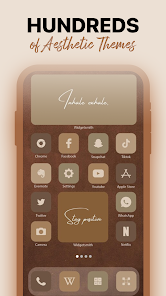
editor reviews
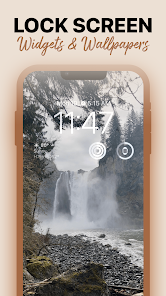
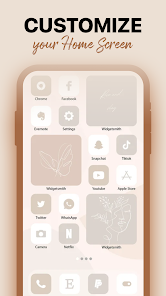
MagicWidgets: Themepack & Icon is a customization tool for Android phones, sitting squarely in the personalization category alongside apps like KWGT or Nova Launcher Companion. Its main job is letting users dress up their home screen with themed widgets, icon packs, and matching wallpapers without having to mess around with complex editors. A normal person would probably grab it from Google Play if they're bored of their stock look and want something fresh in a few taps. After launching it for the first time, the interface hits you with a clean gallery of themed sets, sorted by style, so you're not staring at a blank canvas. It feels light and responsive, which is nice, and there's no mandatory sign-up hurdle, just straight browsing. The install count sits around a few million, and it's free to download, though in-app purchases pop up for premium packs. You'll see occasional ads, but they aren't shoved in your face during setup.
Once you start using it, the hands-on experience is pretty straightforward. You pick a theme from the collection, tap “Apply,” and the app guides you through enabling the right launcher or icon pack through system settings. The onboarding is a little vague the first time because it doesn't explain which third-party launcher works best, but after one go, you get it. The main actions involve scrolling through categories like neon, minimal, or nature, previewing each set, and then hitting the apply button. There's a slight delay when loading previews if your phone's older, but nothing terrible. A small tip I picked up is to use it with a lightweight launcher like Niagara, because stock launchers sometimes don't support icon theming fully. The smooth moments come when a theme clicks perfectly with your wallpaper, and the confusing part is figuring out which widgets actually resize without breaking layout. For daily use, you'll hop back in only when you want a seasonal swap or get bored of the current look.
After spending a bunch of time with it, I'd say it's a decent pick for people who like changing their phone's vibe often but don't want to learn KWGT or spend hours tweaking. Someone who just wants a permanent, minimal setup might not love it, since the free packs are limited and the best ones cost money. Compared to apps like Hishoot or X Icon Changer, MagicWidgets feels more polished because it bundles widgets, icons, and wallpapers into one package instead of making you juggle separate downloads. What makes it stand out is how the widgets actually match the icon packs out of the box, so you don't get that mismatched amateur look. I can see keeping it installed for occasional refreshes, but if you're the type to set a screen once and forget it, you'd probably uninstall after a week. It fills a nice niche for casual customizers who want quick, cohesive results.
features
- 🎨 The app shines with its ready-to-use themed bundles. Unlike KWGT, where you have to manually create or import widgets and adjust everything, MagicWidgets gives you full sets. You pick a theme, and it applies matching icons, clock widgets, and wallpapers in a few taps. This is a huge time-saver for people who don't want to design from scratch.
- 🎨 It includes a massive library of icon packs covering styles like 3D, flat, and gradient. Compared to an app like Nova Launcher Companion, which mostly suggests generic packs, MagicWidgets lets you preview icons directly against your current wallpaper. This helps avoid the awkward mismatch you often get after applying a pack.
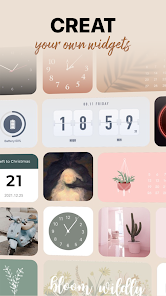
- 🎨 The standout feature is the widget customization within each theme. You can tweak widget colors, fonts, and transparency without leaving the app. That's different from apps like Hishoot, which only offer static templates. Here, you can make a neon widget match a dark wallpaper or adjust it to fit a lighter background.
pros
- ✔️ The main strength is the sheer variety of themes. You get options like retro, cyberpunk, and nature, all in one app. Apps like X Icon Changer just swap icons, but MagicWidgets changes the whole home screen look coherently.
- ✔️ It handles widget sizing pretty well compared to similar tools. On my Pixel, the widgets didn't stretch weirdly or lose quality, something that happens often with third-party widget apps that aren't optimized for certain screen ratios.
- ✔️ The app updates frequently with new seasonal themes. This keeps it fresh, unlike KWGT where you're stuck with whatever you created months ago unless you manually add new content.
cons
- ❌ The free content is limited. You get a handful of themes, but the good ones are locked behind a paywall. Apps like Nova Launcher Companion offer more free icon packs upfront, so you're not pushed to spend right away.
- ❌ Some themes cause a slight battery drain because the animated widgets keep running in the background. Compared to Hishoot's static widgets, which don't cost battery, this can be annoying if you're trying to conserve juice.
- ❌ The app forces you to use a third-party launcher for full effect. Stock launchers like One UI or Pixel Launcher often break the theming. This adds a step that simpler apps like X Icon Changer don't require, since they just change icons independently.
Recommended Apps
![]()
Japevox - Funny Prank Sound
SecureTool4.3
![]()
AstroMatrix Birth Horoscopes
AstroMatrix4.7
![]()
Personalized Call from Santa (
www.PackageFromSanta.com4.3![]()
Prank Call - Fake Call & Chat
Bravestars Casual4.1![]()
Persona: Beauty Camera
TICKET TO THE MOON, INC.4.5![]()
Peacock TV: Stream TV & Movies
Peacock TV LLC4.5![]()
Instant Buttons Soundboard App
Snow Peak Apps2.1![]()
GPS Speedometer: Speed Tracker
SM Infotech3.2![]()
Subway®
SUBWAY Restaurants4.2![]()
Find Your Phone By Clap
Trusted App Global4.5![]()
Gorilla Skins for Monkey Arena
Dumitru Boico4![]()
Vimeo
Vimeo.com, Inc.3.8![]()
Vinted - Buy and sell clothes
Vinted4.6![]()
Galaxy Starry Keyboard Backgro
Fun Keyboard Theme for Android4.7![]()
Chat AI - Ask AI anything
AI Chat Bot, Ask AI4.4















Disclaimer
1.Apklifts does not represent any developer, nor is it the developer of any App or game.
2.Apklifts provide custom reviews of Apps written by our own reviewers, and detailed information of these Apps, such as developer contacts, ratings and screenshots.
3. All trademarks, registered trademarks, product names and company names or logos appearing on the site are the property of their respective owners.
4.Apklifts abides by the federal Digital Millennium Copyright Act (DMCA) by responding to notices of alleged infringement that complies with the DMCA and other applicable laws.
5.If you are the owner or copyright representative and want to delete your information, please contact us [email protected].
6.All the information on this website is strictly observed all the terms and conditions of Google Ads Advertising policies and Google Unwanted Software policy.
7.Apklifts.com is an independent, information-only website which is 100% free to all the users.













