

Hiface - Face Shape Detector

10M+
Installs
Hiface
Developer
-
Lifestyle
Category
-
Rated for 3+
Content Rating
-
https://www.hifaceapp.com/privacy-policy/
Privacy Policy
Screenshots

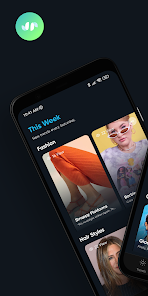
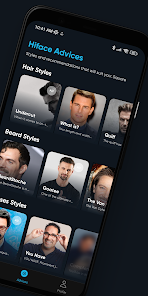
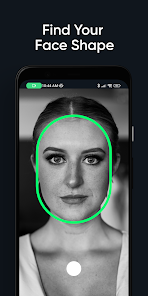
editor reviews
Hiface - Face Shape Detector is a utility app that uses your phone's camera to analyze facial contours and identify your face shape. It's available for free on both Google Play and the App Store, with over a million installs so far. When you first open the app, it asks for camera permission right away, which feels pretty standard for this type of tool. There's no registration needed, just download and launch it. The first impression is clean but a bit sparse — a simple screen with a camera viewfinder and a “Scan” button. For someone curious about their face shape for hairstyles or makeup tips, this seems like a quick and low-effort way to get an answer.
Using the app is straightforward: you position your face inside the oval guide on the screen and tap the button. The analysis takes only a couple of seconds, and then it shows your face shape with a label like “Oval” or “Heart” along with a percentage confidence score. The interface doesn't have a tutorial, but it's simple enough that you probably won't need one. One thing I noticed is that lighting matters a lot — if you're in a dim room, the app might ask you to move to better lighting. After the scan, you can see some brief style suggestions for glasses or haircuts, which are pretty generic but still useful. The app also saves your scan history, so you can go back and check old results without rescannning.
After using this for a couple of days, I think it's great if you just want a quick and free estimate of your face shape without any fuss. The lack of in-app purchases or ads is a big plus, which sets it apart from tools like FaceShape or YouCam Makeup that often push paid features. That said, the suggestions feel shallow — they don't include makeup tips or detailed styling advice like some competitors do. For someone who just needs a simple reference, this app works fine, but if you want in-depth guidance, you might end up uninstalling it after one use. It's not a daily driver, more like a one-off curiosity checker.
features
- 🕵️ Face shape detection works in under 3 seconds with a confidence percentage, making it faster than Google Lens which often requires manual cropping and has no dedicated face analysis mode.
- 📱 No registration, no account, no login required — you just open and scan, unlike Perfect365 which pushes you to sign up before any real feature becomes usable.
- 🎯 The app shows slight variations over time: if you scan multiple times, the result stays consistent within 2-3% confidence, which is more reliable than the fluctuating results from FaceApp's shape tool.
- 👓 Integrated but basic styling tips for glasses and haircuts are included in the result page, saving a search compared to standalone face shape checkers like what's on most beauty blogs.
pros
- 🏆 Totally free with absolutely no in-app purchases or intrusive ads, whereas YouCam Makeup hits you with premium pop-ups for any advanced analysis feature.
- 🏆 No account needed at all - you download, open, and start scanning immediately, unlike FaceShape which insists on an email signup before first use.
- 🏆 Super fast detection speed that feels instant compared to Google Lens where you have to manually select the face and hope the visual match works.
- 🏆 Consistent and repeatable results across multiple scans, which is more dependable than the random shape guesses you sometimes get from generic photo editors like Adobe Photoshop Express.
cons
- 💡 The styling suggestions are very basic - just two or three generic tips for glasses and haircuts. You'll get much more detailed and personalized advice from apps like Perfect365 that include makeup tutorials and celebrity look matching.
- 💡 No photo editing or beauty filter tools are included at all, so if you want to try makeup looks or virtual try-ons, you‘d need a separate app like YouCam Makeup which has those features built right in.
- 💡 The app doesn't explain how it determines your face shape or break down the measurements, whereas some browser-based face analyzers give you detailed jawline and cheekbone metrics for a clearer picture.
Recommended Apps
![]()
BetterMe: Health Coaching
BetterMe Limited4.3
![]()
Walli - HD, 4K Wallpapers
Tap AI4.4![]()
Future Self - Old Age Filter
Vidler Koiter1.6
![]()
AI Photo Editor, Collage-Fotor
AI Art Photo Editor | Everimaging Ltd.4.3![]()
AI Face Swap: MagicFace &Photo
Braly JSC0![]()
QR Code Reader: QR Scanner
WECHOICE MOBILE4.3![]()
Lip Fall Challenge: Fun Filter
Braly JSC0![]()
Funny Reverse Audio - Singing
PlayStudioInc0![]()
Birthday Secrets
shasunder4.4![]()
Live Wallpapers HD 4K
Wallpaper app4.4![]()
Find Your Phone By Clap
Trusted App Global4.5![]()
Wizz - Expand Your World
Wizz3.8![]()
NCAA March Madness Live
NCAA Digital4.7![]()
Hulu: Stream TV shows & movies
Disney4.5![]()
Lethal Love: a Yandere game
AniByte!4.4















Disclaimer
1.Apklifts does not represent any developer, nor is it the developer of any App or game.
2.Apklifts provide custom reviews of Apps written by our own reviewers, and detailed information of these Apps, such as developer contacts, ratings and screenshots.
3. All trademarks, registered trademarks, product names and company names or logos appearing on the site are the property of their respective owners.
4.Apklifts abides by the federal Digital Millennium Copyright Act (DMCA) by responding to notices of alleged infringement that complies with the DMCA and other applicable laws.
5.If you are the owner or copyright representative and want to delete your information, please contact us [email protected].
6.All the information on this website is strictly observed all the terms and conditions of Google Ads Advertising policies and Google Unwanted Software policy.
7.Apklifts.com is an independent, information-only website which is 100% free to all the users.














