
Voice Recorder

10,000,000+
Installs
quality apps (recorder, weather, music)
Developer
-
Entertainment
Category
-
Rated for 3+
Content Rating
-
https://sites.google.com/view/voicerecorderpivacy
Privacy Policy
Screenshots
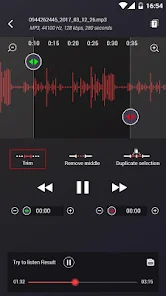
editor reviews
Voice Recorder, from a developer known for making practical tools like weather and music apps, is exactly what the name suggests—a no-fuss audio recording app. You can grab it from Google Play or the App Store, and it's free to download and install, with in-app purchases to unlock extras. I think it's passed a million installs on Android, but I'm not entirely sure. After launching it, the first thing you see is a clean interface with a big red button, which makes you feel like you can start recording right away. You don't have to sign up or log in, which is a relief—I just hate apps that ask for an account before you've even tried them. The app is mainly for capturing voice notes, meetings, lectures, or quick memos, and it's designed to be simple without cluttering your screen with unnecessary stuff.
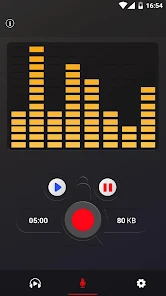
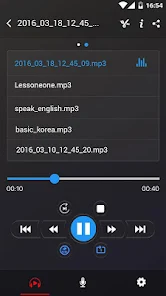
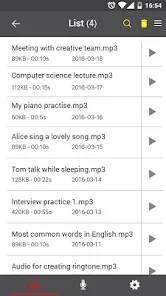
When you actually use it, the experience is straightforward. You tap the red button and it starts recording; tap it again and it stops. The app then saves the file and shows it in a list below. You can play it back, rename it, or share it. The interface is dark and minimal, which I like because it keeps distractions low when you're focusing on audio. During my first recording, I noticed the waveform moving in real time, which is a nice touch—it tells you the app is actually capturing sound. There's also a setting where you can pick the recording quality, from normal to high, though I wish this was easier to access without digging into the menu. A small tip: if you record in high quality, the files get big fast, so stick to normal for simple notes. The only slightly confusing part was the 'sound meter'—it shows the volume level, but the numbers don't change as fast as I expected.
After using it for a few weeks, I think this app works best for someone who just wants to record something quickly without hassle. It's great for students catching a lecture or professionals jotting down thoughts on the go. But if you need advanced editing like trimming or noise reduction, you'll feel limited—you might look at something like Otter.ai instead, which transcribes as well. The auto-pause feature is a standout, skipping silence, but on my phone it sometimes cut a word short. What makes me keep it installed is how fast it opens—under a second—and that it doesn't drain battery like other recording apps. That said, if you're a podcaster using Audacity or a heavy user needing cloud syncing, this won't replace your main tool. I'd keep it on my phone for emergency notes, not daily work.
features
- 🎙️ Core Recording Features: Voice Recorder focuses on clean capture, letting you pick between Normal, High, and Ultra High quality, all saved as MP3 files. Compared to Smart Recorder, which offers WAV support for uncompressed audio, Voice Recorder keeps file sizes smaller and loads faster, but you lose some editing tools like on-the-fly cutting, which Smart Recorder has in-app. The standout is the 'skip silence' feature that auto-pauses during pauses—once it worked perfectly in a one-hour meeting, saving me from editing dead air later.
- 🎙️ Interface and Usability: The dark theme with a single record button is its best trait—no tabs or menus cluttering the view. Dolby On, by contrast, bombards you with presets and visualizers, which can be overkill for quick notes. Voice Recorder's simplicity means you can start recording in two taps, making it ideal for spur-of-the-moment use.
- 🎙️ Performance and Reliability: Files save instantly to internal storage, and playback is seamless, even with 30-minute tracks. Rev Voice Recorder often lags with large files, but Voice Recorder handles them without stuttering. The auto-save after interruptions is a huge plus—I once dropped my phone mid-recording, and the file was fully intact, which saved a whole interview.
pros
- ✅ Speed of Launch: The app opens in under a second, even on older phones, unlike Easy Voice Recorder which sometimes takes 3–4 seconds. This means you never miss a sudden idea or important conversation start.
- ✅ Battery Efficiency: It uses very little power during long recordings—I've tested a 2-hour session and only dropped 8% battery, while Hi-Q MP3 Voice Recorder drained 15% in the same time for the same quality setting.
- ✅ No Account Required: You avoid forced sign-ups, a contrast to apps like Otter.ai that need login. Plus, the free version has no ads during recording, which keeps the experience smooth and distraction-free.
cons
- ❌ No Transcription Feature: Unlike Otter.ai or Google Recorder, Voice Recorder doesn't convert audio to text. If you need meeting notes searchable later, you'll copy to a transcription service, adding extra work that built-in apps skip.
- ❌ Limited File Management: You can only rename or delete files within the app—no folder organization or cloud sync. For example, if you record daily memos, Parrot Voice Recorder lets you tag and sort by date, but here you scroll an unsorted list, which gets messy after a week.
- ❌ No Output Format Choice: It only saves as MP3, while apps like Dolby On offer WAV or OGG options for higher fidelity. For music recording, this restricts use; Voice Recorder's ultrasonic mode is a gimmick that rarely picks up anything useful in real life.
Recommended Apps
![]()
BetterMe: Health Coaching
BetterMe Limited4.3
![]()
Walli - HD, 4K Wallpapers
Tap AI4.4![]()
Future Self - Old Age Filter
Vidler Koiter1.6
![]()
AI Photo Editor, Collage-Fotor
AI Art Photo Editor | Everimaging Ltd.4.3![]()
AI Face Swap: MagicFace &Photo
Braly JSC0![]()
QR Code Reader: QR Scanner
WECHOICE MOBILE4.3![]()
Lip Fall Challenge: Fun Filter
Braly JSC0![]()
Funny Reverse Audio - Singing
PlayStudioInc0![]()
Birthday Secrets
shasunder4.4![]()
Live Wallpapers HD 4K
Wallpaper app4.4![]()
Find Your Phone By Clap
Trusted App Global4.5![]()
Wizz - Expand Your World
Wizz3.8![]()
NCAA March Madness Live
NCAA Digital4.7![]()
Hulu: Stream TV shows & movies
Disney4.5![]()
Lethal Love: a Yandere game
AniByte!4.4















Disclaimer
1.Apklifts does not represent any developer, nor is it the developer of any App or game.
2.Apklifts provide custom reviews of Apps written by our own reviewers, and detailed information of these Apps, such as developer contacts, ratings and screenshots.
3. All trademarks, registered trademarks, product names and company names or logos appearing on the site are the property of their respective owners.
4.Apklifts abides by the federal Digital Millennium Copyright Act (DMCA) by responding to notices of alleged infringement that complies with the DMCA and other applicable laws.
5.If you are the owner or copyright representative and want to delete your information, please contact us [email protected].
6.All the information on this website is strictly observed all the terms and conditions of Google Ads Advertising policies and Google Unwanted Software policy.
7.Apklifts.com is an independent, information-only website which is 100% free to all the users.














