
Cool Fonts Keyboard & Themes

500K+
Installs
Art Maker Studio
Developer
-
Productivity
Category
-
Rated for 3+
Content Rating
-
https://wallpaper-4da20.web.app/privacy_policy
Privacy Policy
Screenshots


editor reviews
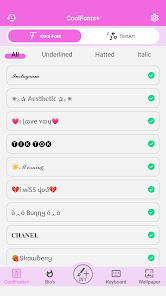
Cool Fonts Keyboard & Themes, created by Art Maker Studio, is a customization app that changes your phone's keyboard into something more personal and visually interesting. Instead of the plain default keyboard, this one lets you swap fonts, apply colorful themes, and add decorative elements. After you install it from the Play Store, opening it for the first time feels a bit like stepping into a candy store, with bright previews and lots of options. You do not need to sign up right away; a few taps and you can start trying out different styles. It's free to download, though there are in-app purchases and some ads here and there, which is pretty standard for this type of app.
Once you set it as your default keyboard through the settings, the actual typing experience is decent. The interface is colorful but not overwhelming. During onboarding, the app walks you through enabling it and granting permissions. For daily use, you just tap any text field and your chosen font shows up. The keyboard itself feels responsive most of the time, though switching between themes requires bouncing back to the main app. A small tip I found handy is changing the font per app, so you can have a playful look in your texting app but something more minimal for work emails. The layout is clear enough, but I had a moment of confusion when I tried to find custom emoji styles, they are tucked away in a submenu.
After using it for a while, I think this app suits people who enjoy standing out in their chats and do not mind extra steps for style. It stands apart from stock keyboards because of the sheer variety of fonts and backgrounds. However, if you primarily care about typing speed or autocorrect quality, you might prefer sticking with something like Gboard which has better prediction. What makes Cool Fonts Keyboard different is how much room there is for self-expression, but the trade-off is occasional lag when loading new themes. Some friends who tried it ended up uninstalling because ads popped up too often, while others kept it specifically for Instagram bios and quirky messages. It is not essential, but it is fun in short bursts.
features
- ⭐ Font Variety: You can pick from dozens of different fonts, ranging from thin script to bold graffiti. This beats Gboard's limited font choices, letting you match your keyboard to your mood or message.
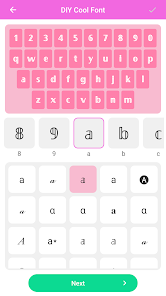
- 🎨 Theme Customization: Swapping backgrounds and colors is straightforward. You can even use your own photos as a keyboard backdrop, which is something SwiftKey does not fully support without extra work.
- 🔧 Per-App Settings: One standout feature is setting different fonts for different apps. This means you can keep things professional in email but playful in messaging, giving you control that other keyboard apps rarely offer so easily.
pros
- 🆓 Free Style Library: Compared to FancyKey, this app gives a wider selection of free fonts and themes right from the start, so you do not feel forced to pay immediately.
- 📱 Lightweight Setup: It does not hog too much storage or battery compared to heavier solutions like GO Keyboard, which can feel bloated after updates.
- 🎯 Quick Preview: The preview system shows changes instantly as you browse styles, something that Fleksy used to do well but has since moved behind a paywall in some areas.
cons
- 📢 Ad Interruptions: Ads show up more often than in Gboard, occasionally appearing right when you are trying to switch a setting. This can be annoying during quick edits.
- ⌨️ Typing Lag: Sometimes after applying a new theme, the keyboard stutters for a second before catching up. SwiftKey handles theme changes more smoothly without this hiccup.
- 🔒 Privacy Uncertainty: Unlike most default keyboards that are transparent about data, this app does not clearly explain what it collects, making you less confident than you would be with something like Microsoft SwiftKey.
Recommended Apps
![]()
Japevox - Funny Prank Sound
SecureTool4.3
![]()
AstroMatrix Birth Horoscopes
AstroMatrix4.7
![]()
Personalized Call from Santa (
www.PackageFromSanta.com4.3![]()
Prank Call - Fake Call & Chat
Bravestars Casual4.1![]()
Persona: Beauty Camera
TICKET TO THE MOON, INC.4.5![]()
Peacock TV: Stream TV & Movies
Peacock TV LLC4.5![]()
Instant Buttons Soundboard App
Snow Peak Apps2.1![]()
GPS Speedometer: Speed Tracker
SM Infotech3.2![]()
Subway®
SUBWAY Restaurants4.2![]()
Find Your Phone By Clap
Trusted App Global4.5![]()
Gorilla Skins for Monkey Arena
Dumitru Boico4![]()
Vimeo
Vimeo.com, Inc.3.8![]()
Vinted - Buy and sell clothes
Vinted4.6![]()
Galaxy Starry Keyboard Backgro
Fun Keyboard Theme for Android4.7![]()
Chat AI - Ask AI anything
AI Chat Bot, Ask AI4.4















Disclaimer
1.Apklifts does not represent any developer, nor is it the developer of any App or game.
2.Apklifts provide custom reviews of Apps written by our own reviewers, and detailed information of these Apps, such as developer contacts, ratings and screenshots.
3. All trademarks, registered trademarks, product names and company names or logos appearing on the site are the property of their respective owners.
4.Apklifts abides by the federal Digital Millennium Copyright Act (DMCA) by responding to notices of alleged infringement that complies with the DMCA and other applicable laws.
5.If you are the owner or copyright representative and want to delete your information, please contact us [email protected].
6.All the information on this website is strictly observed all the terms and conditions of Google Ads Advertising policies and Google Unwanted Software policy.
7.Apklifts.com is an independent, information-only website which is 100% free to all the users.













