
Customuse: Skins Maker Roblox

5M+
Installs
Customuse
Developer
-
Art & Design
Category
-
Everyone
Content Rating
-
https://customuse.notion.site/Customuse-Privacy-Policy-4499481dc31d40099b17d064369dda2b
Privacy Policy
Screenshots
editor reviews
Customuse: Skins Maker Roblox is essentially a design playground for fashion and cosmetic customization, aimed at Roblox fans who want their avatars to stand out. It is not a game itself but rather a UGC (user-generated content) tool that lets you create skins, hair, and even face textures specifically for Roblox characters. After downloading it from the Google Play Store where it has over a million installs, the first thing that hit me was the sheer emptiness of the home screen. It is a freemium download, so you can jump right in without registration, but the heavy presence of in-app purchases for premium templates and the constant pop-ups for ads to skip timers immediately gives away the monetization model. On the bright side, the concept of being able to craft your own items without leaving your phone is exactly what keeps many players hooked.
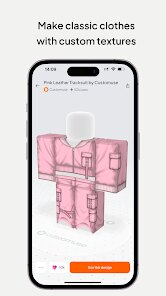
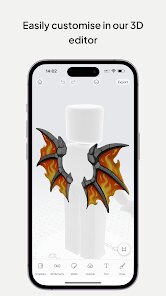
Getting your hands dirty in the app is a mixed bag. The interface is clean but feels a bit like using a watered-down PC photo editor squeezed into a mobile screen. You start by choosing a base template—like a pre-made jacket or a hairstyle—then use layers, color wheels, and stamping tools to tweak it. The onboarding is almost nonexistent, so I spent the first few minutes tapping every icon just to figure out what "add sticker" does. Once you get the hang of it, the workflow is smooth: you pinch to zoom, drag to position a decal, and adjust transparency until it looks right. A practical tip is that the import feature lets you use your own gallery photos as textures, which is where the real creativity lies, but the high-resolution exports are locked behind a paywall. It is frustrating when undo punishes you with a short ad every now and then.
After using it for a solid week, I think Customuse hits a sweet spot for younger Roblox players or anyone who loves grinding for a unique look without learning Blender or Studio. The thrill of creating a shirt that no one else has is real, and the export directly into Roblox works in a few taps once you link your account. However, experienced creators will likely cry over the limited layer count, the clunky brush tool, and the fact that you cannot easily share projects outside the app walled garden. Compared to something like Roblox Studio, this is far less powerful, but it wins on mobility and simplicity. I ended up keeping it just for quick edits on the bus, but I can see myself uninstalling it once the ads start feeling too pushy for a tool that already asks for cash to unlock brushes.
features
- 🎨 The signature feature is the ability to import your own photos from your phone's gallery, turn them into custom textures, and apply them onto skin templates. Most mobile editors for Roblox require you to draw everything from scratch, but here you can use a picture of a dog or a landscape sky, which makes your avatar genuinely unique right away.
- 🎨 Rather than hunting for a specific shirt color in a marketplace, this app provides a full color wheel plus a palette mixer for every single layer. You can precisely match the skin tone of your character or blend two colors for a gradient that looks like a pro design, which saves the headache of trial and error.
- 🎨 Layer-based editing feels like a simplified Photoshop for phones. You can stack multiple images, move them up and down in the order, and adjust each layer's opacity independently. In other skin makers like "Roblox Skin Creator", you often lose track of edits because everything becomes flattened, but here the undo and redo buttons actually work well per layer.
pros
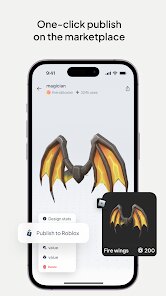
- 🌟 First major strength is the direct integration with Roblox's asset system. After designing a shirt or a face, you can publish it to the Roblox catalog instantly from within the app without needing to upload files manually on a PC. Other tools like "Roblox Avatar Editor" on mobile often just let you preview but not actually sell or equip your creation until you log onto a computer.
- 🌟 The second strength is the sheer variety of templates to start from. While rivals like "Roblox Skin Designer" have only basic hoodie or pants templates, this app includes hats, backpacks, eye textures, and even full body suits that cover the entire avatar, letting you create from zero in ways other apps restrict for free.
- 🌟 Undo button behavior is also better than its competition. In "Customize Roblox Avatar", one wrong tap can delete an hour of work with no recovery, but here the undo button handles multiple steps back, and you can see a history log, which saves a lot of time on complex designs.
cons
- ⚠️ The biggest weakness is the aggressive ad placement. Every time you want to export a design in high resolution, you either watch a 30-second video or spend premium currency. Competing apps like "Roblox Skin Creator Pro" let you save high-quality images for free, which makes Customuse feel like a cash grab after a few hours.
- ⚠️ The brush tool feels very laggy on older phones. If you try to draw fine details like eyelashes or small logos, the strokes glitch as if there is input delay, which ruins precision. "Skin Royale" handles brush input much more responsively for mobile users without stutter.
- ⚠️ There is no way to organize your created skins into folders or albums inside the app. Once you have designed over ten items, the library becomes a flat uncategorized list where you have to scroll forever to find the jacket you made last week. "Design Lab for Roblox" gives you tag filters to sort by category, which is much cleaner.
- ⚠️ Exporting directly into Roblox often fails the first time because of authentication token timeouts. You have to sign out and log in again repeatedly, which is a hassle that other apps solved by keeping your session alive for longer periods.
Recommended Apps
![]()
BetterMe: Health Coaching
BetterMe Limited4.3
![]()
Walli - HD, 4K Wallpapers
Tap AI4.4![]()
Future Self - Old Age Filter
Vidler Koiter1.6
![]()
AI Photo Editor, Collage-Fotor
AI Art Photo Editor | Everimaging Ltd.4.3![]()
AI Face Swap: MagicFace &Photo
Braly JSC0![]()
QR Code Reader: QR Scanner
WECHOICE MOBILE4.3![]()
Lip Fall Challenge: Fun Filter
Braly JSC0![]()
Funny Reverse Audio - Singing
PlayStudioInc0![]()
Birthday Secrets
shasunder4.4![]()
Live Wallpapers HD 4K
Wallpaper app4.4![]()
Find Your Phone By Clap
Trusted App Global4.5![]()
Wizz - Expand Your World
Wizz3.8![]()
NCAA March Madness Live
NCAA Digital4.7![]()
Hulu: Stream TV shows & movies
Disney4.5![]()
Lethal Love: a Yandere game
AniByte!4.4















Disclaimer
1.Apklifts does not represent any developer, nor is it the developer of any App or game.
2.Apklifts provide custom reviews of Apps written by our own reviewers, and detailed information of these Apps, such as developer contacts, ratings and screenshots.
3. All trademarks, registered trademarks, product names and company names or logos appearing on the site are the property of their respective owners.
4.Apklifts abides by the federal Digital Millennium Copyright Act (DMCA) by responding to notices of alleged infringement that complies with the DMCA and other applicable laws.
5.If you are the owner or copyright representative and want to delete your information, please contact us [email protected].
6.All the information on this website is strictly observed all the terms and conditions of Google Ads Advertising policies and Google Unwanted Software policy.
7.Apklifts.com is an independent, information-only website which is 100% free to all the users.














