
Simple Calendar - easy planner

5M+
Installs
Komorebi Inc.
Developer
-
Productivity
Category
-
Everyone
Content Rating
-
https://komorebi-studio.com/policyredirect.html
Privacy Policy
Screenshots
editor reviews
Simple Calendar is exactly what its name suggests — a straightforward day planner app that focuses on the basics without all the clutter you often see in other calendar tools. After downloading it from Google Play (it's free, by the way, with no forced sign-up), I launched it and was welcomed by a clean white interface with minimal icons. For someone like me who just wants to see their schedule without a million pop-ups or fancy animations, this first impression was refreshing. You can start using it right away, and there are no ads interrupting your flow. The app does offer a few optional in-app purchases for extra features, but the free version already covers most daily needs like setting events and reminders.
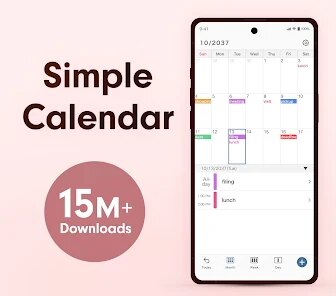
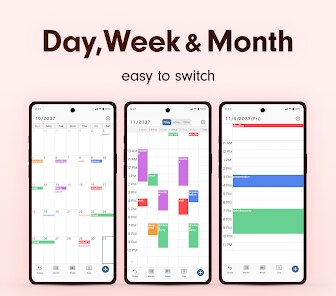
Using Simple Calendar day-to-day feels surprisingly smooth. When you open the app, you see a monthly grid view by default, and tapping on any date pulls up a bottom sheet where you can add events in seconds. You can choose start and end times, set a color label, and even add a note — all without switching to another screen. One small trick I found handy is that you can swipe left or right on the month view to jump between months quickly. The onboarding is basically nonexistent, which might confuse some people, but it never bothered me. Occasionally, I wished the week view was more prominent since it's tucked away in the settings, but for quick planning, the month view works fine.
After using it for a few weeks, I'd say Simple Calendar is perfect for users who hate overcomplicated planners — students, busy parents, or just anyone who wants to jot down appointments without feeling overwhelmed. It doesn't try to sync with a hundred services or remind you about everything; it just stores your events locally, which some may find limiting. Compared to Google Calendar, it's much less feature-rich — no smart suggestions or email integration — but that is also what makes it feel private and distraction-free. I kept it installed because I like having a backup calendar that doesn't require an account. If you need collaborative features or heavy scheduling, you might uninstall it pretty quickly.
features
- 📅 The outstanding feature here is the simplicity of adding events. You tap a date, fill in time and title, and you are done. No extra steps or hidden menus slow you down, which makes it feel faster than Google Calendar for quick entries.
- 🎨 Color coding events by category is straightforward. You pick from a set of bright colors for each event, and the month view shows small colored dots under dates. Google Calendar has color labels too, but it buries them in menus.
- 🔔 Reminders work reliably with a simple toggle. You can set a default reminder time in the settings, so every new event automatically has an alert. No need to choose “10 minutes before” every single time like in some other apps.
- 🔒 No account needed. You install it and start planning right away, which is a big deal if you want to keep your schedule private and offline. Google Calendar forces you to sign in, which some people find annoying.
pros
- 💡 Its biggest strength is the clean, ad-free experience. Unlike many free planner apps that show banner ads or pop-ups, Simple Calendar keeps everything focused on your schedule. Even the free version feels premium in that sense.
- ⏱️ The app is lightweight and launches almost instantly. On older phones, I have used calendar apps that take a few seconds to load, but this one feels snappy. It also uses very little battery compared to feature-heavy apps like Calendars 5.
- 🌀 Navigation is intuitive for basic tasks. The month view with swipe gestures feels natural, and the learning curve is almost zero. Someone who has never used a digital planner before could pick this up without help.
cons
- 🚫 The most obvious weakness is the lack of syncing. You cannot connect it to Google Calendar, iCloud, or any other service. If you use multiple devices, you have to manually re-enter events everywhere, which is a dealbreaker for many people.
- 📉 Week view and day view are not as polished as the month view. They feel tacked on as an afterthought, and the layout can be cramped on smaller screens. Google Calendar handles these views much better.
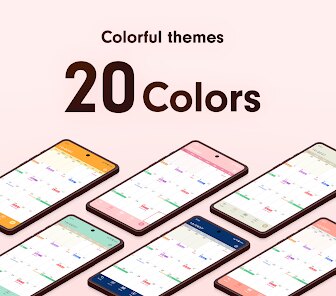
- 🔧 Customization is very limited. You cannot change the app's theme, adjust font sizes extensively, or rearrange the layout. Some users might find the white interface boring after a while compared to apps like Timepage or Fantastical.
- 📂 The app does not support natural language input. You cannot type “lunch tomorrow at 1 PM” and have it understand. You have to manually tap each field, which is slower than what Google Calendar or Calendar 2 can do with smart input.
Recommended Apps
![]()
Japevox - Funny Prank Sound
SecureTool4.3
![]()
AstroMatrix Birth Horoscopes
AstroMatrix4.7
![]()
Personalized Call from Santa (
www.PackageFromSanta.com4.3![]()
Prank Call - Fake Call & Chat
Bravestars Casual4.1![]()
Persona: Beauty Camera
TICKET TO THE MOON, INC.4.5![]()
Peacock TV: Stream TV & Movies
Peacock TV LLC4.5![]()
Instant Buttons Soundboard App
Snow Peak Apps2.1![]()
GPS Speedometer: Speed Tracker
SM Infotech3.2![]()
Subway®
SUBWAY Restaurants4.2![]()
Find Your Phone By Clap
Trusted App Global4.5![]()
Gorilla Skins for Monkey Arena
Dumitru Boico4![]()
Vimeo
Vimeo.com, Inc.3.8![]()
Vinted - Buy and sell clothes
Vinted4.6![]()
Galaxy Starry Keyboard Backgro
Fun Keyboard Theme for Android4.7![]()
Chat AI - Ask AI anything
AI Chat Bot, Ask AI4.4















Disclaimer
1.Apklifts does not represent any developer, nor is it the developer of any App or game.
2.Apklifts provide custom reviews of Apps written by our own reviewers, and detailed information of these Apps, such as developer contacts, ratings and screenshots.
3. All trademarks, registered trademarks, product names and company names or logos appearing on the site are the property of their respective owners.
4.Apklifts abides by the federal Digital Millennium Copyright Act (DMCA) by responding to notices of alleged infringement that complies with the DMCA and other applicable laws.
5.If you are the owner or copyright representative and want to delete your information, please contact us [email protected].
6.All the information on this website is strictly observed all the terms and conditions of Google Ads Advertising policies and Google Unwanted Software policy.
7.Apklifts.com is an independent, information-only website which is 100% free to all the users.













