

ZipLock - Zipper Lock Screen

1M+
Installs
SuperApps Global
Developer
-
Productivity
Category
-
Everyone
Content Rating
-
https://superapps.site/policy.html
Privacy Policy
Screenshots
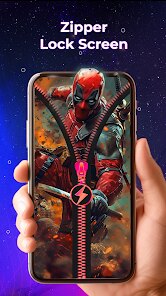
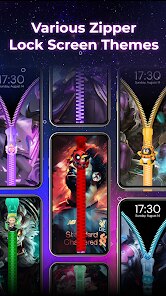
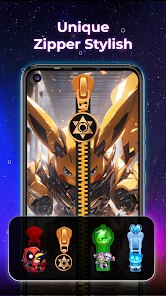
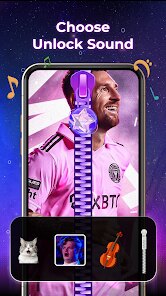
editor reviews
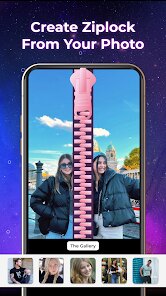
ZipLock is a lock screen customization app available on the Google Play Store, and it does exactly what the name suggests: it turns your phone's lock screen into something that resembles a zipper. You swipe up or down to zip and unzip the screen, which feels like a quirky little gimmick at first. It's been downloaded over a million times, and it's free to install, though it does have ads and offers in-app purchases for extra themes and effects. When you first launch it, you're greeted with a short tutorial that explains how the zipper gesture works, and honestly, the initial novelty is hard to ignore. It's not a serious tool—more of a fun way to freshen up your phone's look without rooting or getting into complicated settings.
Once you start using it, the experience is pretty straightforward but has its ups and downs. After installing, you go through a quick onboarding where you have to grant it permission to draw over other apps and allow it to replace your default lock screen. The main interface shows a zipper slider right in the middle of your screen, and you just swipe up or down to unlock. It works smoothly most of the time, but I noticed a small delay sometimes when the phone wakes up. There are a handful of preset zipper styles, like a purple neon one or a classic silver zipper, and you can pick them from the settings menu. One thing I didn't expect was that the app also adds a clock and notification display, so your missed texts and calls still show up, but the layout feels a bit cluttered since the zipper takes up a lot of space. A practical tip is to adjust the unlock direction in the settings—setting it to swipe up feels more natural if you hold your phone in your right hand.
After a few weeks, I can say ZipLock is more of a conversation starter than a daily driver. If you're the kind of person who likes switching up your phone's look for fun or showing off unique themes, you'll probably enjoy it for a while. But if you want speed and reliability when unlocking your phone, this app might get annoying since the animation adds an extra split second that you don't get with a normal lock screen. Compared to something like Next Lock Screen or Microsoft's lock screen apps, ZipLock feels way less feature-rich—there's no gesture shortcuts to apps or smart lock integration. I kept it installed for about a week before switching back because the novelty wore off. It's fine for a laugh, but I wouldn't call it a keeper unless you really love that zipper aesthetic.
features
- 🔒 The standout feature is obviously the zipper unlock gesture. Unlike most lock screen apps that just use a swipe or a pattern, ZipLock makes you slide a zipper tab up or down to unlock. It's a unique tactile feel that you won't find in popular alternatives like Next Lock Screen or even stock Android. The animation is smooth, and the sound effect that plays when you “zip” it adds extra satisfaction.
- 🎨 It offers a decent selection of built-in zipper themes, from metallic looks to neon colors. While it doesn't have as many options as Lock Screen 2024 or Cover Locker, each theme changes the zipper's color and texture, which keeps things fresh. You can also buy premium packs inside the app if the free ones get boring.
- 📅 The app shows the time, date, and notification badges on the lock screen, so you're not losing functionality for a gimmick. It pulls notifications from your phone's system, but it doesn't let you reply directly or launch apps from the lock screen like AcDisplay does. Still, it covers the basics for checking what's new.
- ⚙️ There's a hidden option to adjust the unlock sensitivity and direction under “Unlock Settings.” You can choose between swipe up or swipe down, which is handy since the default down swipe can feel awkward on taller phones. Most users miss this, but tweaking it makes daily use much better.
pros
- 🌟 ZipLock's main strength is its originality. While most lock screen apps copy the same boring swipe or pattern unlock, this one brings a physical zipper gesture that feels playful and distinct. Apps like Next Lock Screen or Microsoft's lock screen don't offer anything this creatively different.
- 💨 It's lightweight and free to start. The app doesn't drain battery or hog RAM compared to heavier lock screen replacements like CM Locker or Go Locker. You can install it, try it out, and uninstall without worrying about bloatware or performance hits.
- 🎨 The customization is simple yet satisfying. Unlike Cover Locker which drowns you in options, ZipLock keeps it to a handful of zipper styles and a basic clock. That makes it approachable for someone who just wants a quick visual change without learning a whole new UI.
cons
- 💔 The novelty wears off quickly. After a few days, the zipper animation stops feeling cool and starts feeling like an extra step. Regular lock screen apps like AcDisplay or even the stock Android lock screen let you unlock faster, so ZipLock ends up slowing you down in the long run.
- 🔔 Notification support is basic. You can see that you have a message, but you can't expand, reply, or quick-launch apps from the lock screen. Compared to Next Lock Screen which lets you swipe directly into WhatsApp or Instagram, ZipLock feels limited.
- 🛠️ There's no integration with smart unlock features. If you use a smartwatch or trust location to keep your phone unlocked, ZipLock overrides those settings. This is a common issue with third-party lock screens, but apps like Lock Screen 2024 handle system permissions better.
- 📱 The app shows ads after you unlock sometimes, which can get annoying. While it's free, the pop-ups feel intrusive, especially since the zipper gesture already adds friction. You can remove them with a purchase, but that feels like a shaky deal for such a simple app.
Recommended Apps
![]()
Japevox - Funny Prank Sound
SecureTool4.3
![]()
AstroMatrix Birth Horoscopes
AstroMatrix4.7
![]()
Personalized Call from Santa (
www.PackageFromSanta.com4.3![]()
Prank Call - Fake Call & Chat
Bravestars Casual4.1![]()
Persona: Beauty Camera
TICKET TO THE MOON, INC.4.5![]()
Peacock TV: Stream TV & Movies
Peacock TV LLC4.5![]()
Instant Buttons Soundboard App
Snow Peak Apps2.1![]()
GPS Speedometer: Speed Tracker
SM Infotech3.2![]()
Subway®
SUBWAY Restaurants4.2![]()
Find Your Phone By Clap
Trusted App Global4.5![]()
Gorilla Skins for Monkey Arena
Dumitru Boico4![]()
Vimeo
Vimeo.com, Inc.3.8![]()
Vinted - Buy and sell clothes
Vinted4.6![]()
Galaxy Starry Keyboard Backgro
Fun Keyboard Theme for Android4.7![]()
Chat AI - Ask AI anything
AI Chat Bot, Ask AI4.4















Disclaimer
1.Apklifts does not represent any developer, nor is it the developer of any App or game.
2.Apklifts provide custom reviews of Apps written by our own reviewers, and detailed information of these Apps, such as developer contacts, ratings and screenshots.
3. All trademarks, registered trademarks, product names and company names or logos appearing on the site are the property of their respective owners.
4.Apklifts abides by the federal Digital Millennium Copyright Act (DMCA) by responding to notices of alleged infringement that complies with the DMCA and other applicable laws.
5.If you are the owner or copyright representative and want to delete your information, please contact us [email protected].
6.All the information on this website is strictly observed all the terms and conditions of Google Ads Advertising policies and Google Unwanted Software policy.
7.Apklifts.com is an independent, information-only website which is 100% free to all the users.













