

Battle Challenge: Funny Filter

1M+
Installs
Braly JSC
Developer
-
Entertainment
Category
-
Everyone
Content Rating
-
https://bralyvn.com/privacy-policy.php
Privacy Policy
Screenshots





editor reviews
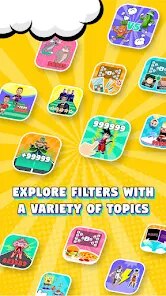
Battle Challenge: Funny Filter is a casual entertainment app that turns your selfies and photos into over-the-top, meme-worthy edits. It sits squarely in the photo-editing and social fun category, designed for people who want to quickly create funny or absurd images to share with friends. You download it from the Google Play Store, and it installs in a snap without any required registration. The app is free, though it supports itself with occasional ads and optional in-app purchases for extra filter packs. After launching it for the first time, the immediate impression is that it's loud, colorful, and barely takes itself seriously—the main screen throws a bunch of goofy filter previews at you, and you can tell right away that this isn't about polished beauty edits, but about getting a laugh.
Using the app is straightforward once you get past the initial splash of options. You snap a photo with the in-app camera or pick one from your gallery, and then it shows you a grid of absurd transformations: things like swelling your head into a giant balloon, adding a screaming face overlay, or warping your cheeks into cartoonish shapes. Tapping one applies the effect instantly, which is satisfying, but the app can feel a little chaotic because the filter thumbnails don't always show exactly what they'll do to your specific picture. You can scroll through a few categories titled things like “Monster” or “Silly,” though the sorting could be clearer. A small tip: if you hold your phone steady and take a clean, front-facing shot, the app detects your face faster and the filters stick better. Once you're happy with a result, you can save it or share it directly to social media, which is where the app really shines—it's built for quick, disposable fun, not for fine-tuning.
After spending a few days with Battle Challenge, I found it's genuinely entertaining in short bursts, especially if you're hanging out with friends and want to send something ridiculous to a group chat. It's best suited for casual users who enjoy meme culture and don't mind a bit of visual chaos. That said, if you're looking for serious face-tuning or subtle enhancements, this is the wrong tool—apps like FaceApp or PicsArt give you far more control and polish. What makes Battle Challenge stand out is how unapologetically silly it is; it doesn't pretend to be something it's not. I kept it installed because it's a fun option when I'm bored, but I could see someone deleting it after the novelty wears off, especially since the free version shows ads after every few edits and some of the best filters are locked behind a paywall.
features
- 😜 The app lets you turn any selfie into hilarious, over-the-top edits like a screaming face or a giant head, which makes it perfect for quick memes. Compared to Snapchat, which focuses on live AR filters, Battle Challenge gives you more aggressive and absurd transformations after you take the photo, giving you time to set up the perfect expression.
- 😜 Its standout feature is the “Battle” mode, where you and a friend take photos and the app merges them into a single contest image with funny effects like a cartoon fight. No other popular photo fun app, like FaceApp or YouCam Perfect, lets you do this kind of two-person goof-off directly.
- 😜 The app processes edits almost instantly with no loading spinner delays, so you can export or share a distorted image in under a second. This speed sets it apart from more resource-heavy editors like PicsArt, which can lag when applying complex face filters.
- 😜 It includes a randomizer button that applies a surprise filter each time you tap, which adds a fun gambling element for when you just want to be surprised by an ugly or funny result. Simple apps like Candy Camera don't offer this kind of playful unpredictability.
pros
- ✨ It's incredibly easy to use, with no learning curve—you just snap and slap a filter on, unlike FaceApp which requires you to tap through multiple edit modes before applying anything.
- ✨ The filters are genuinely creative and not just generic beauty adjustments, so your images end up looking uniquely ridiculous compared to what you'd get from simple editing apps like Remini or BeautyPlus.
- ✨ The app runs smoothly even on older Android phones, without crashing or freezing during intense warp effects, which is better than heavier apps like PicsArt that sometimes crash under heavy filters.
cons
- 🛑 The free version shows an ad after almost every edit, which becomes annoying fast, while apps like Snapchat or FaceApp let you use basic filters without interrupting you as often.
- 🛑 Many of the best filters are locked behind a paywall, so you quickly hit a wall unless you pay, something you don't face with similar apps like Candy Camera which offers more free content upfront.
- 🛑 The filter preview icons are small and sometimes misleading, so you have to apply a filter to see its real effect, wasting your time compared to apps like YouCam Perfect that show live previews on your face.
- 🛑 There's no undo or edit history feature, so if you accidentally apply a filter you don't like, you have to start the photo over from scratch, which simpler editors like Google Photos' basic editing tools don't force you to do.
Recommended Apps
![]()
BetterMe: Health Coaching
BetterMe Limited4.3
![]()
Walli - HD, 4K Wallpapers
Tap AI4.4![]()
Future Self - Old Age Filter
Vidler Koiter1.6
![]()
AI Photo Editor, Collage-Fotor
AI Art Photo Editor | Everimaging Ltd.4.3![]()
AI Face Swap: MagicFace &Photo
Braly JSC0![]()
QR Code Reader: QR Scanner
WECHOICE MOBILE4.3![]()
Lip Fall Challenge: Fun Filter
Braly JSC0![]()
Funny Reverse Audio - Singing
PlayStudioInc0![]()
Birthday Secrets
shasunder4.4![]()
Live Wallpapers HD 4K
Wallpaper app4.4![]()
Find Your Phone By Clap
Trusted App Global4.5![]()
Wizz - Expand Your World
Wizz3.8![]()
NCAA March Madness Live
NCAA Digital4.7![]()
Hulu: Stream TV shows & movies
Disney4.5![]()
Lethal Love: a Yandere game
AniByte!4.4















Disclaimer
1.Apklifts does not represent any developer, nor is it the developer of any App or game.
2.Apklifts provide custom reviews of Apps written by our own reviewers, and detailed information of these Apps, such as developer contacts, ratings and screenshots.
3. All trademarks, registered trademarks, product names and company names or logos appearing on the site are the property of their respective owners.
4.Apklifts abides by the federal Digital Millennium Copyright Act (DMCA) by responding to notices of alleged infringement that complies with the DMCA and other applicable laws.
5.If you are the owner or copyright representative and want to delete your information, please contact us [email protected].
6.All the information on this website is strictly observed all the terms and conditions of Google Ads Advertising policies and Google Unwanted Software policy.
7.Apklifts.com is an independent, information-only website which is 100% free to all the users.














