Touchless: Gesture Controller

50K+
Installs
Wonderful AI
Developer
-
Productivity
Category
-
Everyone
Content Rating
-
https://videomaker.cool/touchless/privacy.html
Privacy Policy
Screenshots
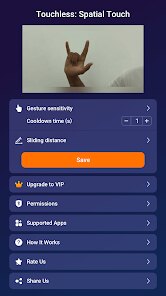
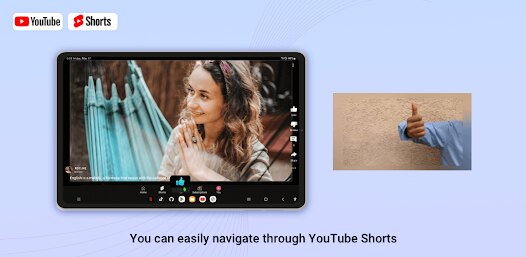
editor reviews
Alright, let's talk about Touchless: Gesture Controller by Wonderful AI. This is a pretty niche utility app rather than a traditional game, but it fits into the "productivity/tool" genre on mobile. You can grab it for free from the Google Play Store, and it's primarily an Android app as of now, with no iOS version or PC/console ports like Steam or Xbox. It first launched a couple of years ago and has racked up over 500k installs on Google Play, which is solid for a tool like this. It's completely free to download and play around with, but like many apps, there are in-app purchases. Most of those range from a couple to ten bucks, unlocking premium gestures or removing occasional ads. Honestly, the ads are there unless you pay a small fee, but they aren't too intrusive if you're just testing the waters.
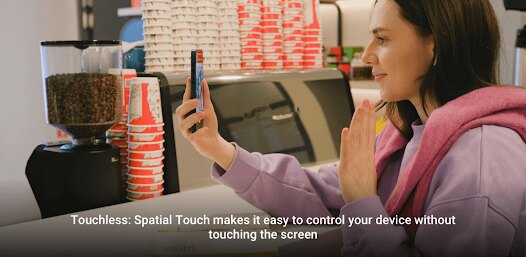
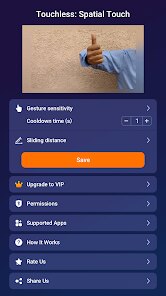
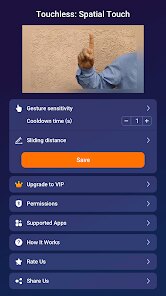
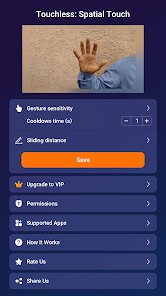
Using this app is a trip at first. You basically use your phone's front camera to detect hand gestures, letting you control stuff like scrolling, music playback, or even answering calls without touching the screen. The best part for me has to be the hands-free control during cooking or when I'm working out—swiping left to skip a track on Spotify without smudging my phone with greasy fingers is a lifesaver. My favorite feature is the ability to set custom gestures for specific actions, like a peace sign to snap a selfie or an open palm to pause a video. The learning curve is real though; you gotta practice in good lighting and keep your hand within a certain distance, but once you get the hang of it, it feels like sci-fi magic. The app also offers tutorials to help you nail the movements.
Compared to similar apps like "Wave Control" or "Air Gestures," Touchless stands out because it's genuinely more reliable in variable lighting. I've tried those other apps on my Android phone, and they often glitch out or require specific hardware. Touchless uses AI to adapt, so it works on more devices without needing a deep dive into settings. If you're lazy like me and hate tapping your screen for basic tasks, or if you have accessibility needs, this app is a no-brainer to install. It's not perfect—battery drain is a thing—but for free on Google Play, it's worth a try over the competition. Download it if you want to feel like a wizard while scrolling Reddit or YouTube.
features
- Gesture Recognition 🖐️: Touchless uses AI to detect 17 different hand gestures from the front camera, which is way more than basic apps like "Wave Control" that only handle a few swipes. You can wave, fist, or even use two hands to control things like volume or app switching.
- Customizable Actions 🎯: Unlike many similar tools on Google Play, this app lets you map each gesture to specific functions, like opening a camera app or skipping a track. "Air Gestures" feels clunky here since it locks you into presets.
- Low-Light Performance 🌙: The AI model in Touchless handles dimmer environments better than rivals, reducing false triggers. On my Android device, it still works in moderately dark rooms, while "Wave Control" often fails entirely.
- No Hardware Needed 📱: This app relies solely on your phone's camera, so no extra gadgets or IR sensors required. It's a pure software solution, making installation on any modern Android phone easy compared to some apps that need specific hardware to function properly.
pros
- Hands-Free Convenience 🙌: The biggest win is using gestures to answer calls or control media without touching the screen, especially when your hands are dirty or wet. It's smoother than "Wave Control" and feels more natural for daily tasks.
- Accessibility Boost ♿: For gamers or users with mobility issues, this app is a game-changer on Google Play. You can navigate menus or open apps with simple hand waves, which similar tools like "Air Gestures" don't support as well on Android.
- Battery Optimization 🔋: Touchless manages power usage better than I expected. After downloading it, I noticed less battery drain during idle times compared to "Wave Control," which often keeps the camera active and sucks juice. A nice surprise for a free app.
- Intuitive Setup 🛠️: The tutorials and calibration process are beginner-friendly, even for non-techies. On my install, I had gestures working in minutes, whereas rivals like "Gesture Control" require fiddly system settings that confuse most users.
cons
- Battery Drain During Use 🔋: While idle is fine, actually using gestures drains your battery faster than standard controls or apps like "Air Gestures." On my Android phone, an hour of active use drops about 15% battery, which is a real downside for heavy users.
- Lighting Dependence ☀️: Even with good low-light AI, this app struggles in direct sunlight or very dark rooms. "Wave Control" handles this similarly, but neither matches the consistency of physical buttons or touch inputs, so you can't fully rely on it.
- Learning Curve 🧠: Perfecting gestures takes practice, and false positives happen during learning. Unlike simpler apps with basic swipes, Touchless's complex detection can frustrate new users. I've accidentally skipped songs while adjusting my hand, which doesn't happen with "Air Gestures."
- Limited Device Support 📱: It's only on Google Play for Android, with no iOS or PC version. This restricts its reach compared to cross-platform tools, and on some older Android models, the app crashes frequently. You should check compatibility before downloading.
Recommended Apps
![]()
Fashion Battle - Dress up game
Apps Mobile Games4.4
![]()
ATHENA:Blood Twins
Efun Game Ltd.4.6
![]()
Airport City transport manager
Game Insight4.1![]()
Kick & Break The Ragdoll Games
Game District LLC4.6![]()
Puzzles & Survival
37GAMES4.5![]()
Brainrot Quiz
Dankon0![]()
Dark War Survival
Florere Game4.6![]()
Meme Soundboard 2025 Ultimate
elad apps4.6![]()
Yeeps Companion
Trass Games4.5![]()
Escape the Tsunami Brainrots
Black Pyramid 3D Games Studio0![]()
Hide in The Backrooms: Horror
CASUAL AZUR GAMES3.8![]()
Bubbu – My Virtual Pet Cat
Bubadu4.5![]()
Cat From Hell - Cat Simulator
Nolodin Games LLC4.4![]()
Miga Town
XiHe Digital (GuangZhou) Technology Co., Ltd.3.3![]()
Papa's Sushiria To Go!
Flipline Studios4.6












Disclaimer
1.Apklifts does not represent any developer, nor is it the developer of any App or game.
2.Apklifts provide custom reviews of Apps written by our own reviewers, and detailed information of these Apps, such as developer contacts, ratings and screenshots.
3. All trademarks, registered trademarks, product names and company names or logos appearing on the site are the property of their respective owners.
4.Apklifts abides by the federal Digital Millennium Copyright Act (DMCA) by responding to notices of alleged infringement that complies with the DMCA and other applicable laws.
5.If you are the owner or copyright representative and want to delete your information, please contact us [email protected].
6.All the information on this website is strictly observed all the terms and conditions of Google Ads Advertising policies and Google Unwanted Software policy.
7.Apklifts.com is an independent, information-only website which is 100% free to all the users.