

Home AI - AI Interior Design

10M+
Installs
HubX
Developer
-
Lifestyle
Category
-
Everyone
Content Rating
-
https://homeinterior.ai/privacy
Privacy Policy
Screenshots



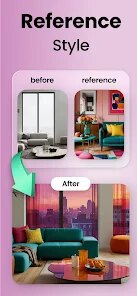
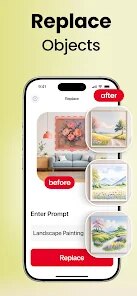

editor reviews
I first stumbled across Home AI - AI Interior Design when I was scrolling through the Play Store, looking for something to help me visualize a living room makeover without spending money on a designer. It's basically an AI-powered tool that lets you upload a photo of your room and then generates new design styles for it. The app has been downloaded over a million times and is free to install, though it pushes a subscription pretty hard once you start playing around. Right after launching, you're greeted with a clean, minimal interface that asks you to snap or upload a picture of your space. The first impression is solid — it feels modern and purposeful, not cluttered with ads or confusing menus. You can tell right away what the app wants you to do.
Once you get past the initial setup, the actual experience is pretty straightforward. You take a photo of your room or pick one from your gallery, then crop it to focus on the area you want to redesign. The app then gives you a handful of style options like Modern, Bohemian, Minimalist, or Scandinavian, and after you pick one, it takes maybe 10 to 20 seconds to generate a few renders. The interface is smooth for the most part, but I did hit a moment where the app froze after I tried to regenerate a style too quickly. A small tip: make sure your original photo has good lighting and isn't too cluttered with random objects, because the AI tends to get confused and spit out weird furniture placements otherwise. You can save your favorites or share them, but the free version only lets you do a handful of generations per day before it asks you to subscribe.
After using it for a couple of weeks, I think this app is great for homeowners or renters who want quick inspiration without hiring a decorator or learning 3D modeling software. The results aren't always realistic — sometimes the AI adds windows where there are none or places a sofa in front of a door — but it gives you a solid starting point for brainstorming. Compared to something like Havenly or Modsy, Home AI is much faster and doesn't require you to fill out a long questionnaire, but it also lacks the human touch or the ability to actually buy the furniture shown in the renders. I ended up keeping it installed because it's fun to play around with, but I can see someone uninstalling it after a week if they're not into interior design or don't want to pay for more generations.
features
- 😊 One standout feature is the AI room generation itself. You snap a photo of your space, pick a style, and within seconds the app transforms it into a fully decorated room. Unlike apps like Houzz, which just show you curated photos from other people, Home AI actually applies the style to your own room layout, so you get a personalized preview. It's not perfect — sometimes the AI struggles with odd angles — but it's impressive for a free tool.
- 😊 Another solid feature is the style variety. The app offers about a dozen different aesthetics, from Japandi and Industrial to Coastal and Mid-Century. Compared to something like Planner 5D, which requires you to manually place every piece of furniture, Home AI does all the heavy lifting. You just pick a style and the app handles the rest, which is great if you're lazy or just want to explore ideas quickly.
- 😊 The user interface also deserves a mention. It's clean, with no messy menus or confusing navigation. A lot of similar apps, like ColorSnap or Sherwin-Williams' tool, bury features behind multiple screens, but Home AI keeps everything on one page. You take your photo, choose your style, and see results without jumping through hoops. It's simple and fast, which is exactly what I want from an AI app.
pros
- 👍 The speed of generation is probably the biggest strength. Apps like Havenly require you to submit your photos and wait days for a designer to respond, while Home AI gives you results in under 30 seconds. It's great for instant inspiration when you're stuck.
- 👍 The ease of use is another big plus. You don't need to know anything about design software or furniture terminology. Just upload a photo and tap a style. Even compared to free tools like Roomstyler, which still requires some dragging and dropping, Home AI feels effortless.
- 👍 The app is also good at handling different room types — living rooms, bedrooms, kitchens, even bathrooms. I tested it on a small bathroom and it still produced decent results, which a lot of other AI design apps struggle with because they're trained mostly on living spaces.
cons
- 👎 The biggest weakness is the limited free usage. You only get a few generations per day, and after that, the app pushes you to subscribe for around $10 per month. Apps like Pinterest or Houzz give you unlimited browsing for free, so this feels restrictive if you're just exploring.
- 👎 The AI often misses context — it'll add furniture that doesn't match the room's scale or place items in illogical spots. Compared to Modsy, where human designers review the layouts, Home AI's results can look unrealistic or just plain wrong sometimes.
- 👎 There's no way to buy the furniture shown in the renders. You get a nice picture, but you can't click on items to purchase them directly. Apps like Wayfair or IKEA Place let you visualize and then buy, so Home AI feels incomplete in that regard.
- 👎 The app occasionally crashes or freezes when you try to regenerate a style too many times in a row. It's not a dealbreaker, but it's annoying when you're in the middle of a creative session and have to restart.
Recommended Apps
![]()
BetterMe: Health Coaching
BetterMe Limited4.3
![]()
Walli - HD, 4K Wallpapers
Tap AI4.4![]()
Future Self - Old Age Filter
Vidler Koiter1.6
![]()
AI Photo Editor, Collage-Fotor
AI Art Photo Editor | Everimaging Ltd.4.3![]()
AI Face Swap: MagicFace &Photo
Braly JSC0![]()
QR Code Reader: QR Scanner
WECHOICE MOBILE4.3![]()
Lip Fall Challenge: Fun Filter
Braly JSC0![]()
Funny Reverse Audio - Singing
PlayStudioInc0![]()
Birthday Secrets
shasunder4.4![]()
Live Wallpapers HD 4K
Wallpaper app4.4![]()
Find Your Phone By Clap
Trusted App Global4.5![]()
Wizz - Expand Your World
Wizz3.8![]()
NCAA March Madness Live
NCAA Digital4.7![]()
Hulu: Stream TV shows & movies
Disney4.5![]()
Lethal Love: a Yandere game
AniByte!4.4















Disclaimer
1.Apklifts does not represent any developer, nor is it the developer of any App or game.
2.Apklifts provide custom reviews of Apps written by our own reviewers, and detailed information of these Apps, such as developer contacts, ratings and screenshots.
3. All trademarks, registered trademarks, product names and company names or logos appearing on the site are the property of their respective owners.
4.Apklifts abides by the federal Digital Millennium Copyright Act (DMCA) by responding to notices of alleged infringement that complies with the DMCA and other applicable laws.
5.If you are the owner or copyright representative and want to delete your information, please contact us [email protected].
6.All the information on this website is strictly observed all the terms and conditions of Google Ads Advertising policies and Google Unwanted Software policy.
7.Apklifts.com is an independent, information-only website which is 100% free to all the users.














