

Bikii Cloud Game

10M+
Installs
Bikii Game Dev
Developer
-
Entertainment
Category
-
Everyone
Content Rating
-
https://www.bikiigame.com/protocol/Bikii/index.html?classify=privacy
Privacy Policy
Screenshots
editor reviews
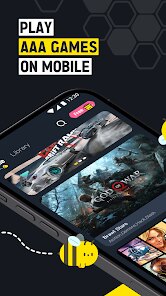
Bikii Cloud Game is a mobile app that lets you stream high-end PC and console games directly onto your phone, acting like a remote gaming setup in your pocket. You download it from Google Play or the App Store, install it, and launch it without any upfront cost—the app itself is free to grab. After opening it, the first impression is surprisingly clean: a straightforward list of games you can tap to play, no cluttered menus or aggressive sign-up walls. For a normal user, the appeal is obvious—you don't need a powerful device or a big download; you just need a decent internet connection. I noticed it has over a million installs, though exact numbers vary, and while registration is quick, there are in-app purchases for time or membership options, and occasional ads pop up unless you subscribe.
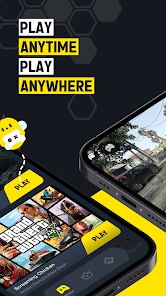
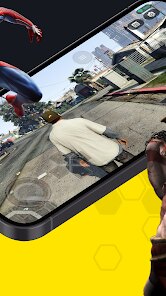
Once you're in, the hands-on experience is pretty smooth for the most part. The interface is minimal—you pick a game, hit play, and after a brief buffering moment, you're controlling it via touch overlays or a connected controller. I tried a few action titles, and the responsiveness felt fine on Wi-Fi, though it stuttered a bit on mobile data. Onboarding is simple: you create an account, maybe link a controller, and you're good to go. The main actions are browsing the library, launching games, and managing your session time, which is capped unless you buy more. A practical tip I picked up: keep the stream quality set to auto, because forcing high resolution leads to lag. The app doesn't overwhelm you with tutorials, which I liked, but the touch controls can feel cramped on smaller screens.
After using Bikii Cloud Game for a while, I'd say it's a neat option for casual gamers who want to try titles like Genshin Impact or Cyberpunk 2077 on the go without dropping cash on hardware. It's less polished than big players like GeForce Now, since the library is smaller and stability varies, but the free entry point is a fair trade-off. Someone who already subscribes to a more established cloud service might not need it, while a user looking for a low-commitment test run could keep it installed for occasional use. I'd probably uninstall it if I got a better service, but for now, it serves its purpose without demanding much.
features
- 🚀 Instant Play: Bikii Cloud Game skips downloads entirely. You tap a game, it streams in seconds, and you're playing. GeForce Now requires you to own games on other stores, which adds friction, while Bikii keeps it self-contained—no extra accounts or purchases needed.
- 🎮 Controller Integration: The app supports most Bluetooth controllers out of the box, and the mapping is solid. In contrast, Google Stadia had similar ease, but since Stadia shut down, Bikii fills that gap for mobile-first users without the messy setup.
- 💸 Free Trial Access: You can play a handful of AAA games for free without a subscription, just with ads or short time limits. Xbox Cloud Gaming charges a monthly fee upfront, but Bikii's no-commitment entry lets you test the waters first.
- 📱 Lightweight App: The app itself is under 50 MB, so it installs fast even on older phones. Shadow PC requires a hefty download and a powerful device for optimal use, whereas Bikii's low footprint makes it accessible to more users.
pros
- 🎯 Hardware Independence: Bikii Cloud Game runs on almost any Android or iOS device, even budget models from 2019, since all processing is server-side. Other services like Boosteroid demand stronger Wi-Fi, but Bikii adapts well to common home routers.
- 🔄 Session Continuity: If your connection drops, the app saves your progress in the cloud and lets you resume right where you left off, a feature that pushes it ahead of niche competitors like Vortex which don't handle pauses as smoothly.
- 🆕 Growing Library: Bikii regularly adds newer titles, including upcoming indie games, which is rare for a free cloud service. Caffeine Cloud Game has a static list, but Bikii updates monthly, keeping things fresh for regular users.
cons
- ⏳ Time Caps: Free users get limited playtime without a membership, often just 30 minutes per session, which is too short for immersive games. GeForce Now's free tier offers one-hour sessions, but Bikii's cap feels more restrictive and forces frequent reconnects.
- 📶 Stream Quality Drops: On anything but fast Wi-Fi, the video stream pixelates noticeably, especially in fast-moving scenes. Xbox Cloud Gaming handles variable connections better with adaptive scaling, while Bikii's fallback is rougher around the edges.
- 📋 Small Game Selection: The library is only about 30-40 games, compared to hundreds on services like Luna or Blacknut, so you'll run out of options quickly if you're a diverse gamer. Bikii focuses on popular hits, but misses many niche genres.
- 🖥️ Touch Control Lag: The on-screen buttons have a slight delay, making precise actions in shooters or platformers harder. Even Nvidia's GeForce Now app offers more customizable touch layouts, but Bikii's defaults feel clunky without a controller.
Recommended Apps
![]()
BetterMe: Health Coaching
BetterMe Limited4.3
![]()
Walli - HD, 4K Wallpapers
Tap AI4.4![]()
Future Self - Old Age Filter
Vidler Koiter1.6
![]()
AI Photo Editor, Collage-Fotor
AI Art Photo Editor | Everimaging Ltd.4.3![]()
AI Face Swap: MagicFace &Photo
Braly JSC0![]()
QR Code Reader: QR Scanner
WECHOICE MOBILE4.3![]()
Lip Fall Challenge: Fun Filter
Braly JSC0![]()
Funny Reverse Audio - Singing
PlayStudioInc0![]()
Birthday Secrets
shasunder4.4![]()
Live Wallpapers HD 4K
Wallpaper app4.4![]()
Find Your Phone By Clap
Trusted App Global4.5![]()
Wizz - Expand Your World
Wizz3.8![]()
NCAA March Madness Live
NCAA Digital4.7![]()
Hulu: Stream TV shows & movies
Disney4.5![]()
Lethal Love: a Yandere game
AniByte!4.4















Disclaimer
1.Apklifts does not represent any developer, nor is it the developer of any App or game.
2.Apklifts provide custom reviews of Apps written by our own reviewers, and detailed information of these Apps, such as developer contacts, ratings and screenshots.
3. All trademarks, registered trademarks, product names and company names or logos appearing on the site are the property of their respective owners.
4.Apklifts abides by the federal Digital Millennium Copyright Act (DMCA) by responding to notices of alleged infringement that complies with the DMCA and other applicable laws.
5.If you are the owner or copyright representative and want to delete your information, please contact us [email protected].
6.All the information on this website is strictly observed all the terms and conditions of Google Ads Advertising policies and Google Unwanted Software policy.
7.Apklifts.com is an independent, information-only website which is 100% free to all the users.














