

Raccoon Prank Call & Chat

1K+
Installs
TopHopStudio LTD
Developer
-
Entertainment
Category
-
Everyone
Content Rating
-
https://tophopstudio.com/privacy.html
Privacy Policy
Screenshots



editor reviews
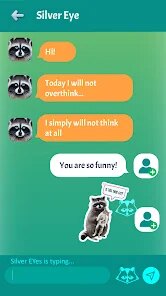
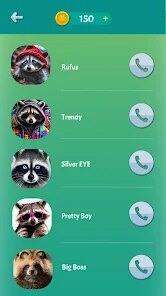
You know those moments when you want to mess with a friend without being too mean? Raccoon Prank Call & Chat is exactly that kind of app, sitting somewhere between a joke generator and a silly communication tool. It's built around the idea of sending fake call screens or chat messages that look real enough to fool someone for a laugh. I stumbled across it on Google Play after a friend mentioned using it during a gaming session, and the download count was decent, so I figured why not. After installing, you're greeted with a bright, cartoonish interface that immediately sets the tone, it's not trying to be serious at all. There's no forced sign-up, which I appreciated, though I spotted some optional in-app purchases for extra prank packs. No ads popped up right away, which was a nice surprise for a free download.
Once I launched the app, the first thing I saw was a list of prank scenarios, things like "fake boss call" or "imaginary pizza delivery." Tapping one brought up a simple editing screen where I could customize the caller name and a short message. The onboarding was basically nonexistent, but honestly, it didn't need a tutorial. I picked "angry girlfriend" as a joke for my buddy, typed in his name, and hit send. The app then shows a simulated incoming call screen that feels surprisingly real, complete with a ringtone and a caller ID image. The smooth part was how quickly it generated the fake call, almost instant. One small tip I found useful was that you can preview the prank before sending it, which saved me from sending something too ridiculous by accident. On the flip side, customizing the chat messages felt a bit clunky because the keyboard sometimes overlapped with the preview area, making it hard to see what I was typing until I closed it.
After using Raccoon for a couple of weeks, I'd say it's a fun tool if you're looking for quick, harmless laughs with close friends or family who won't get genuinely annoyed. The prank scenarios are creative, like fake Uber arrival or a call from a celebrity, which sets it apart from generic prank apps that just offer text spam or basic call screens. Compared to something like Fake Call or Prank Caller, Raccoon feels more polished with its graphics and variety of options, though those apps offer more manual control over the simulation details. I could see someone keeping it installed if they regularly play jokes on their group chat, but for daily use, it's too gimmicky to stick around. I'd probably uninstall it once the novelty wears off, especially since the free content is limited, and the paid packs aren't cheap enough to justify unless you're really into pranking.
features
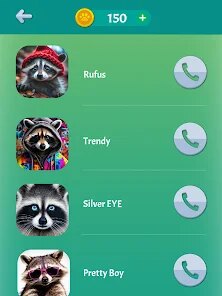
- 🐾 The fake call screens are shockingly realistic, showing caller names, profile pictures, and even a custom ringtone, which makes pranking feel convincing rather than childish.
- 🐾 There are over 50 pre-written prank scenarios, ranging from "getting fired" to "you won the lottery," so you don't need to come up with ideas yourself, just pick and customize the name.
- 🐾 Unlike generic call fakers, this app also includes chat message simulations, where you can create fake text threads with timestamps and bubble colors, adding another layer of trickery.
- 🐾 A standout feature is the "send and forget" option, which lets you schedule a prank call for later, so you don't have to wait around or time it manually, perfect for surprising someone at lunch.
pros
- 🦊 The interface is way more user-friendly than something like Fake Call Free, which often bombards you with ads and confusing menus; Raccoon keeps everything clean and tap-friendly.
- 🦊 The variety of prank types is a big plus, because apps like Prank Caller usually only handle calls, while Raccoon mixes in chat and notification fakes, giving you more ways to joke.
- 🦊 The optional scheduled pranks feel unique compared to most rivals, which require manual sending, so you can set a prank for a specific time without being stuck on your phone.
cons
- 🐺 The free version is extremely limited, with only a handful of scenarios available, and the paid packs feel overpriced at around $3 each, especially compared to Prank Caller that offers more free content upfront.
- 🐺 Some prank scenarios feel recycled or outdated, like the "missed call from mom" one, which might not fool anyone used to modern messaging apps, unlike the more creative options in Fake Call Pro.
- 🐺 There's no way to export or share the prank as a video or image after it's done, so you can't save the funny reaction for later, which is a missed opportunity compared to apps with recording features.
Recommended Apps
![]()
BetterMe: Health Coaching
BetterMe Limited4.3
![]()
Walli - HD, 4K Wallpapers
Tap AI4.4![]()
Future Self - Old Age Filter
Vidler Koiter1.6
![]()
AI Photo Editor, Collage-Fotor
AI Art Photo Editor | Everimaging Ltd.4.3![]()
AI Face Swap: MagicFace &Photo
Braly JSC0![]()
QR Code Reader: QR Scanner
WECHOICE MOBILE4.3![]()
Lip Fall Challenge: Fun Filter
Braly JSC0![]()
Funny Reverse Audio - Singing
PlayStudioInc0![]()
Birthday Secrets
shasunder4.4![]()
Live Wallpapers HD 4K
Wallpaper app4.4![]()
Find Your Phone By Clap
Trusted App Global4.5![]()
Wizz - Expand Your World
Wizz3.8![]()
NCAA March Madness Live
NCAA Digital4.7![]()
Hulu: Stream TV shows & movies
Disney4.5![]()
Lethal Love: a Yandere game
AniByte!4.4















Disclaimer
1.Apklifts does not represent any developer, nor is it the developer of any App or game.
2.Apklifts provide custom reviews of Apps written by our own reviewers, and detailed information of these Apps, such as developer contacts, ratings and screenshots.
3. All trademarks, registered trademarks, product names and company names or logos appearing on the site are the property of their respective owners.
4.Apklifts abides by the federal Digital Millennium Copyright Act (DMCA) by responding to notices of alleged infringement that complies with the DMCA and other applicable laws.
5.If you are the owner or copyright representative and want to delete your information, please contact us [email protected].
6.All the information on this website is strictly observed all the terms and conditions of Google Ads Advertising policies and Google Unwanted Software policy.
7.Apklifts.com is an independent, information-only website which is 100% free to all the users.














