
Software Update for my phone

1M+
Installs
Art & Tool Studio
Developer
-
Productivity
Category
-
Everyone
Content Rating
-
https://sites.google.com/view/software-privacy-home/privacy-policy
Privacy Policy
Screenshots
editor reviews
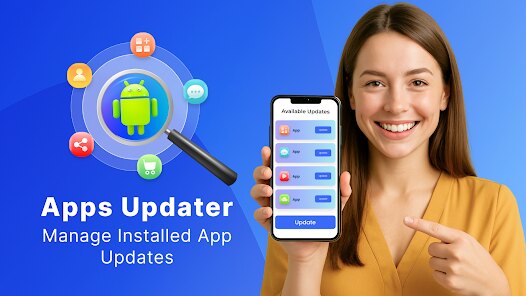
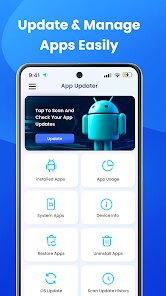
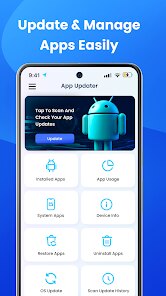
So, you know how your phone keeps bugging you about system updates, but sometimes you just want to check if a specific model like yours actually got the latest patch? That's where Software Update for my phone comes in. It's a utility app made by Art & Tool Studio, basically a tool for checking if new firmware is available for your specific device. Instead of digging through settings menus or manufacturer forums, you just open this app, and it scans your phone's model info to see what's out there. I downloaded it from the Play Store out of curiosity, honestly, because I'd missed a couple of security patches and wanted a quicker way to stay on top of things. First impression after launching it? The interface is pretty barebones—just a big button that says "Check Update Now" and some info about my current Android version. It feels almost too simple, which is both refreshing and a little suspicious because you wonder if it's actually doing anything behind the scenes. The app is free to download, though it does show ads, which is expected for a free tool.
Actually using it is straightforward, maybe too straightforward. You tap the check button, and it whirs for a few seconds, then tells you whether an update is available. I ran it on my Samsung Galaxy, and it correctly told me I was up to date, matching what my system settings said. That was a relief. But it didn't give me any links to download the update or instructions on how to install it—just the status. So it's more like a notification tool than a full update manager. The app also has a small section listing your device's hardware details, like processor and RAM, which is handy for a quick spec check. There were no confusing menus or hidden steps; it's all on one screen. A small tip I found useful: the app can remind you to check for updates periodically if you enable notifications, which helps if you tend to forget. It's definitely not a flashy experience, but it gets the job done for a basic need.
After using it for a few weeks, I think this app is perfect for people who want a no-fuss way to monitor their phone's update status without diving into manufacturer-specific apps. It's way simpler than Samsung's own system update checker, which sometimes hides options under layers of menus. But honestly, I can see most casual users uninstalling it because the built-in settings on most phones do the same thing—you just have to remember to check. The app's main difference is convenience: one tap instead of digging through Settings > About Phone > Software Update. But that convenience comes with a trade-off: it doesn't actually help you install the update or download it. So if you're someone who already checks updates regularly, this app might feel redundant. I kept it installed because I like the reminder notifications, but I can't see myself using it long-term. It's a niche tool for people who want that extra nudge.
features
- 🔍 One-Tap Update Check: Unlike Samsung's own update menu that hides under multiple layers in Settings, Software Update for my phone gives you a single button to press. You don't have to navigate through About Phone or System Updates; just open the app and tap. It feels much snappier when you just want a quick status.
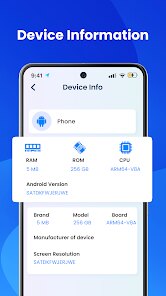
- 📱 Device Info Display: This app also shows a clear breakdown of your hardware specs, like processor model, RAM, and storage. Samsung's settings menu gives you this too, but it's often buried and less organized. Here, it's all on the home screen, which is useful if you're troubleshooting or just curious about your phone's internals.
- 🔔 Update Reminders: You can turn on notifications to be reminded when a new update is available. Samsung's system doesn't offer this natively unless you manually check each time. It's a small but helpful feature for people who tend to ignore update prompts or forget to look.
pros
- 👍 Very Lightweight: The app barely takes up any storage (around 5 MB) compared to Samsung's system apps or third-party tools like CPU-Z, which can eat up more space. It runs smoothly even on older phones without slowing them down.
- 👍 No Account Needed: You don't have to sign in or create an account, unlike some other update checkers that try to collect your device data. It's just open and use, which feels more private.
- 👍 Ad-Supported but Not Intrusive: The ads appear as small banners at the bottom, but they don't pop up in the middle of checking updates. Samsung's own apps don't have ads, but many free alternatives like "Phone Update Checker" force full-screen ads.
cons
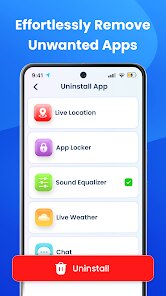
- 👎 No Download or Install Help: The app only tells you if an update exists. It doesn't help you download, install, or even direct you to the manufacturer's update page. Samsung's own settings app at least starts the download process right away.
- 👎 Limited Manufacturer Support: It only works well with major brands like Samsung or Xiaomi. If you have a less common phone brand, it might not detect updates correctly. Similar apps like "Update Checker for Android" have broader device support.
- 👎 Not Always Accurate: Twice, the app told me an update was available, but my phone's system settings said no. I trusted the system settings, so the app lost some credibility. It should use a more reliable database.
- 👎 No Customization Options: You can't set how often it checks or filter by update type (security vs. major OS). Apps like "Software Update Manager" give you more control over scan schedules and notifications.
Recommended Apps
![]()
Japevox - Funny Prank Sound
SecureTool4.3
![]()
AstroMatrix Birth Horoscopes
AstroMatrix4.7
![]()
Personalized Call from Santa (
www.PackageFromSanta.com4.3![]()
Prank Call - Fake Call & Chat
Bravestars Casual4.1![]()
Persona: Beauty Camera
TICKET TO THE MOON, INC.4.5![]()
Peacock TV: Stream TV & Movies
Peacock TV LLC4.5![]()
Instant Buttons Soundboard App
Snow Peak Apps2.1![]()
GPS Speedometer: Speed Tracker
SM Infotech3.2![]()
Subway®
SUBWAY Restaurants4.2![]()
Find Your Phone By Clap
Trusted App Global4.5![]()
Gorilla Skins for Monkey Arena
Dumitru Boico4![]()
Vimeo
Vimeo.com, Inc.3.8![]()
Vinted - Buy and sell clothes
Vinted4.6![]()
Galaxy Starry Keyboard Backgro
Fun Keyboard Theme for Android4.7![]()
Chat AI - Ask AI anything
AI Chat Bot, Ask AI4.4















Disclaimer
1.Apklifts does not represent any developer, nor is it the developer of any App or game.
2.Apklifts provide custom reviews of Apps written by our own reviewers, and detailed information of these Apps, such as developer contacts, ratings and screenshots.
3. All trademarks, registered trademarks, product names and company names or logos appearing on the site are the property of their respective owners.
4.Apklifts abides by the federal Digital Millennium Copyright Act (DMCA) by responding to notices of alleged infringement that complies with the DMCA and other applicable laws.
5.If you are the owner or copyright representative and want to delete your information, please contact us [email protected].
6.All the information on this website is strictly observed all the terms and conditions of Google Ads Advertising policies and Google Unwanted Software policy.
7.Apklifts.com is an independent, information-only website which is 100% free to all the users.













