
GPS Camera Timestamp & Geotag

10K+
Installs
Betasoft Mobile
Developer
-
Productivity
Category
-
Everyone
Content Rating
-
https://sites.google.com/betasoftmobile.com/policy-remote-control-for-tv
Privacy Policy
Screenshots

editor reviews
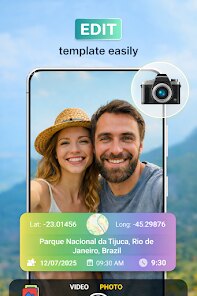
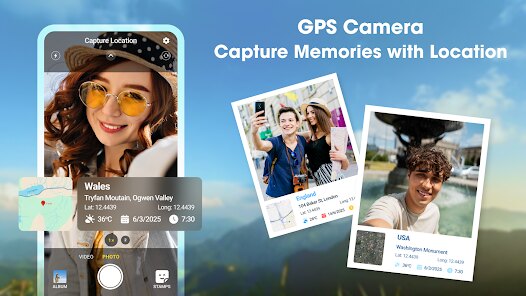
I picked up GPS Camera Timestamp & Geotag from Betasoft Mobile because I needed a quick way to stamp my photos with exact location data for a hiking trip log. It's one of those utility apps that sits in that niche between a simple camera and a full-on field data collector. You use it to capture images with an overlay showing the date, time, GPS coordinates, and even the street address if it can grab it. The app has been downloaded over a million times on Android, and it's free to install, though you'll bump into ads unless you pay for the pro version to kill them. When I first launched it, the interface felt a little cluttered, like someone threw too many toggle switches on a single screen, but the core idea was clear right away: point, shoot, and get a photo that embeds the where and when directly onto the image file itself.
Getting into the actual use, the onboarding was straightforward but not exactly polished. You open the app, and the camera viewfinder is there, but you have to set up your overlay template first. You can configure what shows up: lat/long, altitude, timestamp format, font size, and color. I spent a few minutes sliding the coordinate fields around on screen to avoid covering up the subject. The shutter button works like any other camera app, but what surprised me was how the app handles GPS locking. It takes a second or two to lock onto satellites, especially if you just opened it indoors, so you end up waiting for the coordinates to stop flickering before you snap. The geotag is written right into the EXIF data, which is handy for later sorting, but the timestamp overlay is burned onto the photo itself, so you can't remove it afterward. There's a batch mode for adding coordinates to existing photos from your gallery, though I didn't find that super smooth since it chokes on large image batches from my Pixel phone.
After using it for a couple of weeks on and off, I think it's a decent tool for specific scenarios. Surveyors, real estate agents, or anyone documenting outdoor evidence or progress shots will get real mileage out of the clean overlay and the reliable GPS tagging. But for casual snappers who just want location data hidden in the file metadata, apps like Geotag Photos Pro or even Google Photos' built-in location tagging are less intrusive because they don't force a watermark on every image. What keeps me from deleting it is the offline reliability; if you're out in a cell dead zone, many competing apps fail to geotag at all, but this one stores the last known coordinates and works. The ad placement is annoying, though, popping up right when you are trying to adjust settings, which pushes you toward the paid version faster than I'd like. Still, for what it does, it's a solid utility that does not pretend to be anything else.
features
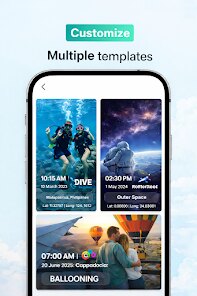
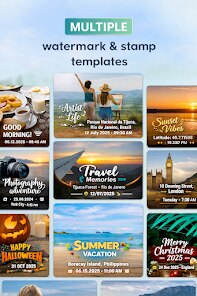
- 📷 The stamp customization is more flexible than GeoTag Photos Pro lets you adjust position, opacity, font color, and which data fields appear, so your work photos don't end up with ugly overlapping text.
- 📷 The app supports timestamp pinning to a specific time zone, which is great if you are traveling and want the overlay to show local time instead of your home zone, something the basic Samsung Camera app refuses to do with GPS stamps.
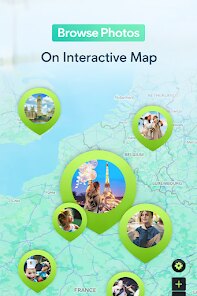
- 📷 It writes the geotag into both the visual overlay and the hidden EXIF metadata at the same time, meaning you can sort photos on a map later without having the stamp on screen if you use a viewer that ignores overlays.
- 📷 The batch geotagging mode for existing photos saves time if you missed a location tag earlier, though it works best on small groups of images and crashes on large albums compared to Geotag Photos Pro's smoother queue system.
pros
- 👍 Offline GPS use is more reliable than Map Camera GPS, which often defaults to a generic 'unknown location' when there's no cell signal, but this app keeps the last good fix on screen.
- 👍 The pro version is a one-time purchase rather than a subscription, which feels fair compared to Geotag Photos Pro's yearly fee if you only need occasional tagging.
- 👍 The address lookup via reverse geocoding works well in cities, popping up street names and landmarks that save you from manually typing locations later.
cons
- 👎 The interface is clunky and looks like it hasn't been updated since Android 6, with small buttons and a messy settings screen that feels dated next to Timestamp Camera's clean modern layout.
- 👎 Free version ads appear at the worst moments, blocking the viewfinder right when you're lining up a shot, and the only way to remove them is paying up.
- 👎 Batch processing is unstable with large photo sets, freezing or crashing on anything over 50 images, while similar apps handle hundreds without a hiccup.
- 👎 The GPS lock is slow to acquire indoors, sometimes taking over 30 seconds, which frustrates when you just want a quick timestamped snapshot.
Recommended Apps
![]()
Japevox - Funny Prank Sound
SecureTool4.3
![]()
AstroMatrix Birth Horoscopes
AstroMatrix4.7
![]()
Personalized Call from Santa (
www.PackageFromSanta.com4.3![]()
Prank Call - Fake Call & Chat
Bravestars Casual4.1![]()
Persona: Beauty Camera
TICKET TO THE MOON, INC.4.5![]()
Peacock TV: Stream TV & Movies
Peacock TV LLC4.5![]()
Instant Buttons Soundboard App
Snow Peak Apps2.1![]()
GPS Speedometer: Speed Tracker
SM Infotech3.2![]()
Subway®
SUBWAY Restaurants4.2![]()
Find Your Phone By Clap
Trusted App Global4.5![]()
Gorilla Skins for Monkey Arena
Dumitru Boico4![]()
Vimeo
Vimeo.com, Inc.3.8![]()
Vinted - Buy and sell clothes
Vinted4.6![]()
Galaxy Starry Keyboard Backgro
Fun Keyboard Theme for Android4.7![]()
Chat AI - Ask AI anything
AI Chat Bot, Ask AI4.4















Disclaimer
1.Apklifts does not represent any developer, nor is it the developer of any App or game.
2.Apklifts provide custom reviews of Apps written by our own reviewers, and detailed information of these Apps, such as developer contacts, ratings and screenshots.
3. All trademarks, registered trademarks, product names and company names or logos appearing on the site are the property of their respective owners.
4.Apklifts abides by the federal Digital Millennium Copyright Act (DMCA) by responding to notices of alleged infringement that complies with the DMCA and other applicable laws.
5.If you are the owner or copyright representative and want to delete your information, please contact us [email protected].
6.All the information on this website is strictly observed all the terms and conditions of Google Ads Advertising policies and Google Unwanted Software policy.
7.Apklifts.com is an independent, information-only website which is 100% free to all the users.













