
DIY Battery: 3D Charge & Emoji

500K+
Installs
Braly JSC
Developer
-
Productivity
Category
-
Everyone
Content Rating
-
https://bralyvn.com/privacy-policy.php
Privacy Policy
Screenshots
editor reviews
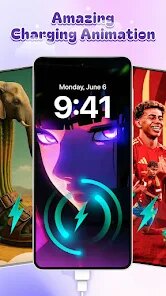
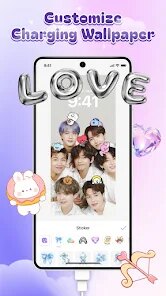
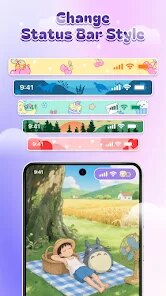
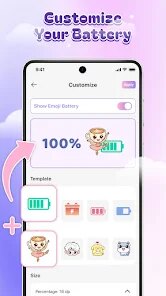
DIY Battery: 3D Charge & Emoji is an Android utility app that turns your phone's charging screen into a customizable, animated display. Instead of the standard battery icon, you get a full-screen 3D battery model with different styles, colors, and even emoji-based charge levels. People usually download this from Google Play when they want a more playful or personalized charging experience — maybe they're bored with the default look or just want something that feels more interactive. The first time you open it, the interface is pretty straightforward: you pick a battery design, adjust a few settings, and that's it. The install count seems modest compared to mainstream apps, and while it's free to download, you'll see some in-app purchase prompts for premium themes. There are also ads here and there, which isn't surprising for a free utility app, but they don't totally ruin the experience.
Once you start using it, the app requires very little effort. After installation, you set it as your default charging animation through the app's instructions — it takes maybe a minute. Then, whenever you plug in your phone, the 3D battery shows up with the design you chose. Swiping left or right lets you preview other themes without going into the menu, which is a nice touch. The animations are smooth, but sometimes the app feels a bit sluggish when switching between heavy 3D models on older phones. One practical tip: if you want to avoid ads, you can turn off the app's network access in your phone settings, since it doesn't need internet to work. The interface itself is clean, with big icons and clear labels, so you won't get lost. There's no complicated onboarding — you just pick, apply, and charge.
After using this app for a while, I think it's more of a fun gimmick than a must-have tool. People who enjoy customizing every bit of their phone — like changing launchers or lock screen widgets — will probably love it. It's definitely different from something like AccuBattery, which is more about battery health stats and monitoring. DIY Battery focuses purely on the visual side, so if you don't care about how your charging screen looks, you'll likely uninstall it after a day. The premium themes look great, but paying just for an animation might feel overpriced. I kept it installed for a week because it's amusing to see a glowing battery or a row of emojis when I plug in, but I'm not sure it's something I need long-term. It's a nice distraction, not a daily driver.
features
- 🎨 3D Battery Customization – Unlike Battery Widget Reborn, which focuses on a simple widget, DIY Battery gives you a full 3D model that rotates and glows. You can pick themes like a cyberpunk battery or a cartoon emoji charger, which makes the charging screen feel alive rather than static.
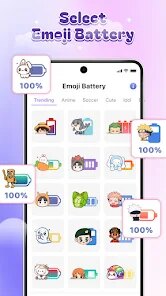
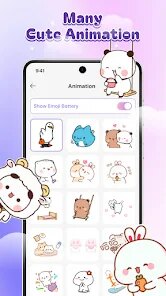
- 😊 Emoji Charge Levels – Instead of a boring percentage, you can set emojis to represent battery levels — for example, a happy face when charged or a skull when low. It's a playful twist that similar apps like Ampere don't offer, since they only show numbers and voltage.
- 🔄 Swipe Preview – You can swipe left or right on the charging screen to switch between themes without entering the settings. This is super handy if you want to test different looks quickly. Big apps like Energy Ring don't have this feature — they lock you into one style at a time.
- ⚡ Low Resource Usage – Despite the 3D graphics, the app doesn't drain battery as much as you'd think. It runs only when the charger is connected, so it doesn't slow down your phone during normal use. That's better than some wallpapers that keep running in the background.
pros
- 🌟 Easy to Set Up – Compared to BatteryGuru, which has tons of notifications and settings, DIY Battery just asks you to pick a theme and turn it on. It's much simpler for someone who doesn't want to mess with permissions and alerts.
- 🌟 Visually Fresh – The 3D look is more eye-catching than Battery HD Pro's flat icons. The colors pop, and the animations feel smooth on most devices. You get a charging screen that actually looks cool, not just functional.
- 🌟 No Background Drain – Unlike some apps that run all day to monitor battery, DIY Battery only activates when you plug in. This saves juice, which is a big plus over always-on tools like GSam Battery Monitor.
- ⚠️ Limited Functionality – It only changes the charging screen. Apps like AccuBattery give you charge speed, health estimates, and alarms — DIY Battery does none of that. If you want real battery data, this app won't help.
- ⚠️ Ads and Paywalls – Free themes are decent, but the best ones cost money. Battery Widget Reborn offers more free customization without pushing in-app purchases so aggressively.
- ⚠️ Occasional Lag – On older or budget phones, the 3D animation can stutter for a second or two when the charger first connects. Ampere, being a simple stats app, never has this problem because it doesn't waste resources on graphics.
- ⚠️ No Widget or Lock Screen – You can only see the animation while charging. If you want a permanent battery display on your home screen, you'll need another app like Energy Ring, which works all the time.
cons
>
DIY Battery: 3D Charge & Emoji is an Android utility app that turns your phone's charging screen into a customizable, animated display. Instead of the standard battery icon, you get a full-screen 3D battery model with different styles, colors, and even emoji-based charge levels. People usually download this from Google Play when they want a more playful or personalized charging experience — maybe they're bored with the default look or just want something that feels more interactive. The first time you open it, the interface is pretty straightforward: you pick a battery design, adjust a few settings, and that's it. The install count seems modest compared to mainstream apps, and while it's free to download, you'll see some in-app purchase prompts for premium themes. There are also ads here and there, which isn't surprising for a free utility app, but they don't totally ruin the experience.
Once you start using it, the app requires very little effort. After installation, you set it as your default charging animation through the app's instructions — it takes maybe a minute. Then, whenever you plug in your phone, the 3D battery shows up with the design you chose. Swiping left or right lets you preview other themes without going into the menu, which is a nice touch. The animations are smooth, but sometimes the app feels a bit sluggish when switching between heavy 3D models on older phones. One practical tip: if you want to avoid ads, you can turn off the app's network access in your phone settings, since it doesn't need internet to work. The interface itself is clean, with big icons and clear labels, so you won't get lost. There's no complicated onboarding — you just pick, apply, and charge.
After using this app for a while, I think it's more of a fun gimmick than a must-have tool. People who enjoy customizing every bit of their phone — like changing launchers or lock screen widgets — will probably love it. It's definitely different from something like AccuBattery, which is more about battery health stats and monitoring. DIY Battery focuses purely on the visual side, so if you don't care about how your charging screen looks, you'll likely uninstall it after a day. The premium themes look great, but paying just for an animation might feel overpriced. I kept it installed for a week because it's amusing to see a glowing battery or a row of emojis when I plug in, but I'm not sure it's something I need long-term. It's a nice distraction, not a daily driver.
- 🎨 3D Battery Customization – Unlike Battery Widget Reborn, which focuses on a simple widget, DIY Battery gives you a full 3D model that rotates and glows. You can pick themes like a cyberpunk battery or a cartoon emoji charger, which makes the charging screen feel alive rather than static.
- 😊 Emoji Charge Levels – Instead of a boring percentage, you can set emojis to represent battery levels — for example, a happy face when charged or a skull when low. It's a playful twist that similar apps like Ampere don't offer, since they only show numbers and voltage.
- 🔄 Swipe Preview – You can swipe left or right on the charging screen to switch between themes without entering the settings. This is super handy if you want to test different looks quickly. Big apps like Energy Ring don't have this feature — they lock you into one style at a time.
- ⚡ Low Resource Usage – Despite the 3D graphics, the app doesn't drain battery as much as you'd think. It runs only when the charger is connected, so it doesn't slow down your phone during normal use. That's better than some wallpapers that keep running in the background.
- 🌟 Easy to Set Up – Compared to BatteryGuru, which has tons of notifications and settings, DIY Battery just asks you to pick a theme and turn it on. It's much simpler for someone who doesn't want to mess with permissions and alerts.
- 🌟 Visually Fresh – The 3D look is more eye-catching than Battery HD Pro's flat icons. The colors pop, and the animations feel smooth on most devices. You get a charging screen that actually looks cool, not just functional.
- 🌟 No Background Drain – Unlike some apps that run all day to monitor battery, DIY Battery only activates when you plug in. This saves juice, which is a big plus over always-on tools like GSam Battery Monitor.
- ⚠️ Limited Functionality – It only changes the charging screen. Apps like AccuBattery give you charge speed, health estimates, and alarms — DIY Battery does none of that. If you want real battery data, this app won't help.
- ⚠️ Ads and Paywalls – Free themes are decent, but the best ones cost money. Battery Widget Reborn offers more free customization without pushing in-app purchases so aggressively.
- ⚠️ Occasional Lag – On older or budget phones, the 3D animation can stutter for a second or two when the charger first connects. Ampere, being a simple stats app, never has this problem because it doesn't waste resources on graphics.
- ⚠️ No Widget or Lock Screen – You can only see the animation while charging. If you want a permanent battery display on your home screen, you'll need another app like Energy Ring, which works all the time.
Recommended Apps
![]()
Japevox - Funny Prank Sound
SecureTool4.3
![]()
AstroMatrix Birth Horoscopes
AstroMatrix4.7
![]()
Personalized Call from Santa (
www.PackageFromSanta.com4.3![]()
Prank Call - Fake Call & Chat
Bravestars Casual4.1![]()
Persona: Beauty Camera
TICKET TO THE MOON, INC.4.5![]()
Peacock TV: Stream TV & Movies
Peacock TV LLC4.5![]()
Instant Buttons Soundboard App
Snow Peak Apps2.1![]()
GPS Speedometer: Speed Tracker
SM Infotech3.2![]()
Subway®
SUBWAY Restaurants4.2![]()
Find Your Phone By Clap
Trusted App Global4.5![]()
Gorilla Skins for Monkey Arena
Dumitru Boico4![]()
Vimeo
Vimeo.com, Inc.3.8![]()
Vinted - Buy and sell clothes
Vinted4.6![]()
Galaxy Starry Keyboard Backgro
Fun Keyboard Theme for Android4.7![]()
Chat AI - Ask AI anything
AI Chat Bot, Ask AI4.4















Disclaimer
1.Apklifts does not represent any developer, nor is it the developer of any App or game.
2.Apklifts provide custom reviews of Apps written by our own reviewers, and detailed information of these Apps, such as developer contacts, ratings and screenshots.
3. All trademarks, registered trademarks, product names and company names or logos appearing on the site are the property of their respective owners.
4.Apklifts abides by the federal Digital Millennium Copyright Act (DMCA) by responding to notices of alleged infringement that complies with the DMCA and other applicable laws.
5.If you are the owner or copyright representative and want to delete your information, please contact us [email protected].
6.All the information on this website is strictly observed all the terms and conditions of Google Ads Advertising policies and Google Unwanted Software policy.
7.Apklifts.com is an independent, information-only website which is 100% free to all the users.













