

Pollo AI: AI Video Generator

1M+
Installs
COCOSOFT TECHNOLOGY PTE. LTD.
Developer
-
Entertainment
Category
-
Everyone
Content Rating
-
https://pollo.ai/privacy-policy
Privacy Policy
Screenshots



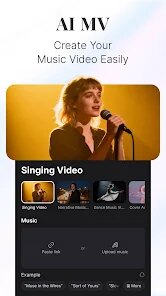

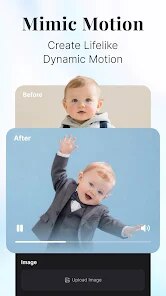
editor reviews
Pollo AI is a video generation tool that sits squarely in the fast-growing AI content creation space. You can use it to turn text prompts, images, or even short clips into new videos without needing any editing skills. I first heard about it through an ad, and the idea of skipping complex software to just type out a scene and see it come to life was pretty tempting. After downloading it from the Google Play store (it's free to install, with over a million downloads), the first launch felt straightforward. The homepage throws you right into a prompt box, asking what you want to create. There's no marathon registration process – you can poke around a bit before committing to an account, which I appreciated. It definitely makes you want to try something immediately.
Once you start using it, the experience is mostly about choosing your input format. You can type a sentence, upload a photo, or select a style like "anime" or "3D cartoon." For my first test, I wrote "a cat walking on a neon-lit street at night." The app processed it for about thirty seconds and played back a short clip. The motion was there, but the cat's face kept shifting shape every few frames. That inconsistency is something you notice pretty early on. The interface is clean – you tap the plus button, pick your option, and wait. A small tip: if you use a clear, high-contrast reference image, the output tends to hold together better than relying solely on text. There is a free daily quota, so you can experiment without spending money right away, though the queue times can get a bit long during peak hours. It's not a flawless tool, but the basic loop of input and output is simple enough to keep you trying different prompts.
After a week of casual use, I think Pollo AI works best for people who want quick, low-effort visual ideas – say, a social media background or a fun clip to share in a group chat. It's not for anyone needing consistent character animation or high-resolution output for professional work. Compared to something like Runway or Pika Labs, Pollo feels narrower; those apps give you more control over camera movement and scene transitions, while Pollo leans hard on the "just type and see" simplicity. What keeps me from uninstalling it is the novelty factor – it's genuinely entertaining to throw weird prompts at it and see what sticks. But the free credits run out fast, and the paid plans aren't cheap for what you get. I can see someone keeping it installed as a toy, but likely not as a daily driver for serious projects.
features
- 🎬 Simple Prompt to Video: You can literally type "a forest fire at dusk" and get a 4-second clip back. The process is dead simple compared to Kaiber, which often requires you to pick a style first or tweak motion sliders. Pollo just wants your text and runs with it. No fuss.
- 📷 Image-to-Video with Style Presets: Uploading a photo and applying a style like "retro film" or "pixel art" is where the app shines. It adds movement to static images better than most free tools I have tried. It is not as refined as Pika Labs, but the preset options make it faster for casual users.
- 🎭 Multiple Aspect Ratios: Unlike CapCut's AI feature that only outputs vertical video, Pollo lets you switch between 16:9, 9:16, and 1:1. This is a huge plus if you are making clips for TikTok, YouTube Shorts, and Instagram all at once.
- ⚡ Quick Rendering on Mobile: The app runs the AI processing on the cloud, so your phone doesn't heat up or drain battery while generating. It takes about 30 to 60 seconds per clip, which is faster than most mobile-based AI video generators I have tested.
pros
- ✨ No Subscription Lock: You can generate several videos per day for free without forcing you into a trial. Apps like Runway and Pika Labs give you very limited free trials, but Pollo gives a generous daily refresh of credits.
- 🚀 Low Learning Curve: There is no curve at all. Type, pick a style, wait. Compared to Deforum or Kaiber, which have daunting menus and sliders, Pollo is basically idiot-proof.
- 🎨 Creative Style Filters: The "Anime" and "Claymation" presets add genuine personality to outputs. These filters are more expressive than the generic "cinematic" defaults found in apps like Kling or Luma Dream Machine.
cons
- 🔁 Inconsistent Character Faces: Faces warp and morph every few frames, especially with human subjects. Runway handles facial consistency much better, making Pollo unreliable for any video that features a person's face prominently.
- ⏳ Long Wait Times on Free Tier: Even with a decent Wi-Fi connection, the queue can take 3-5 minutes per generation during busy hours. Pika Labs free tier processes in less than a minute usually.
- 🎥 Short Video Length: The maximum output is 4 seconds per clip. You have to manually stitch clips together in another app if you want anything longer. CapCut or Kling allow up to 10 seconds for free, which saves editing time.
- 💰 Expensive Monthly Plans: The paid subscription is quite pricey compared to what you get. For the same monthly cost, you could use a full suite like Canva's AI video tool or even Runway's basic plan, both of which offer more control.
Recommended Apps
![]()
BetterMe: Health Coaching
BetterMe Limited4.3
![]()
Walli - HD, 4K Wallpapers
Tap AI4.4![]()
Future Self - Old Age Filter
Vidler Koiter1.6
![]()
AI Photo Editor, Collage-Fotor
AI Art Photo Editor | Everimaging Ltd.4.3![]()
AI Face Swap: MagicFace &Photo
Braly JSC0![]()
QR Code Reader: QR Scanner
WECHOICE MOBILE4.3![]()
Lip Fall Challenge: Fun Filter
Braly JSC0![]()
Funny Reverse Audio - Singing
PlayStudioInc0![]()
Birthday Secrets
shasunder4.4![]()
Live Wallpapers HD 4K
Wallpaper app4.4![]()
Find Your Phone By Clap
Trusted App Global4.5![]()
Wizz - Expand Your World
Wizz3.8![]()
NCAA March Madness Live
NCAA Digital4.7![]()
Hulu: Stream TV shows & movies
Disney4.5![]()
Lethal Love: a Yandere game
AniByte!4.4















Disclaimer
1.Apklifts does not represent any developer, nor is it the developer of any App or game.
2.Apklifts provide custom reviews of Apps written by our own reviewers, and detailed information of these Apps, such as developer contacts, ratings and screenshots.
3. All trademarks, registered trademarks, product names and company names or logos appearing on the site are the property of their respective owners.
4.Apklifts abides by the federal Digital Millennium Copyright Act (DMCA) by responding to notices of alleged infringement that complies with the DMCA and other applicable laws.
5.If you are the owner or copyright representative and want to delete your information, please contact us [email protected].
6.All the information on this website is strictly observed all the terms and conditions of Google Ads Advertising policies and Google Unwanted Software policy.
7.Apklifts.com is an independent, information-only website which is 100% free to all the users.














