AndrOpen Office

5M+
Installs
Akikazu Yoshikawa
Developer
-
Productivity
Category
-
Everyone
Content Rating
-
support@andropenoffice.com
Developer Email
-
https://www.andropenoffice.com/privacy-policy
Privacy Policy
Screenshots
editor reviews
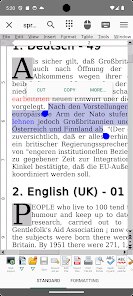
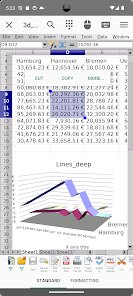
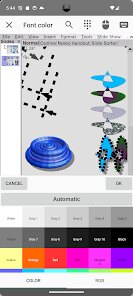
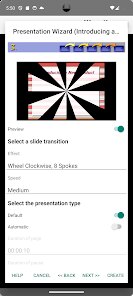
AndrOpen Office is a port of the full OpenOffice suite to Android. It's essentially a full-fledged office application that aims to bring the power of a desktop productivity suite to your phone or tablet. You can think of it as a Swiss Army knife for documents, spreadsheets, presentations, and more. A user would likely download this app if they need to work on complex .docx or .xlsx files on the go and find that standard mobile editors are too limiting. The first impression after launching it is a bit of a shock, honestly. The interface screams "desktop port," with tiny buttons and a layout that clearly wasn't designed with touch in mind. It feels like you're running a legacy program from ten years ago, and you might worry about using it on a small screen.
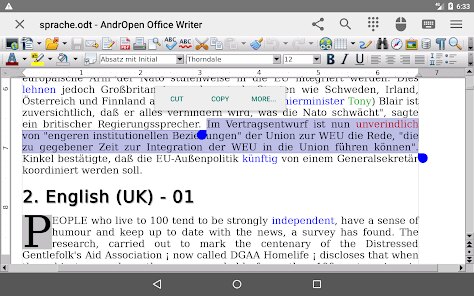
Once you get past the initial shock and start actually editing files, the real experience kicks in. Opening a document, the app takes a moment to render everything, especially if there are images or complex formatting. The main workspace is just your document, with a toolbar at the top that you'll be tapping constantly. The most common thing you'll do is tap to place a cursor, then bring up the on-screen keyboard to type. The interface itself is navigable, but you'll quickly notice it's not smooth. Scrolling can be laggy, and switching between editing modes takes a little time. One practical tip: you can use the settings to increase the icon size of the toolbar to save your eyes. It's not a seamless, fluid experience, but the key word here is functional. You can get real work done. You might also notice it lacks a dedicated viewer mode, and the copy-paste function from the drop-down menus feels a bit clunky compared to more modern apps.
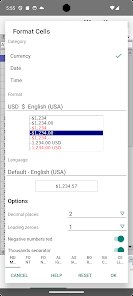
After using it for a while, I've got mixed feelings. AndrOpen Office is incredibly powerful for what it is. The fact that it supports macros, mail merge, and has a full formula editor sets it leagues apart from apps like Google Docs or Microsoft's mobile offerings. Anyone who needs to work on heavy, technical documents or spreadsheets with precise formatting and power tools will find it indispensable. On the flip side, the average user who just needs to jot down a grocery list or make a simple presentation will find it overly complex and frustrating. It's clearly built for a niche audience: power users who absolutely require desktop-grade functionality on their phone. What makes it different is its uncompromising feature set, but that's also its biggest flaw. I'd keep it installed because no other Android app can handle the specific .odt file I need to edit for work, but I could see a more casual user uninstalling it five minutes after downloading it out of sheer confusion.
features
- 📄 Full OpenOffice Port: Unlike most other mobile office apps, AndrOpen Office is a direct port of the desktop version. This means it handles macros and complex scripts that apps like WPS Office or OfficeSuite simply cannot touch. It's the most feature-complete office suite you can get on Android.
- 📄 Unmatched Formatting Fidelity: When opening a .docx or .xlsx file, the layout, fonts, and embedded content are so accurate it almost feels like you're on a PC. Competing apps like Google Docs often break or simplify layouts, but this app preserves them without major corruption.
- 📄 Macro and Extension Support: The standout feature is the ability to run OpenOffice macros and even install extensions. No other mobile office app offers this. It turns your phone into a tool for automating repetitive tasks within a spreadsheet or document.
pros
- ✅ True Desktop Power: AndrOpen Office is basically a desktop app crammed into a mobile shell. It crushes apps like Google Docs when you need to use a formula editor or add comments in a specific, non-simplified way. It's the only real option for advanced editing.
- ✅ Supports Legacy Formats: It flawlessly opens very old .doc, .xls, and .ppt files that feel like a lost cause on newer apps like Polaris Office. If you're digging through an old archive, this app is a lifesaver.
- ✅ 100% Free: It offers all these advanced features for absolutely nothing and is ad-free. You don't have to pay for a subscription to unlock macro features or advanced formatting, which gives it a massive edge over paid competitors like OfficeSuite.
cons
- ❌ Terrible User Interface: The UI is dated and clearly designed for a desktop with a mouse. Tapping small buttons on a phone screen is a massive pain. Apps like Google Docs have much better touch-optimized controls and gestures that make editing intuitive.
- ❌ Poor Performance: The app feels heavy and unoptimized. Opening a document is slow, scrolling is laggy, and switching between tools takes a few beats. It's not a smooth experience, especially compared to how snappy apps like WPS Office feel.
- ❌ No Cloud Integration: You can't just sign into your Google Drive or OneDrive and start editing. You have to manually download files to your device first. This is a major step backward from any modern office app that handles cloud sync automatically.
Recommended Apps
![]()
Fruit Doctor ASMR Surgery Game
SandBox Games Studios0
![]()
Face Me - AI Art Photo Editor
Fillog Studio4.8
![]()
Inura: Astrology & Horoscope
Improvs3.3![]()
Incredible Horror Music Box
Lecu4.1![]()
MyHyundai with Bluelink
Hyundai Motor America4.6![]()
Ace Hardware
Ace Hardware Corporation4.7![]()
ChatBot - AI Chat
X PhotoKit4.5![]()
Dog Scanner: Breed Recognition
Siwalu Software GmbH4.2![]()
Change Hair And Eye Color
Csmartworld3![]()
ZEPETO: Avatar, Connect & Play
Naver Z Corporation4.3![]()
DeepArtEffects AI Photo Editor
Deep Art AI GmbH4.6![]()
How old do i look - Age app
Edia Studio4.1![]()
99 Nights in the Forest
Oleg J inc.4![]()
A Call From Santa Claus! (Sim)
SantaClaus4.1![]()
EVA AI Chat Bot & Soulmate
Novi Limited4.1















Disclaimer
1.Apklifts does not represent any developer, nor is it the developer of any App or game.
2.Apklifts provide custom reviews of Apps written by our own reviewers, and detailed information of these Apps, such as developer contacts, ratings and screenshots.
3. All trademarks, registered trademarks, product names and company names or logos appearing on the site are the property of their respective owners.
4.Apklifts abides by the federal Digital Millennium Copyright Act (DMCA) by responding to notices of alleged infringement that complies with the DMCA and other applicable laws.
5.If you are the owner or copyright representative and want to delete your information, please contact us info@Apklifts.com.
6.All the information on this website is strictly observed all the terms and conditions of Google Ads Advertising policies and Google Unwanted Software policy.
7.Apklifts.com is an independent, information-only website which is 100% free to all the users.