

Skype

1,000,000,000+
Installs
Skype
Developer
-
Social
Category
-
Rated for 12+
Content Rating
-
http://www.skype.com/go/privacy
Privacy Policy
Screenshots

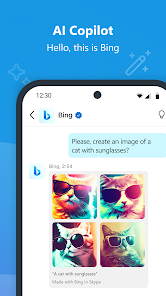
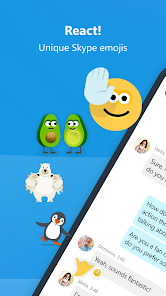
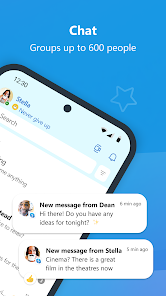
editor reviews
Skype is a communications app that lets you make voice and video calls, send instant messages, and share files with people anywhere in the world. It's one of the oldest players in this space, and for many users, it's the first thing they think of when they need to talk to someone far away without paying phone bills. You might install it from Google Play or the App Store because a friend or relative insists on using it for group calls, or because you need a reliable tool for a quick interview abroad. The first time you open it, you're greeted with a clean but slightly outdated interface—nothing flashy, just a list of contacts and a call button. There's a free download, but you'll notice prompts for purchasing credits if you want to call actual phone numbers. It feels functional, not exciting, like an old tool that still gets the job done.
Once you start using it, the experience is straightforward but a bit clunky. After signing up with an email or Microsoft account, you'll see your contacts list and can tap to start a call or send a message. The call quality is decent, though sometimes it lags or drops if your internet isn't stable, which can be frustrating during important conversations. You can also share your screen during a call, which is handy for showing a document or walking someone through a problem. A small tip: you can turn off video during calls to save bandwidth, which helps a lot on slower connections. The main actions feel smooth enough, but the app occasionally feels sluggish, especially when switching between chats and calls. It's not a nightmare, but you'll notice it doesn't have the snappy polish of newer apps.
After using Skype for a while, I think it's a solid choice for people who need cross-platform calling without spending money, especially if they're connecting with older relatives or colleagues who aren't tech-savvy. Someone who wants a modern, fast, and ad-free experience might find it a bit dated, though. What sets it apart is its ability to call landlines with Skype Credit, which apps like WhatsApp or FaceTime don't offer. But compared to Zoom or Google Meet, Skype feels heavier and less intuitive for group calls. I'd keep it installed if I frequently talk to someone who refuses to switch, but otherwise, I might uninstall it for something lighter. It's a workable tool, but not one I'd pick first anymore.
features
- 💬 Instant messaging with rich features: Skype lets you send text messages, emojis, and file attachments seamlessly. Unlike WhatsApp, which focuses on mobile-first chats, Skype integrates better with desktop use, making it easier to type long messages or drag and drop documents straight into a conversation.
- 📞 Landline calling with Skype Credit: A standout feature is the ability to call actual phone numbers, including landlines and mobiles, for a fee. This is something major competitors like Telegram or Signal can't do at all. It feels like having an old-fashioned phone line but controlled through an app.
- 🖥️ Screen sharing during calls: You can share your entire screen or just a specific window during a video call. Zoom offers similar, but Skype's version works without needing to start a meeting first—just a direct peer-to-peer call. It's practical for quick tutorials or remote help.
- 🌍 Cross-platform reach: Skype runs on Windows, Mac, Linux, iOS, Android, and even some smart TVs. That's more than FaceTime, which is locked to Apple devices. For someone with a mixed-device household, this is a big convenience.
pros
- 👨👩👧👦 Familiarity and old user base: Skype has been around for years, so many people—especially older generations—already have accounts and know how it works. Compared to newer apps like Signal, this removes the friction of getting someone to install and learn a new tool.
- 🔐 Call recording without extra tools: You can record both voice and video calls directly inside the app, saving them to your device. Zoom does this too, but Skype doesn't require a paid plan for recording, making it more accessible for casual users.
- 🎤 Built-in live captions: Skype offers real-time subtitles during calls, which helps in noisy environments or for users with hearing difficulties. Microsoft Teams has something similar, but Skype makes it simpler without the corporate complexity.
cons
- 🐌 Performance issues on newer devices: Skype often feels slower than competitors like Zoom or Discord. The app can take a while to start, and the interface can lag, which is annoying if you're used to snappy apps like Google Meet.
- 🛑 Frequent crashes and bugs: After updates, some users experience crashes or failed connections. WhatsApp is much more stable in this regard; Skype's reliability seems to have dropped over the years.
- 📱 Mobile interface is bloated: On phones, Skype clutters the screen with a bottom bar full of tabs (Chats, Calls, Contacts, etc.), making it feel busier than Telegram or FaceTime‘s simpler designs. It's not impossible to use, but it lacks that clean, modern feel.
- 📢 Too many notifications: The app defaults to sending noise alerts for every little thing, even when you're in another app. This gets intrusive fast, compared to how Signal handles quiet notifications gracefully.
Recommended Apps
![]()
BetterMe: Health Coaching
BetterMe Limited4.3
![]()
Walli - HD, 4K Wallpapers
Tap AI4.4![]()
Future Self - Old Age Filter
Vidler Koiter1.6
![]()
AI Photo Editor, Collage-Fotor
AI Art Photo Editor | Everimaging Ltd.4.3![]()
AI Face Swap: MagicFace &Photo
Braly JSC0![]()
QR Code Reader: QR Scanner
WECHOICE MOBILE4.3![]()
Lip Fall Challenge: Fun Filter
Braly JSC0![]()
Funny Reverse Audio - Singing
PlayStudioInc0![]()
Birthday Secrets
shasunder4.4![]()
Live Wallpapers HD 4K
Wallpaper app4.4![]()
Find Your Phone By Clap
Trusted App Global4.5![]()
Wizz - Expand Your World
Wizz3.8![]()
NCAA March Madness Live
NCAA Digital4.7![]()
Hulu: Stream TV shows & movies
Disney4.5![]()
Lethal Love: a Yandere game
AniByte!4.4















Disclaimer
1.Apklifts does not represent any developer, nor is it the developer of any App or game.
2.Apklifts provide custom reviews of Apps written by our own reviewers, and detailed information of these Apps, such as developer contacts, ratings and screenshots.
3. All trademarks, registered trademarks, product names and company names or logos appearing on the site are the property of their respective owners.
4.Apklifts abides by the federal Digital Millennium Copyright Act (DMCA) by responding to notices of alleged infringement that complies with the DMCA and other applicable laws.
5.If you are the owner or copyright representative and want to delete your information, please contact us [email protected].
6.All the information on this website is strictly observed all the terms and conditions of Google Ads Advertising policies and Google Unwanted Software policy.
7.Apklifts.com is an independent, information-only website which is 100% free to all the users.














