

Cash App

100M+
Installs
Block, Inc.
Developer
-
Finance
Category
-
Everyone
Content Rating
-
support@squareup.com
Developer Email
-
https://cash.app/legal/us/en-us/privacy
Privacy Policy
Screenshots


editor reviews
Cash App is a mobile payment service that lets you send, receive, and request money directly from your phone. It's technically a financial app, but it also dips into investing and even banking with its Cash Card and direct deposit features. Most people download it because they owe a friend for dinner or need to split rent quickly. The first time you open it, the design feels clean and modern, almost like a social media feed with a green-and-white theme. It's free to download on Google Play and the App Store, and while you don't need to register to browse the home screen, sending money requires creating an account with your phone number or email. The app has been installed over 100 million times on Android alone, which tells you how common it's become. There are no forced ads during setup, though you'll see occasional prompts to try Bitcoin or stocks. Overall, the first impression is that it's built for speed, not for showing off complicated graphs or bank jargon.
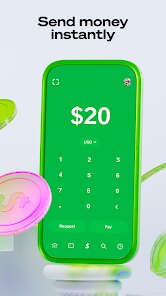
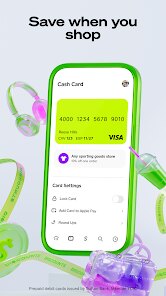
Once you actually use it, Cash App is surprisingly straightforward. You tap the dollar sign at the bottom to enter an amount, then type the person's name, phone number, or $cashtag. A neat touch is that you can add a note like "for pizza" or "gas money." The app remembers frequent contacts, so paying the same friend each week takes about 10 seconds. After sending money, the recipient gets a notification and the money usually lands within minutes if both parties use the bank-linked option. The Cash Card, which is a free Visa debit card linked to your balance, works everywhere standard cards do. Activating it in the app is as simple as scanning the card with your phone's camera. One small tip: if you want to avoid fees for instant transfers, schedule a standard transfer to your bank account — it takes one to three business days but costs nothing. The interface is mostly smooth, though sometimes the investing tab feels tucked away. I've had moments where I accidentally tapped the wrong button because everything is so minimal, but you get used to it quickly.
After using Cash App for a few months, I'd say it's perfect for people who just want no-hassle peer-to-peer payments without the clutter of a full banking app. If you're the type who only pays friends or family and occasionally buys Bitcoin out of curiosity, you'll probably keep it installed. But if you need robust budgeting tools, joint accounts, or detailed spending reports, you'll likely uninstall it within a week. Compared to PayPal, Cash App feels faster and less formal, but PayPal offers buyer protection for online shopping. Venmo is closer in style, though Venmo has that social feed feature that some love and others find awkward. Cash App skips the feed entirely, keeping things private. What sets it apart is the seamless integration of stock and Bitcoin trading right inside the same app, which is something Venmo only added later and PayPal handles as a separate service. It's not the most comprehensive finance tool, but for its core job — moving money between friends — it's one of the smoothest experiences out there.
features
- 🎯 Instant money transfers with $cashtags: Instead of typing full bank account numbers, you just use a unique $cashtag, which feels as easy as a username on social media. Venmo uses @usernames, but Cash App's system is slightly more direct because you can request money by simply typing someone's tag.
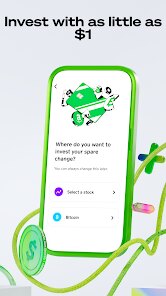
- 🎯 Built-in Bitcoin and stock trading: You can buy fractions of stocks or Bitcoin with as little as $1. PayPal also offers crypto, but Cash App makes the buying process feel more native to the app — it's not buried in a separate menu. Venmo lets you trade crypto too, but the fees here are often lower for small amounts.
- 🎯 Free Cash Card with instant discounts: The physical debit card is free to order and works everywhere Visa is accepted. What makes it stand out is the "Boosts" feature — you pick a discount category like coffee or fast food, and it applies automatically at checkout. Square's other products don't offer this, and Venmo's similar card has fewer boost options.
pros
- 💪 Speed and simplicity: Sending money takes fewer taps than Venmo or PayPal. There's no confirmation dialogue that feels redundant, just straight-forward steps.
- 💪 No social feed: Unlike Venmo, which shows public transactions to friends unless you manually make them private, Cash App keeps everything invisible. This is a big plus if you value privacy.
- 💪 Integrated Cash App Investing: You can switch from sending $20 to a friend to buying $10 of Apple stock without leaving the app. PayPal requires you to bounce to a separate investing section, which feels disjointed.
cons
- 🥴 Limited customer support: If something goes wrong — like a failed transfer or a lost card — getting help is frustrating. You mostly interact with an automated chat bot, and reaching a real person takes hours. Venmo and PayPal have slightly better phone support.
- 🥴 No joint accounts or family features: You can't share a Cash App account with a partner or manage a teenager's account. Zelle offers this through many banks, and even Venmo allows a "teen" account with parental controls.
- 🥴 Withdrawal fees for instant transfers: If you want your money in your bank account immediately, Cash App charges a 1.5% fee. Venmo's instant transfer fee is similar, but Zelle (through banks) is usually free and instant already.
Recommended Apps
![]()
Daily Horoscope
KADO Apps4.4
![]()
FOX Sports: Watch Live Games
Fox Digital Services, LLC3.7
![]()
Fake Call from Santa Claus
ThunderClap4.2![]()
Google Maps
Google LLC4.2![]()
PhotoLayers-Superimpose,Eraser
handyCloset Inc.4.6![]()
Healthy Benefits+
Solutran, Inc.4.5![]()
SuperMe - Avatar Maker Creator
THE.DEMON3.7![]()
Air Horn
Tenoku4.8![]()
Football Wallpaper HD 4K
Orange Infotech Studio4.6![]()
Artplay - AI Photo & Video
Hideaway Technology Limited4.5![]()
Horoscopes – Daily Zodiac Horo
Mail.Ru Group4.1![]()
Passport Parking
Passport Labs, Inc.2.5![]()
ParkMobile: Park. Pay. Go.
Parkmobile, LLC4.3![]()
FestAI: Ghost Detector App
Now Tech3.2![]()
Photo Tool
COLIFER LAB4





























