
WOMBO Dream - AI Art Generator

10M+
Installs
Wombo Studios Inc
Developer
-
Generative AI
Category
-
Rated for 3+
Content Rating
-
hello@wombo.ai
Developer Email
-
https://www.w.ai/privacy-policy
Privacy Policy
Screenshots
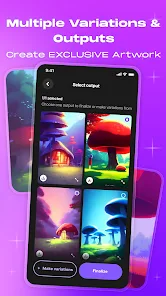
editor reviews
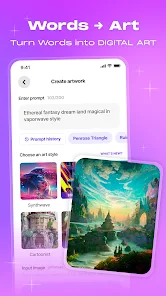
WOMBO Dream is an AI art generation app that lets you turn text prompts or simple ideas into images in seconds. It sits in the category of creative AI tools, similar to Midjourney or DALL-E, but it is designed for mobile-first use. You can type in a phrase, pick a style, and the app turns your words into a picture. I downloaded it from the Google Play store out of curiosity, mostly because I kept seeing other people post Dream-generated art on social media. The install count is pretty high, and it is free to download, though you can buy a subscription for premium features. Right after launching, the app puts a text box and style menu right in front of you, so the first impression is straightforward and not overwhelming. There are a couple of ads here and there, but they did not ruin the initial experience.
Using the app feels like playing with a toy rather than operating serious software. You just punch in something simple, like "frog in a spacesuit," pick one of the dozens of art styles, and hit create. The processing takes maybe 10 to 15 seconds, which is fast enough to keep you tapping. The interface is clean, with your generated art saved in a gallery tab, and you can swipe through results easily. The onboarding does not force you to watch a tutorial or sign up immediately, which is a small relief. I did run into some confusion when I tried to tweak an image. The app does not let you edit a specific part of the generated picture, you have to regenerate the whole thing with a different prompt. A practical tip is to be very specific with your prompt, because the AI tends to interpret vague words in strange ways. The app also offers an "inpainting" feature, but it took me a while to figure out where that option was buried.
After using it for a couple of weeks, I think WOMBO Dream is a good fit for casual creators and people who want quick, shareable art without learning complicated tools. If you are into digital painting or need fine control over your imagery, you will probably find this app restrictive. The standout difference from apps like Midjourney is how easy and accessible it is, but you lose a lot of depth in return. The free version is surprisingly usable, but the watermark on free outputs can be annoying if you want to post the art somewhere. The subscription is not cheap, and I can see why someone would just keep using the free tier until they hit the daily limit. I keep it installed because it is fun to mess around with on the bus, but I would not count on it for real artwork.
features
- 🎨 Text-to-art in seconds. You type a prompt, pick a style, and the app generates an image way faster than Midjourney or Stable Diffusion. It feels almost instant on a good connection.
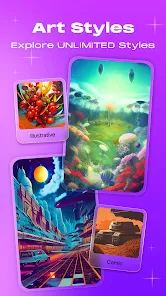
- 🖼️ Wide style library. You get over 50 styles like pixel art, fantasy, or cyberpunk. Midjourney has a lot of flexibility, but Dream makes it easier to just tap and see what sticks.
- 🤳 Mobile-first design. Unlike Midjourney which runs through Discord or requires a desktop setup, Dream is built for phones from the ground up. The touch interface works smoothly.
- 🔁 Inpaint and remix. You can select a part of the image and change it with a new prompt. Not many mobile AI art apps offer this, and it gives you more control than most casual tools.
pros
- ⚡ Speed. Compared to Midjourney or Leonardo AI, Dream generates images much faster on mobile. It cuts down wait time significantly.
- 📱 Accessibility. No need for a Discord account or a powerful PC. you just install the app and start creating. This lowers the barrier for beginners.
- 🎭 Broad style range. Apps like DALL-E are great but limited in artistic styles. Dream gives you dozens of preset styles that change the whole mood of the output.
- 🆓 Generous free tier. Many AI art apps limit you to a few free generations. Dream gives a decent daily quota even without paying.
cons
- 💧 Watermark on free outputs. Every free image gets a big watermark, which is annoying if you want to use the art for anything public. Midjourney does not do this in its free trials.
- 📉 Lower resolution. Dream outputs are smaller and less detailed compared to what you get from a desktop app like Stable Diffusion. zooming in shows artifacts.
- 🔒 Limited control. You cannot tweak parameters like seed, sampler, or CFG scale. Apps like ComfyUI or Automatic1111 give full control, but Dream keeps everything locked down.
- 💰 Pricey subscription. The premium plan feels expensive for mobile-only output. Other tools offer more value for a similar monthly cost.
Recommended Apps
![]()
Daily Horoscope
KADO Apps4.4
![]()
FOX Sports: Watch Live Games
Fox Digital Services, LLC3.7
![]()
Fake Call from Santa Claus
ThunderClap4.2![]()
Google Maps
Google LLC4.2![]()
PhotoLayers-Superimpose,Eraser
handyCloset Inc.4.6![]()
Healthy Benefits+
Solutran, Inc.4.5![]()
SuperMe - Avatar Maker Creator
THE.DEMON3.7![]()
Air Horn
Tenoku4.8![]()
Football Wallpaper HD 4K
Orange Infotech Studio4.6![]()
Artplay - AI Photo & Video
Hideaway Technology Limited4.5![]()
Horoscopes – Daily Zodiac Horo
Mail.Ru Group4.1![]()
Passport Parking
Passport Labs, Inc.2.5![]()
ParkMobile: Park. Pay. Go.
Parkmobile, LLC4.3![]()
FestAI: Ghost Detector App
Now Tech3.2![]()
Photo Tool
COLIFER LAB4





























