

Period Tracker and Calendar

10M+
Installs
SimpleInnovation
Developer
-
Health & Fitness
Category
-
Everyone
Content Rating
-
https://www.simpleinnovation.us/my-calendar/privacy-policy
Privacy Policy
Screenshots
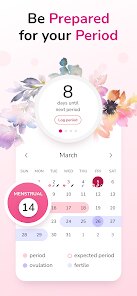
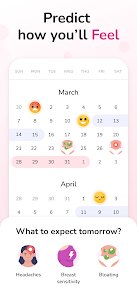
editor reviews
I stumbled upon Period Tracker and Calendar by SimpleInnovation after a friend complained about forgetting to log her cycle in a more complicated app. It's basically a straightforward period tracking tool that also functions as a simple calendar, so you can mark symptoms, ovulation windows, and upcoming periods in one place. Honestly, I downloaded it from Google Play because it had a decent install count and was free with no forced sign-up, which felt like a relief. My first impression after launching it was a bit plain; the interface is very minimal, almost like a basic digital diary from 2015. No flashy animations or pastel overload, just clean, no-nonsense screens. That actually appealed to me because I didn't want to fiddle with a thousand settings before even logging my first day.
Once I started using it, the experience was pretty smooth for what it does. The onboarding is basically nonexistent, which might confuse someone who expects a tutorial, but I just tapped the current date and added a period day, then noticed a small icon letting me add symptoms like cramps or headaches. Moving through the app, I swipe between months, and the calendar marks predicted days with a dotted line, which updates as I log more data. I did hit a confusing moment when I tried to edit a past entry and accidentally cleared the whole month's data; there is no undo button, so that scared me off from experimenting too much. A practical tip I found helpful was using the notes section for each day to track things like sleep quality or stress levels, since it syncs with the cycle prediction. Daily use just means tapping the current day to log what happened, and the prediction algorithm seems decent after a few cycles, though it never felt super precise compared to apps like Clue.
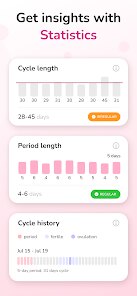
After sticking with it for a couple of months, I think this app is great for someone who wants bare-bones tracking without any social sharing or obsessive health insights. If you love detailed charts, community forums, or syncing with wearables, you will probably feel let down. What makes it different from apps like Flo or Period Tracker is its complete lack of ads and that it works fully offline, which is rare. I keep it installed because it does the job quietly, but I almost uninstalled after the accidental data wipe incident. It feels like a tarnished version of what it could be; reliable until you make one mistake. For now, it stays on my phone as a backup, but I would not recommend it to anyone who needs robust predictions or tech support.
features
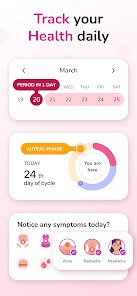
- 📅 Simple Calendar View: The main screen shows a month calendar where you can tap any date to log start and end days. Unlike Clue, which buries predictions under tabs, this app puts everything in one view, making it easier to see at a glance where your cycle stands. The dotted line for ovulation prediction updates automatically without needing extra taps.
- 💊 Symptom Logging with Icons: After logging a period, you can add symptoms like cramps, mood changes, or headaches using small, clear icons. This is more straightforward than Flo's long drop-down menus, but it lacks the ability to add custom symptoms, so you are stuck with what they offer.
- 📓 Note Section for Each Day: Every day has a notes box where you can write anything from sleep patterns to medication reminders. This is better than Apple's Health app because it links the note to the cycle phase, so future entries get tagged with the predicted stage automatically.
- 🔮 Decent Prediction Algorithm: After a few cycles, the app starts estimating next period dates with reasonable accuracy, usually within a day or two. It does not use fancy AI like Clue, but for a free, offline tool, it holds up fine for casual users who just need a rough idea.
pros
- 👍 No Ads at All: Unlike 90% of free period trackers, this app runs entirely ad-free, even when offline. You never get interrupted with tampon commercials or bogus fertility quizzes, which makes logging feel private and distraction-free. Clue and Flo show ads regularly without a paid subscription.
- 👍 Works Completely Offline: You can log everything without internet permission, and your data stays local on the device. This is a huge plus if you travel or worry about privacy policies. Glow needs constant syncing, while this app never asks for an account or internet connection.
- 👍 Lightweight and Fast: The app is under 5 MB and loads instantly, even on old phones. It takes up virtually no storage and never lags when scrolling through months. Apple's Health app is bloated with widgets, but this app just works without draining battery.
cons
- 👎 No Data Backup or Export: If you uninstall the app or reset your phone, all your logs vanish permanently. There is no cloud sync or CSV export like Clue offers, so you lose years of data with one mistake. This feels reckless for a tracking app.
- 👎 Bland Visual Design: The interface uses a tired 2015 aesthetic with tiny fonts and no themes. Flo and Period Tracker by GP Software look polished with soothing colors and graphics, but this app feels like a school project, which may annoy people who care about appearance.
- 👎 No Custom Alerts or Reminders: You cannot set push notifications for upcoming periods or fertile windows. Clue lets you schedule daily reminders, but this app stays silent unless you manually open it. Busy users will forget to log consistently.
- 👎 Limited Symptom Options: The symptom list is short and cannot be expanded. You are forced to use predefined icons, so tracking irregular symptoms like migraines or breast tenderness becomes impossible. Glow allows custom fields, making this app feel restrictive over time.
Recommended Apps
![]()
BetterMe: Health Coaching
BetterMe Limited4.3
![]()
Walli - HD, 4K Wallpapers
Tap AI4.4![]()
Future Self - Old Age Filter
Vidler Koiter1.6
![]()
AI Photo Editor, Collage-Fotor
AI Art Photo Editor | Everimaging Ltd.4.3![]()
AI Face Swap: MagicFace &Photo
Braly JSC0![]()
QR Code Reader: QR Scanner
WECHOICE MOBILE4.3![]()
Lip Fall Challenge: Fun Filter
Braly JSC0![]()
Funny Reverse Audio - Singing
PlayStudioInc0![]()
Birthday Secrets
shasunder4.4![]()
Live Wallpapers HD 4K
Wallpaper app4.4![]()
Find Your Phone By Clap
Trusted App Global4.5![]()
Wizz - Expand Your World
Wizz3.8![]()
NCAA March Madness Live
NCAA Digital4.7![]()
Hulu: Stream TV shows & movies
Disney4.5![]()
Lethal Love: a Yandere game
AniByte!4.4















Disclaimer
1.Apklifts does not represent any developer, nor is it the developer of any App or game.
2.Apklifts provide custom reviews of Apps written by our own reviewers, and detailed information of these Apps, such as developer contacts, ratings and screenshots.
3. All trademarks, registered trademarks, product names and company names or logos appearing on the site are the property of their respective owners.
4.Apklifts abides by the federal Digital Millennium Copyright Act (DMCA) by responding to notices of alleged infringement that complies with the DMCA and other applicable laws.
5.If you are the owner or copyright representative and want to delete your information, please contact us [email protected].
6.All the information on this website is strictly observed all the terms and conditions of Google Ads Advertising policies and Google Unwanted Software policy.
7.Apklifts.com is an independent, information-only website which is 100% free to all the users.














