

Microsoft Copilot

1M+
Installs
Microsoft Corporation
Developer
-
Generative AI
Category
-
Rated for 3+
Content Rating
-
sapphirefeedback@microsoft.com
Developer Email
-
https://aka.ms/Copilot/Protections
Privacy Policy
Screenshots

editor reviews
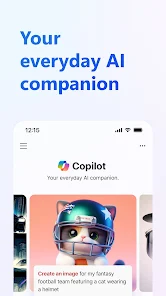
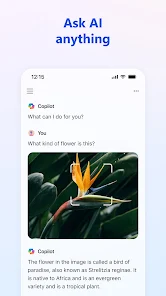
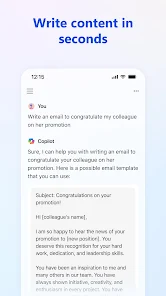
Microsoft Copilot sits right alongside the growing wave of AI helper apps. It's basically Microsoft's own take on a smart assistant you can chat with, ask questions, get summaries from, and even generate images on the fly. You mainly use it for writing help, quick explanations, brainstorming ideas, or just having a conversation that feels less robotic than older bots. A lot of folks end up downloading it from Google Play or the App Store because it's completely free with no subscription wall for the basic stuff, which is honestly refreshing. After you install and launch it, the first impression is surprisingly clean and minimal. No clutter, no banner ads screaming at you, just a chat window and a few toggle options. You notice right away that it feels integrated into the Microsoft ecosystem, but it doesn't shove that down your throat. The sign-up process is simple, just your Microsoft account, and you're in. For a free tool, the zero-ad policy straight out of the gate feels like a breath of fresh air.
When you actually start using Copilot, the experience is pretty smooth. The onboarding walks you through the basics, like switching between creative, balanced, and precise conversation styles. That's a neat touch because you can decide if you want a more playful response or something straight to the point. In daily use, you just type or speak your question, and the reply comes back fast. I found myself using it for summarizing long articles I didn't want to read fully, and it handled that well. The image generation feature, powered by DALL-E, is also baked right in, so you don't need to jump to another app. One small tip is that if you use the voice input, it picks up pretty accurately even in slightly noisy places. The interface is clean, but sometimes the responses can feel a bit too polished or generic, especially when you ask for something opinion-based. Still, the flow from question to answer is natural, and you rarely run into loading issues or crashes.
After spending a good chunk of time with Copilot, I think it's a solid pick for someone who wants a free AI assistant without dealing with paywalls or aggressive upsells. People who already use Microsoft services will probably keep it installed because it syncs nicely with what they already do. On the flip side, if you're someone who needs super niche or highly technical answers, you might find the responses a bit too broad. Compared to something like ChatGPT, Copilot feels more restrained and less creative, but it's also more reliable for factual queries and doesn't try to upsell you every five minutes. The lack of ads and the truly free core experience make it stand out from a lot of competitors that hide useful features behind subscriptions. I'd say it's worth keeping around for quick everyday tasks, but if you need deep customization or advanced features, you'd probably uninstall it and look elsewhere. It's a decent helper, just not a power tool.
features
- 🤖 Real-time web search access – Unlike ChatGPT's free tier, which relies on a cutoff date, Copilot can pull live information from the internet right in your chat. This makes it way more useful for checking current events, prices, or news without switching tabs.
- 🎨 Built-in DALL-E image generation – You can ask Copilot to create an image on the spot without needing a separate subscription or app. It's not as advanced as dedicated tools, but for quick visual ideas or fun experiments, it's a great addition.
- 🔒 No paywall for core features – Copilot doesn't hide its most useful features behind a monthly fee. While other apps like Gemini or ChatGPT lock advanced models or longer conversations behind a subscription, Copilot keeps its free tier generous and functional.
- 📱 Seamless cross-device sync – Since it's tied to your Microsoft account, your conversations and settings carry over between your phone and PC without extra hassle. This is something standalone apps often fail to do smoothly.
pros
- 💸 Completely free with no hidden costs – Unlike ChatGPT Plus or Gemini Advanced, you don't have to pay to get decent quality responses or image generation. The free tier here actually feels like a full product.
- 🔄 Strong integration with Microsoft apps – If you use Outlook, Word, or Edge, Copilot slots right into your workflow. Other assistants like Claude or Perplexity don't offer that kind of ecosystem hook.
- 📊 Balanced response styles – The ability to switch between creative, balanced, and precise modes gives you control over tone and depth. Gemini and ChatGPT have similar options, but Copilot's implementation feels more intuitive for everyday users.
cons
- 🧠 Responses can feel too cautious – Compared to ChatGPT, Copilot often gives safer, less opinionated answers. If you want a bold take or creative storytelling, it holds back too much.
- 🔗 Limited free conversation length – Free users can't maintain super long chats without hitting a context limit. Perplexity handles longer discussions better without cutting you off.
- 📶 Requires internet for most features – You can't really use Copilot offline. Apps like Gemini or offline AI tools let you do basic tasks without a connection, which Copilot doesn't.
- 🎨 Image generation isn't as refined – DALL-E inside Copilot is convenient, but standalone tools like Midjourney or even Adobe Firefly give you much more control and better results for serious creative work.
Recommended Apps
![]()
Daily Horoscope
KADO Apps4.4
![]()
FOX Sports: Watch Live Games
Fox Digital Services, LLC3.7
![]()
Fake Call from Santa Claus
ThunderClap4.2![]()
Google Maps
Google LLC4.2![]()
PhotoLayers-Superimpose,Eraser
handyCloset Inc.4.6![]()
Healthy Benefits+
Solutran, Inc.4.5![]()
SuperMe - Avatar Maker Creator
THE.DEMON3.7![]()
Air Horn
Tenoku4.8![]()
Football Wallpaper HD 4K
Orange Infotech Studio4.6![]()
Artplay - AI Photo & Video
Hideaway Technology Limited4.5![]()
Horoscopes – Daily Zodiac Horo
Mail.Ru Group4.1![]()
Passport Parking
Passport Labs, Inc.2.5![]()
ParkMobile: Park. Pay. Go.
Parkmobile, LLC4.3![]()
FestAI: Ghost Detector App
Now Tech3.2![]()
Photo Tool
COLIFER LAB4





























