
AI Anime Filter - Anime AI

500K+
Installs
TAPUNIVERSE
Developer
-
Generative AI
Category
-
Everyone
Content Rating
-
tapuniverse@gmail.com
Developer Email
-
https://tapuniverse.com/policy/
Privacy Policy
Screenshots
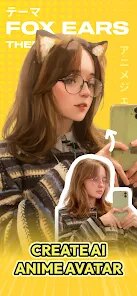
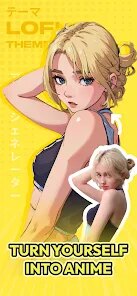

editor reviews
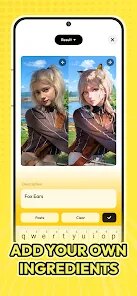
So I stumbled across AI Anime Filter - Anime AI by TAPUNIVERSE a few weeks back, and honestly, it's exactly what it sounds like: an app that turns your regular photos and selfies into anime-style artwork. It's one of those photo editing slash art filter apps that have been popping up everywhere, but this one focuses purely on that anime transformation gimmick. You download it from the Play Store or App Store, it's free to install, and the setup is pretty straightforward. The first time you open it, you're hit with a simple camera interface and a gallery import button, so there's no real learning curve. I'd say it's got a decent amount of installs, though I'm not sure about the exact number. You can use most features without paying, but there are some in-app purchases and ads here and there, which feels pretty standard for this kind of app.
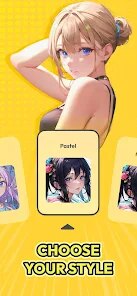
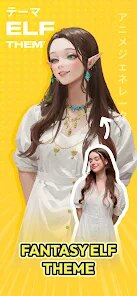
After signing up, I started messing around with my photos. The interface is clean and not cluttered, which I appreciated. You pick a photo from your gallery or snap one on the spot, then the app processes it through its AI model. The first result took maybe ten or fifteen seconds, which felt reasonable. What I liked was that it didn't just slap a generic filter on my face; it actually tried to adapt the anime style to my specific features, like hair color and eye shape. There's a few style options to choose from, like "Studio Ghibli vibes" or "Shonen jump energy," though they're named differently in the app. One small tip: if you have a busy background, it sometimes struggles with the edges, so plain backdrops work best. I did hit a moment where the app froze for a few seconds after applying a filter, but it recovered quickly.
After using it for a while, I think this app is perfect for people who love anime and want to see themselves as a character, or for someone looking for a fun way to spice up their social media profile pics. That said, if you're after professional-level photo editing or something that works reliably every time, this might not cut it. Compared to other apps like Meitu or Prisma, the anime filter here feels more tailored and less like a generic cartoon effect, but those other apps offer way more variety and editing tools. What sets it apart is how deeply it commits to the anime aesthetic, almost like a costume. Still, the ads can be annoying, and there's a paywall for certain high-quality styles. I'd keep it installed for quick laughs, but I wouldn't pay for the premium version.
features
- ✨ Customizable Anime Styles: Unlike competitors like Snapchat's cartoon filter, which gives you one look, this app offers several distinct anime-inspired styles, from softer watercolor effects to sharp line art. It's not just a one-size-fits-all filter, which makes it feel more personal.
- ✨ Face Adaptation Technology: Most filter apps just map a generic overlay onto your face, but AI Anime Filter tries to capture specific details like your hair's natural shades or the shape of your jawline. It's not perfect, but it's way better than the competition at making you look like a real anime character instead of a cartoonized mess.
- ✨ Simple Interface: The app is stripped down to the essentials, no confusing layers or professional editing jargon. You just pick a photo, choose a style, and wait a few seconds. For casual users who don't want to fiddle with sliders, this is a huge plus compared to complex alternatives like PicsArt.
pros
- 🚀 Quick Processing: The AI churns out results in under 20 seconds for most photos, which is faster than many similar apps on the market. No waiting around forever.
- 🚀 Fun Factor: It's genuinely entertaining to see yourself or friends turned into anime characters. The novelty value is high, making it great for group activities or parties compared to the more serious tone of editing apps like Lightroom.
- 🚀 Lightweight App: The app doesn't eat up your storage or drain your battery excessively. It's a lightweight download compared to some heavy-hitting AI tools that require lots of space.
cons
- 🐛 Inconsistent Edge Detection: When my background had a bunch of patterns or other people, the app sometimes messed up the contouring, leaving weird artifacts around hair or shoulders. Apps like FaceApp handle this much more smoothly.
- 🐛 Aggressive Ads: You'll get an ad after almost every single transformation, which kills the flow when you're trying to try multiple styles. Competitors like Remini at least space out their ad breaks.
- 🐛 Limited Output Quality: The final images aren't super high resolution. If you zoom in, you can see pixelation. Prisma or other style transfer apps offer sharper exports for printing or using as high-quality wallpapers.
Recommended Apps
![]()
Daily Horoscope
KADO Apps4.4
![]()
FOX Sports: Watch Live Games
Fox Digital Services, LLC3.7
![]()
Fake Call from Santa Claus
ThunderClap4.2![]()
Google Maps
Google LLC4.2![]()
PhotoLayers-Superimpose,Eraser
handyCloset Inc.4.6![]()
Healthy Benefits+
Solutran, Inc.4.5![]()
SuperMe - Avatar Maker Creator
THE.DEMON3.7![]()
Air Horn
Tenoku4.8![]()
Football Wallpaper HD 4K
Orange Infotech Studio4.6![]()
Artplay - AI Photo & Video
Hideaway Technology Limited4.5![]()
Horoscopes – Daily Zodiac Horo
Mail.Ru Group4.1![]()
Passport Parking
Passport Labs, Inc.2.5![]()
ParkMobile: Park. Pay. Go.
Parkmobile, LLC4.3![]()
FestAI: Ghost Detector App
Now Tech3.2![]()
Photo Tool
COLIFER LAB4





























