

Webex Meetings

100,000,000+
Installs
Cisco Systems, Inc.
Developer
-
Business
Category
-
Rated for 3+
Content Rating
-
+18662293239
Developer Email
-
http://www.cisco.com/web/siteassets/legal/privacy.html
Privacy Policy
Screenshots


editor reviews
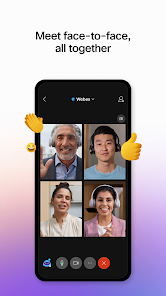
Webex Meetings is a video conferencing app from Cisco, aimed squarely at the professional and corporate world. People use it for remote work meetings, client calls, webinars, and even large-scale virtual events. I downloaded it from the Play Store mainly because a client insisted on using it, despite my skepticism. After launching it, the first impression was a bit of a shock—the interface felt cluttered and dated compared to the sleek apps I was used to. The home screen was a sea of buttons and options, and I honestly had to pause and figure out where to tap just to join the meeting link I was sent. The app is free to download, like most of its competitors, but those enterprise-grade features come with a hefty subscription if you're the one hosting large meetings.
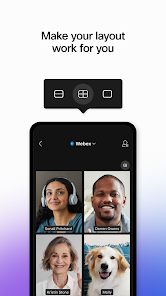
The actual hands-on experience was a mixed bag. After clicking a meeting link, the app took me through a pre-meeting lobby that checks your audio and video, which was surprisingly thorough. Once inside, the controls are all at the bottom of the screen, but they feel crowded. I fumbled a bit trying to share my screen, accidentally muting myself instead. The video and audio quality were rock solid during the call, which is clearly Cisco's strength. One practical tip I figured out the hard way: always test your microphone in the lobby, not during the meeting. The host had mute-all control, which was useful for a 20-person briefing but annoying when I had a quick question. There's a raised hand feature, but finding it under a sub-menu was not intuitive at all.
After a few weeks, I have a love-hate relationship with Webex. For someone like me who values simplicity in a meeting app, it feels over-engineered. I'd say it's a great fit for IT departments or large companies that need strict control over security and attendance tracking. If you're a freelancer or small team used to something like Zoom or Google Meet, you might find this app clunky and overwhelming. What sets it apart is that it doesn't crash or glitch even on a weak connection, but the price of that stability is a user interface that feels like it's from five years ago. I kept it installed for client calls, but every time I open it, I wish it had the clean, casual feel of Zoom's streamlined design.
features
- 🎥 Webex Meetings boasts a powerful noise removal feature that uses AI to filter out background sounds like barking dogs or traffic. Unlike Zoom's basic settings, Webex's version is noticeably more aggressive and effective in keeping the meeting clean, which is a lifesaver for home offices.
- 🎥 The app supports up to 1,000 video participants in a single meeting with the paid plan, compared to Zoom's 1,000 limit on Business tier. But Webex's real edge is in its large event mode, which allows for up to 10,000 viewers, making it a strong choice for webinars without needing a separate platform.
- 🎥 Cisco's security features are a standout, with end-to-end encryption as standard and no reports of major vulnerabilities like "Zoombombing." The app also includes a compliance dashboard for IT admins to track data, something Google Meet lacks in its free version entirely.
pros
- ✅ Webex's video and audio quality consistently outperforms Microsoft Teams during low-bandwidth situations. I once hosted a call from a train, and the picture stayed crisp while Teams users were pixelated.
- ✅ The app integrates deeply with Cisco hardware, like their desk phones and room kits, which is a godsend for offices that already use their ecosystem. Zoom can do this too, but it feels more seamless here.
- ✅ Webex offers a free tier with 40-minute meetings for up to 100 people, matching Zoom's free plan, but the trade-off is a more secure backend that businesses actually trust for sensitive data.
cons
- ❌ The user interface on Webex feels clunky and outdated compared to Zoom's smooth, intuitive design. Simple tasks like muting yourself or sending a chat take an extra tap, which gets frustrating in fast-paced meetings.
- ❌ Onboarding is a pain for new users. Unlike Google Meet, which lets you join via a simple browser link, Webex often requires installing a plugin or struggling through a device setup, making it less friendly for casual guests.
- ❌ Screen sharing is slower and more error-prone than in Zoom. I regularly encounter a multi-second delay before my shared screen appears to others, and sometimes it blocks the view until I refresh the connection entirely.
Recommended Apps
![]()
Daily Horoscope
KADO Apps4.4
![]()
FOX Sports: Watch Live Games
Fox Digital Services, LLC3.7
![]()
Fake Call from Santa Claus
ThunderClap4.2![]()
Google Maps
Google LLC4.2![]()
PhotoLayers-Superimpose,Eraser
handyCloset Inc.4.6![]()
Healthy Benefits+
Solutran, Inc.4.5![]()
SuperMe - Avatar Maker Creator
THE.DEMON3.7![]()
Air Horn
Tenoku4.8![]()
Football Wallpaper HD 4K
Orange Infotech Studio4.6![]()
Artplay - AI Photo & Video
Hideaway Technology Limited4.5![]()
Horoscopes – Daily Zodiac Horo
Mail.Ru Group4.1![]()
Passport Parking
Passport Labs, Inc.2.5![]()
ParkMobile: Park. Pay. Go.
Parkmobile, LLC4.3![]()
FestAI: Ghost Detector App
Now Tech3.2![]()
Photo Tool
COLIFER LAB4





























