
TeraBox: 1TB Cloud & AI Space

100M+
Installs
Flextech Inc.
Developer
-
Productivity
Category
-
Everyone
Content Rating
-
helpdesk@terabox.com
Developer Email
-
https://www.terabox.com/box-static/disk-system/html/wap_privacy.html
Privacy Policy
Screenshots


editor reviews
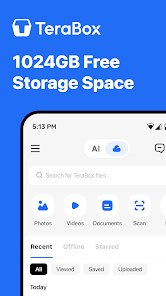
TeraBox is a cloud storage app developed by Flextech Inc. that promises a massive 1TB of free space, positioning itself firmly in the utility category alongside file management and backup tools. For a normal user, the appeal is immediate: you download it from the Google Play or App Store because the idea of getting a terabyte of free cloud storage without paying a monthly subscription is hard to ignore. After you install and launch the app, the first impression is surprisingly clean and straightforward, given the generous offer. It asks for a quick registration, usually via a Google account or email, and right after that, you are greeted by a simple dashboard that feels modern and well-organized. There are no aggressive in-app purchase pop-ups right away, and only occasional ads, which seems fair for a free product. The 1TB claim feels almost too good to be true, but the app does not try to hide any catches in the initial setup.
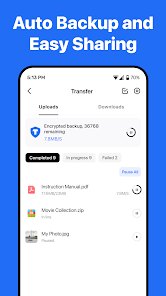
Once you start using TeraBox, the hands-on experience reveals both its strong points and its quirks. The interface is intuitive, with a clear file browse, photo album, and video player section. Uploading files is easy: you tap the plus button, select from your gallery or documents, and within seconds, your files sync to the cloud. The real surprise is the video playback. TeraBox actually streams video content like a dedicated player, and it handles 4K files without stuttering, which is genuinely impressive for a free service. One common usage scenario is backing up a large photo library; the app makes this simple by offering an automatic camera backup toggle. However, the onboarding can feel a bit rushed. You might find yourself accidentally starting a 30-second ad before a file download, which is a minor annoyance. A practical tip: use the app for media archiving rather than critical documents, because the free-tier download speeds are throttled, but uploading is fast.
After using TeraBox for a few weeks, my personal judgment is mixed. This app is fantastic for users who have a huge photo or video collection accumulated from years and need a cheap dumping ground for memories. It excels at what it advertises: massive storage. However, users who prioritize security, privacy, or fast file syncing for work might feel uneasy. Compared to similar apps like Google Drive or Dropbox, TeraBox lacks the seamless desktop integration and real-time collaboration tools, but it surpasses them in raw free storage capacity by a huge margin. What truly sets TeraBox apart is the AI-powered photo cleanup and duplicate finder, which is a nice touch that other cloud giants usually put behind a paywall. Ultimately, I have kept it installed because it is a practical backup for media, but I have not moved my essential work files there. It is a keeper for casual users, but power users will likely uninstall it when they hit the download speed limit or notice the lack of end-to-end encryption.
features
- 💾 Massive 1TB free storage: While Google Drive only offers 15GB free and Dropbox gives just 2GB, TeraBox gives you a full terabyte right from the start. This is its killer feature and what makes it stand out in the crowded cloud storage market. You can literally dump thousands of photos, videos, and documents without worrying about space.
- 🎥 Built-in video player with 4K support: Most cloud apps make you download a file to watch it, but TeraBox streams video content directly with impressive quality. It handles large 4K files smoothly, which is something you normally only see in premium services like Plex or VLC paired with a NAS.
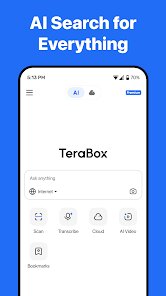
- 🔍 AI-powered photo management: The app includes a smart cleanup tool that detects similar photos, blurry shots, and screenshots automatically. This is a feature Google Photos used to offer for free, but now requires a paid subscription. TeraBox gives it to you at no extra cost.
pros
- 🚀 Incredible storage-to-price ratio: Compared to Google Drive or iCloud, TeraBox gives you 1TB for free while the competition charges monthly fees for a fraction of that space. If you are on a budget, this is a no-brainer.
- 🚀 Smooth media playback: Unlike Dropbox or OneDrive, which force you into a bare-bones viewer, TeraBox has a proper media player. It remembers your playback position and supports background audio, making it much more useful for media hoarders.
- 🚀 Decent cross-platform support: TeraBox syncs across Android, iOS, and web browsers without hiccups. It is not as polished as Google Drive's desktop sync, but for a free app, it gets the job done reliably.
cons
- 🔻 Slow download speeds on the free tier: Uploading files is fast, but when you want to download a large folder, TeraBox throttles speeds significantly. Google Drive's free tier is much faster for downloading your own files, making TeraBox feel sluggish for retrieval.
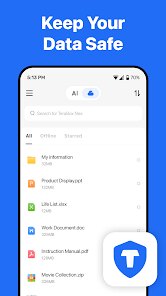
- 🔻 No end-to-end encryption: Unlike Sync.com or Tresorit, TeraBox does not offer client-side encryption. This means your files are stored on their servers in a readable format, which is a privacy concern for sensitive documents.
- 🔻 Frequent ads during usage: Every time you download a file or open a shared link, you are hit with a 15-30 second video ad. MEGA.nz and pCloud give you more freedom without interrupting your workflow so often.
- 🔻 Web interface is clunky: The mobile app is decent, but the browser version feels outdated and buggy. Navigating folders is slower than on Drive or Dropbox, and file previews often fail to load properly.
Recommended Apps
![]()
Face Dance: AI Photo Animator
Codeway Dijital4.1
![]()
Pedometer - Step Counter
Simple Design Ltd.4.8
![]()
PicsApp Photo Editor & Collage
Lyrebird Studio4.2![]()
Chat AI - Ask AI anything
AI Chat Bot, Ask AI4.4![]()
Live Wallpapers 3D
Joy Wallpaper5![]()
ThemeKit - Themes & Widgets
ThemeKit4.4![]()
Google Opinion Rewards
Google LLC4.6![]()
IMDb: Movies & TV Shows
IMDb4.3![]()
Magic Voice Changer
PerryLeeGame32.3![]()
FaceLab: Face Editor, Aging
Lyrebird Studio4.4![]()
Call Santa Claus: Prank Call
Jaadoo Studio0![]()
GPS Navigation Maps Directions
SaaAneeDroid4.2![]()
Photo Collage Pro
Zentertain4.4![]()
Astrotalk - Talk to Astrologer
Astrology & Horoscope4.7![]()
Vinted - Buy and sell clothes
Vinted4.6














Disclaimer
1.Apklifts does not represent any developer, nor is it the developer of any App or game.
2.Apklifts provide custom reviews of Apps written by our own reviewers, and detailed information of these Apps, such as developer contacts, ratings and screenshots.
3. All trademarks, registered trademarks, product names and company names or logos appearing on the site are the property of their respective owners.
4.Apklifts abides by the federal Digital Millennium Copyright Act (DMCA) by responding to notices of alleged infringement that complies with the DMCA and other applicable laws.
5.If you are the owner or copyright representative and want to delete your information, please contact us info@Apklifts.com.
6.All the information on this website is strictly observed all the terms and conditions of Google Ads Advertising policies and Google Unwanted Software policy.
7.Apklifts.com is an independent, information-only website which is 100% free to all the users.