

Mivo: Face swap video bride

50M+
Installs
Mivo studio
Developer
-
Video Players & Editors
Category
-
Rated for 12+
Content Rating
-
sweetsnap.online@gmail.com
Developer Email
-
https://res.wiseoel.com/aboutus/policy/policy.vidos.html
Privacy Policy
Screenshots
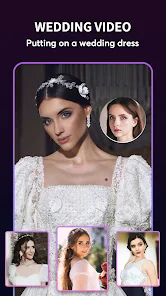
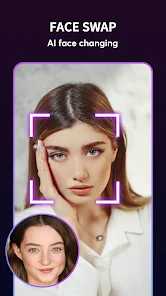
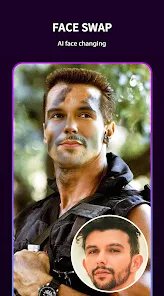
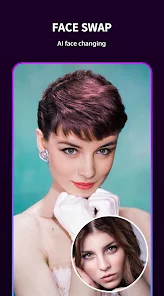
editor reviews
So you've stumbled upon Mivo, an app that bills itself as a face swap video bride tool. Honestly, the name alone is a bit of a head-scratcher. It's basically a video editing and face-swapping app, squarely in the category of entertainment or photo/video tools. The main gimmick is that you can take a photo or a short video clip and swap faces, often with pre-loaded templates that feature, well, brides in traditional wedding attire. I guess the idea is to see what you or a friend would look like as a bride? When you download it from the Google Play or App Store — it's free to install, by the way — the first impression is a bit chaotic. The interface is crammed with flashy banners, "hot" templates, and a lot of visual noise. You're immediately hit with a sense that this is less about polished editing and more about quick, viral-style fun. The install count seems decent for a niche app, but you definitely get a "proceed with caution" vibe from the cluttered landing screen.
Once you actually start using it, the experience is a mixed bag. The onboarding throws you right into the deep end without much of a tutorial. You pick a template — most are those bride clips or some generic dance videos — and then you upload a clear face photo. The app does its thing, swapping your face onto the person in the video. The process is surprisingly fast for a free app, taking maybe 10-15 seconds. The results? They're hit or miss. If you use a well-lit, forward-facing photo, the swap can look surprisingly smooth, with the facial movements tracking decently. But if your photo is angled, or if the template video has a lot of head movement, things get wobbly, with edges looking rough and skin tones mismatched. A practical tip: avoid sunglasses or hats in your photo, or it'll look like a glitchy mess. There are also some basic editing tools like skin smoothing and a few filters, but they feel slapped on. Navigating back to the main menu after a render often leads to a brief ad, which is expected for a free app but gets annoying fast.
After a few weeks of tinkering with it, I think Mivo has a very specific, very limited appeal. It's perfect for that one-off joke — sending your friend a video of them as a dancing bride for a laugh. The viral, shareable nature of the output is its main draw. But for anyone wanting a serious face-swapping tool or a reliable video editor, this isn't it. It feels clunky compared to something like Reface or Snapchat's face swap lenses, which are smoother and more integrated. The app's obsession with the "bride" theme is also weirdly limiting. Why not just let people swap faces onto any random video? The constant ads, the lack of a clean interface, and the inconsistent quality mean I'd probably keep it installed for the novelty, but it wouldn't survive a phone cleanup. It's a silly, disposable toy, not a keeper app.
features
- 💍 The core face swap function is actually quite fast. You pick a template, drop in a photo, and within seconds you get a rendered video. Compared to a heavyweight like Reface, which sometimes takes ages to process even a short clip, Mivo feels snappy. The speed is its main selling point for that quick, throwaway joke.
- 💍 It comes with a whole library of pre-made templates, all centered around the wedding bride theme. So if you want to see yourself as a traditional bride from different cultures — Indian, Western, Chinese, you name it — it's already there. Reface lets you swap onto any video, but Mivo gives you these curated, ready-to-go clips, which saves time if that's your jam.
- 💍 The output videos have a certain "viral" quality to them. They're short, often funny, and easy to share directly to social media. The app even nudges you to share, which is a bit heavy-handed but effective. For pure, mindless fun, it does its job faster than more polished apps.
pros
- 😄 It runs smoothly on older phones. I tested it on a mid-range Android from a few years ago, and it didn't crash, unlike Reface which often stutters or freezes on the same device. That's a big plus for people who aren't on the latest hardware.
- 😄 It's completely free to download and use. There are ads, sure, but you don't need a subscription to make a face swap video. Compare that to Reface, which locks its best features and high-resolution outputs behind a paywall. For a casual user, free is a huge advantage.
- 😄 The template variety is oddly specific but well-executed. If you're into the bride concept, the app nails the cultural diversity. It feels more niche and focused than the generic "swap your face onto anything" approach of apps like Snapchat.
cons
- 😞 The overall quality is inconsistent. One video might look seamless, the next will have your face sliding off the template's head like a melting mask. Reface is far more reliable in tracking facial movements and blending skin tones, even in difficult lighting.
- 😞 The app is aggressively ad-heavy. Every time you finish a render, you're hit with a full-screen video ad that you have to wait through. It kills the flow. Snapseed's tools and even some free video editors are far less intrusive.
- 😞 The feature set is extremely limited. You can't swap faces onto your own videos from your camera roll without using a template. You're stuck with their pre-made clips. Apps like YouCam Perfect let you do custom swaps, but Mivo feels like a one-trick pony.
- 😞 The interface is cluttered and feels dated. The design is full of flashy buttons and pop-ups that scream "spammy." It lacks the clean, modern feel of apps like Instagram's Reels editor or even the older Facetune app.
Recommended Apps
![]()
Daily Horoscope
KADO Apps4.4
![]()
FOX Sports: Watch Live Games
Fox Digital Services, LLC3.7
![]()
Fake Call from Santa Claus
ThunderClap4.2![]()
Google Maps
Google LLC4.2![]()
PhotoLayers-Superimpose,Eraser
handyCloset Inc.4.6![]()
Healthy Benefits+
Solutran, Inc.4.5![]()
SuperMe - Avatar Maker Creator
THE.DEMON3.7![]()
Air Horn
Tenoku4.8![]()
Football Wallpaper HD 4K
Orange Infotech Studio4.6![]()
Artplay - AI Photo & Video
Hideaway Technology Limited4.5![]()
Horoscopes – Daily Zodiac Horo
Mail.Ru Group4.1![]()
Passport Parking
Passport Labs, Inc.2.5![]()
ParkMobile: Park. Pay. Go.
Parkmobile, LLC4.3![]()
FestAI: Ghost Detector App
Now Tech3.2![]()
Photo Tool
COLIFER LAB4





























