
FaceLab: Face Editor, Aging

10M+
Installs
Lyrebird Studio
Developer
-
Video Players & Editors
Category
-
Rated for 3+
Content Rating
-
lyrebirdstudio@gmail.com
Developer Email
-
https://lyrebirdstudio.net/privacy_policy.htm
Privacy Policy
Screenshots
editor reviews
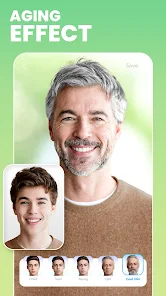
FaceLab is a photo-editing app that focuses specifically on altering faces in portraits. You know those apps that let you try on different hairstyles or makeup? This one is similar, but its main draw is aging and de-aging people. A lot of users probably download it for a laugh, like to see what their friends will look like when they're old, or what their parents looked like as teenagers. Opening it for the first time, the interface is pretty clean and modern. It asks for basic permissions, you upload a photo, and then you're faced with a row of effect buttons. I remember being surprised by how quickly it processed the image; there wasn't much of a wait before seeing myself with gray hair and wrinkles.
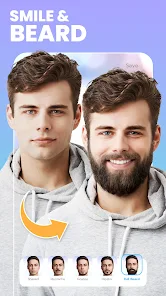
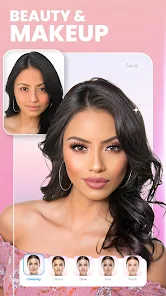
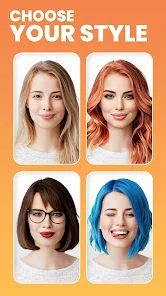
Actually using FaceLab day-to-day is pretty straightforward. Once you pick a photo, you tap an effect like "Old" or "Young," and the app does its magic. The interface is mostly swipeable horizontal buttons for different tool categories. The main actions are the core face transformers, then some extras like adding a beard, makeup, or swapping genders. A simple usage flow would be: take a selfie, upload it, tap the "Makeup" button, and try different lipstick colors. It's quite smooth for basic tasks. I did find that for group photos, it can get confused trying to focus on the wrong face, which is a bit of a clumsy moment. A practical tip is to take a well-lit, front-facing photo for the best results, as side profiles make the aging look less realistic.
After using it for a while, I think FaceLab is a fun tool for casual, humorous editing. If you're looking for a laugh at a party or want to create a funny profile picture, it's great. But if you're after professional retouching or realistic aging for a project, it falls short. The app differs from something like Facetune because it's more about playful transformations than skin smoothing. What's unique is how aggressively it applies effects; the young-to-old filter isn't subtle, it makes you look like a different person entirely. I could see someone keeping it installed for occasional giggles, but they might uninstall it when the novelty wears off. It doesn't have the utility of a general editor, so it's more of a party trick than a daily driver.
features
- 🔄 FaceLab specializes in extreme aging and de-aging effects, whereas popular competitors like FaceApp offer similar tools but often with more realistic texture blending. FaceLab's standout feature is its "age machine" that applies a complete makeover—adding wrinkles, gray hair, and sagging skin—all in one tap, which is funnier and more dramatic than the gradual shifts in other apps.
- 🔄 Another distinctive feature is the gender swap filter, which is surprisingly detailed. It changes hair length, adds facial hair, and adjusts bone structure. In comparison, apps like Snapchat do gender swaps too, but FaceLab's version feels more like a full identity shift rather than just a filter overlay.
- 🔄 The app includes a "baby" filter that de-ages a face to look like a toddler, enlarging eyes and softening features. This is a little unique because most other apps stop at teenage-level de-aging. It gives a cute, almost doll-like result that stands out from basic "young" modes.
pros
- 🌟 One big strength is the speed of processing. You tap a filter, and in two seconds you see the result. Facetune, for example, takes more time for similar transformations because it tries to give you manual controls. FaceLab just goes, which keeps things fun and fast.
- 🌟 The app is also very accessible for non-techy users. You don't need to know about layers or masks. Competitors like Photoshop Express are powerful but intimidating. FaceLab's one-tap simplicity means my grandma can age a photo of herself without asking for help.
- 🌟 It handles different skin tones and ages reasonably well. Other apps often fail on darker skin or older faces, but FaceLab seems to have a more robust algorithm that doesn't turn everyone into the same generic grandparent.
cons
- ⚠️ A notable weakness is that the free version is extremely limited. You only get a few filters before it asks for a subscription. In contrast, something like YouCam Perfect gives you more free options before hitting a paywall.
- ⚠️ The results can be uncanny valley in bad lighting. If the original photo is dark or blurry, the app hallucinates wrinkles or skin patches that look like plastic. FaceApp handles low-light photos much better without creating those horror-movie looking distortions.
- ⚠️ There's no undo button for individual effects. If you apply an aging filter and then want to go back to the original, you have to reload the photo. This feels clunky compared to Remini, which lets you swipe back and forth between states.
- ⚠️ It tends to over-apply effects on every face in a group photo, even when you only want to edit one person. You can't isolate a specific subject easily, which is something PicsArt does well with its selective editing tools.
Recommended Apps
![]()
Daily Horoscope
KADO Apps4.4
![]()
FOX Sports: Watch Live Games
Fox Digital Services, LLC3.7
![]()
Fake Call from Santa Claus
ThunderClap4.2![]()
Google Maps
Google LLC4.2![]()
PhotoLayers-Superimpose,Eraser
handyCloset Inc.4.6![]()
Healthy Benefits+
Solutran, Inc.4.5![]()
SuperMe - Avatar Maker Creator
THE.DEMON3.7![]()
Air Horn
Tenoku4.8![]()
Football Wallpaper HD 4K
Orange Infotech Studio4.6![]()
Artplay - AI Photo & Video
Hideaway Technology Limited4.5![]()
Horoscopes – Daily Zodiac Horo
Mail.Ru Group4.1![]()
Passport Parking
Passport Labs, Inc.2.5![]()
ParkMobile: Park. Pay. Go.
Parkmobile, LLC4.3![]()
FestAI: Ghost Detector App
Now Tech3.2![]()
Photo Tool
COLIFER LAB4





























