

Skype for Business for Android

10M+
Installs
Microsoft Corporation
Developer
-
Business
Category
-
Rated for 3+
Content Rating
-
SFBAndroidApp@microsoft.com
Developer Email
-
https://go.microsoft.com/fwlink/?LinkId=510643
Privacy Policy
Screenshots
editor reviews
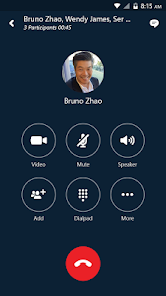
Skype for Business on Android is basically Microsoft's enterprise-grade communication tool, a more serious cousin of the regular Skype we all remember from a decade ago. It's designed for workplace chat, video calls, and online meetings, and it ties directly into Office 365 or on-premises Exchange servers. A lot of people end up downloading it because their company forces them to, not because they had a choice. The first time you launch the app after installing it from Google Play, you're greeted with a login screen asking for your work or school account, which is a dead giveaway that this isn't for casual Friday night chats. With over 100 million installs out there, it's clearly a staple for corporate mobility, though it's free to download with subscriptions handled by the employer. There are no random ads popping up, thank goodness, though the app does push quite a few notifications about meeting reminders and missed conversations.
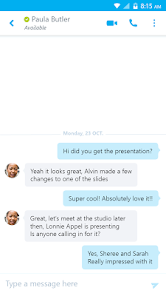
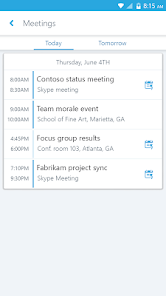
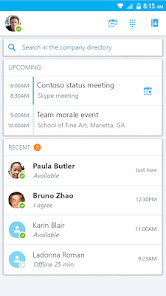
Once you get past the login screen, which honestly can be a bit tricky if your IT department has quirky multifactor authentication rules, the interface feels like a stripped-down version of the desktop client. The bottom tabs let you switch between conversations, meetings, and contacts, and the overall layout is fairly clean. Honestly, tapping on a contact and hitting the call button works well enough, but I've noticed that switching from Wi-Fi to mobile data during a call sometimes drops the connection completely. That's frustrating. On the plus side, the app handles presence status nicely; you can see if a colleague is in a meeting or available without having to send a random "Hey, are you free?" message. For daily use, I find myself mostly checking my unread messages from the notification bar and replying quickly, which is smooth. A small practical tip: if you have a lot of meetings, the calendar integration in the app is actually pretty solid, letting you join a Teams meeting or just a plain old Skype call straight from the event details.
After using Skype for Business for a while, I get why Microsoft is slowly pushing everyone toward Teams. The app does what it's supposed to do, but it feels dated compared to something like Slack's call feature or Zoom's mobile experience. It's really best for people stuck in a Microsoft-centric workplace where IT hasn't migrated everyone yet. The reliability is decent for simple messaging, but the call quality can be a bit hit or miss depending on your network. I keep it installed purely because my company requires it, but if I had the choice, I would probably uninstall it and just use Teams or any other modern app that feels less clunky. It's functional, but it doesn't spark joy.
features
- 📞 Enterprise-Grade Meeting Scheduling & Joining - You can view upcoming meetings right in the app and join them with a single tap. This is miles ahead of something like regular WhatsApp calls, which don't have any calendar sync. You can also schedule a meeting from scratch and invite participants directly, which feels very professional and organized.
- 🛡️ Robust Security and Compliance - When you're dealing with sensitive internal data, Skype for Business keeps everything encrypted and compliant with corporate policies. Nothing beats that peace of mind. Unlike using Telegram or Signal for work chats, this app is built to be audited and controlled by your IT department, which is a huge plus for large organizations.
- 👥 Presence Status and Delegation - The app shows real-time availability of your colleagues, like "In a Call" or "Do Not Disturb." You can also delegate your inbox or calendar to an assistant, so they can answer calls or send invites on your behalf. This is something simple messenger apps like Google Hangouts or Facebook Messenger just can't handle properly. It makes collaboration smoother without back-and-forth messages.
pros
- ⚡ Deep Integration with Office 365 Ecosystem - You can share PowerPoint slides directly during a call or edit a Word doc live with a coworker. Slack or Zoom don't offer this level of native Office integration. It feels like everything works together without extra plugins.
- 📉 Reliability in Low-Bandwidth Conditions - The app has a pretty good ability to adjust video quality when your internet is acting up. I've tested it next to Google Meet, and Skype for Business holds the connection better even when my 4G signal dips. It might get pixelated, but it rarely drops the call entirely.
- 🎤 One-Touch Meeting Recording - You can record your meetings directly from the mobile app, which is super useful for catching up on missed sessions. Cisco Webex requires a lot more setup for mobile recording. It's stored in your OneDrive afterward, making it easy to share.
cons
- ⏳ Clunky Interface Compared to Modern Apps - The design feels like it's stuck in 2015. Slack or Teams have much more intuitive layouts, smoother animations, and generally better user experience. Navigating between conversations and contacts feels unnecessarily stiff on Skype for Business. It's not terrible, but it's not pleasant.
- 🔇 Notification Issues on Certain Android Versions - I've personally experienced missed notifications where a message pops up hours later, especially on Samsung devices. This is a known pain point that apps like Telegram or Viber have solved ages ago. It makes you look unresponsive to your boss when you genuinely didn't see the message.
- 👎 Poor Cross-Platform Consistency - The Android version sometimes lacks features that the iOS version has, like better group call management or screen sharing. Zoom and Google Meet offer nearly identical experiences across platforms, while Skype for Business feels like a second-class citizen on Android. It can be frustrating when your colleague on iPhone has options you don't.
Recommended Apps
![]()
Daily Horoscope
KADO Apps4.4
![]()
FOX Sports: Watch Live Games
Fox Digital Services, LLC3.7
![]()
Fake Call from Santa Claus
ThunderClap4.2![]()
Google Maps
Google LLC4.2![]()
PhotoLayers-Superimpose,Eraser
handyCloset Inc.4.6![]()
Healthy Benefits+
Solutran, Inc.4.5![]()
SuperMe - Avatar Maker Creator
THE.DEMON3.7![]()
Air Horn
Tenoku4.8![]()
Football Wallpaper HD 4K
Orange Infotech Studio4.6![]()
Artplay - AI Photo & Video
Hideaway Technology Limited4.5![]()
Horoscopes – Daily Zodiac Horo
Mail.Ru Group4.1![]()
Passport Parking
Passport Labs, Inc.2.5![]()
ParkMobile: Park. Pay. Go.
Parkmobile, LLC4.3![]()
FestAI: Ghost Detector App
Now Tech3.2![]()
Photo Tool
COLIFER LAB4





























