
Photo Collage Maker

50M+
Installs
Scoompa
Developer
-
Video Players & Editors
Category
-
Rated for 3+
Content Rating
-
contact+cm@scoompa.com
Developer Email
-
http://goo.gl/q5z4fP
Privacy Policy
Screenshots
editor reviews
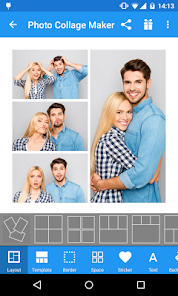
Photo Collage Maker from Scoompa is a straightforward photo editing tool that lets you combine multiple pictures into one single frame. It's one of those collage apps you'd grab when you want to post a batch of vacation snaps or event photos without clogging up your feed with individual uploads. The app has been downloaded quite a bit on Google Play, sitting somewhere in the tens of millions, and it's free to install, though you'll run into ads and prompts for in-app purchases if you want to unlock the full template library or remove watermarks. The first time you launch it, the interface feels clean enough, with a simple grid layout showing different collage templates. It doesn't ask you to sign up for an account, which I always appreciate, so you can jump straight into making something.
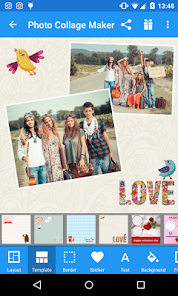
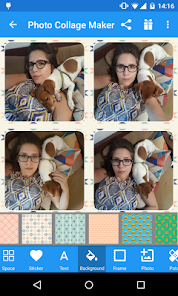
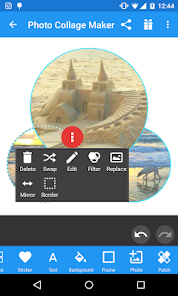
After tapping the big "Create Collage" button, you're taken to your phone's gallery to pick photos. Selecting images is responsive, and the app handles batches of up to about nine or ten photos at once without lagging. Once your pictures are loaded, you can swipe through template options that arrange your photos in different grid styles, freestyle layouts, or even scrapbook-style frames with stickers and backgrounds. The drag-and-drop feature works well enough, letting you swap photo positions or resize individual frames by pinching. For a casual user just wanting a quick Instagram-worthy post, the process is smooth. There are moments where the interface feels slightly cluttered with premium template labels and pop-up prompts to unlock pro packs, but the core editing tools like filters, border adjustments, and text overlays are easy to locate. One small tip: if you double-tap a photo inside a frame, you can zoom or reposition it without messing up the layout, which took me a few tries to discover.
After spending a few days with Photo Collage Maker, I think it's a solid pick if you frequently make simple collages and don't need professional-level control. It definitely gets the job done faster than manually arranging photos in a separate editor. The free version is usable, but you'll feel the limitations after a while, especially since watermarks appear unless you watch ads or pay. Compared to something like Canva or PicsArt, this app feels more focused on collages than full photo editing, which can be good if that's all you need. That said, the constant ads and the push to upgrade might frustrate someone who just wants a no-fuss tool. I can see casual social media users keeping it installed for quick weekend posts, but if you're someone who edits photos regularly, you'd probably outgrow it fast.
features
- 🖼️ The standout feature here is the sheer variety of collage templates. You get over 100 layouts including grids, freestyle frames, and scrapbook styles. In comparison, something like Pic Collage offers fewer free layouts before pushing a paywall, so Scoompa's app gives you more to play with right from the start without needing to unlock everything immediately.
- 🖼️ The background customization is particularly flexible. You can pick solid colors, gradients, or even use one of your photos as the background behind the frames. Adobe Spark Post has similar options but requires a subscription for the full range, while this app lets you access most background choices without paying.
- 🖼️ The sticker collection is surprisingly extensive for a free app. There are themed packs for holidays, travel, food, and more. Canva has better stickers overall, but they're heavily locked behind the premium tier. Scoompa's app gives you a decent chunk of stickers without asking for money upfront.
- 🖼️ One feature that feels unique is the "scrapbook" mode, which throws in decorative elements like paper clips, tape, and torn edges. Most collage apps focus on clean grids, so this adds a playful, handmade look that stands out from the usual polished results you get from Layout from Instagram or other minimalist tools.
pros
- ✅ The learning curve is almost nonexistent. You can make a decent collage within a minute of opening the app, whereas Canva has a steeper start if you're not familiar with layers and design tools.
- ✅ It works fine offline after the templates load. This is a big plus compared to apps like PicsArt that keep requiring internet access for filters and stickers.
- ✅ The export quality stays high even in the free version. You can save images at 1080p resolution without compression, which beats many free collage makers that drop quality unless you subscribe.
cons
- ❌ The ads are intrusive. Every time you save or switch tabs, a full-screen video ad pops up. Pic Collage has ads too, but they're less frequent and usually skippable after five seconds.
- ❌ Watermarks appear on free exports unless you watch an ad for each save. Layout from Instagram has zero watermarks, so this feels like a step backward for something that should be simple.
- ❌ The app crashes occasionally when you try to load high-resolution photos from your gallery. This doesn't happen often, but it's frustrating when you've spent time arranging a complex collage.
- ❌ There's no cloud backup or account sync. If you uninstall the app or switch phones, your saved templates and projects are gone. Canva and Adobe Spark Post let you save projects to the cloud, which is much more convenient.
Recommended Apps
![]()
Daily Horoscope
KADO Apps4.4
![]()
FOX Sports: Watch Live Games
Fox Digital Services, LLC3.7
![]()
Fake Call from Santa Claus
ThunderClap4.2![]()
Google Maps
Google LLC4.2![]()
PhotoLayers-Superimpose,Eraser
handyCloset Inc.4.6![]()
Healthy Benefits+
Solutran, Inc.4.5![]()
SuperMe - Avatar Maker Creator
THE.DEMON3.7![]()
Air Horn
Tenoku4.8![]()
Football Wallpaper HD 4K
Orange Infotech Studio4.6![]()
Artplay - AI Photo & Video
Hideaway Technology Limited4.5![]()
Horoscopes – Daily Zodiac Horo
Mail.Ru Group4.1![]()
Passport Parking
Passport Labs, Inc.2.5![]()
ParkMobile: Park. Pay. Go.
Parkmobile, LLC4.3![]()
FestAI: Ghost Detector App
Now Tech3.2![]()
Photo Tool
COLIFER LAB4





























