
Photoshop Express Photo Editor

100M+
Installs
Adobe
Developer
-
Video Players & Editors
Category
-
Rated for 3+
Content Rating
-
PSX-Feedback-Android@adobe.com
Developer Email
-
http://www.adobe.com/privacy/policy.html
Privacy Policy
Screenshots

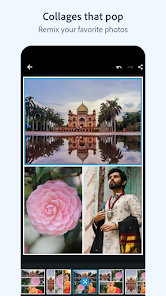
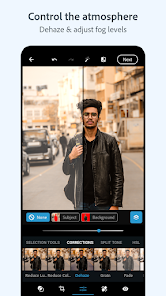
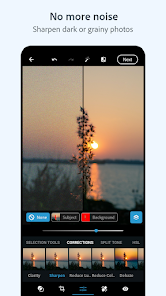
editor reviews
Photoshop Express Photo Editor is Adobe's streamlined mobile companion for quick photo fixes. It's not the full desktop giant, but a focused tool for on-the-go editing. I grabbed it from Google Play after seeing it had over a hundred million downloads, which made me think it must be doing something right. The first time I opened it, I was met with a clean interface that wasn't intimidating at all. You can use it right away without signing up, though some features ask for an Adobe account. It's free to download, but there are in-app purchases for premium tools, and ads pop up occasionally. My initial thought was that Adobe finally made a phone editor that doesn't feel like a watered-down afterthought.
Getting into the actual use, the app walks you through a short tutorial when you first start, which covers the basics like cropping, adjusting light, and applying filters. The interface is straightforward: you pick a photo from your gallery, then a row of editing tools appears at the bottom. I found the sliders for exposure and contrast easy to understand, and the auto-fix button actually works well for lazy days. One thing that bugged me at first was the "Looks" filter section - it's loaded with presets, but scrolling through them can be a bit laggy on my older phone. A practical tip I picked up is to use the "Healing" brush for small blemishes, which worked better than I expected. The app does support layers and text overlays, but those are pushed into the premium side. For daily use, I can crop, adjust colors, and remove background noise without much confusion.
After a few weeks of regular use, I think this app is a solid pick for anyone who wants decent editing without learning a complex tool. Casual users who just want to make their Instagram shots look better will enjoy it, but professionals or those used to Snapseed might find the free version too limited. What sets Photoshop Express apart from something like Lightroom Mobile is how direct and simple it feels for basic fixes - no signing in required for most tasks. The premium features, like the "Defog" tool and custom bokeh effects, are tempting but not essential. I ended up keeping it installed because it's handy for quick edits, but I can see someone uninstalling if they're flooded by the ads or if they need more advanced control without paying. It's a good secondary editor, not a replacement for a full suite.
features
- 📸 Auto-Fix vs Snapseed's Adaptive Tuning - The auto-fix button in Photoshop Express instantly balances exposure and color with one tap. Snapseed's adaptive tuning is similar but sometimes overdoes contrast. Photoshop Express offers a more controlled correction that feels less aggressive, making it a better starting point for beginners.🛠️ Healing Brush for Blemishes - This tool lets you paint over unwanted objects or spots, and the app intelligently blends them out. Unlike Snapseed's healing tool, which can leave a blurry patch if you're not careful, Photoshop Express process is smoother and more forgiving on edges. It's a standout for cleaning up portraits.🎨 Text and Shape Overlays - You can add text boxes and geometric shapes directly on your photo without needing a separate app. Snapseed lacks this integrated feature entirely, forcing users to jump to another tool for overlays. Photoshop Express makes it simple to combine text and image editing in one place.🌫️ Defog Effect - This premium tool cuts through haze and makes dull landscapes pop. It's more precise than Snapseed's dehaze slider, which can sometimes drain color. Photoshop Express applies the effect with less noise, giving a cleaner result that feels more natural in final images.
pros
- 👍 Fast loading and smooth performance - Compared to VSCO, which takes forever to launch and sync galleries, Photoshop Express starts up in seconds. It handles high-res photos without stuttering, making it reliable for quick edits when you are short on time.👍 All basic tools are free - Adobe gives you crop, rotate, exposure, contrast, and even the healing brush without paying a cent. VSCO and PicsArt hide many of these behind monthly subscriptions, so Photoshop Express is more wallet-friendly for casual users.👍 Integration with Adobe Creative Cloud - If you already use Adobe apps, you can sync edited photos across devices. Neither Snapseed nor VSCO offers cloud sync like this, which is a huge plus if you move between your phone and tablet or even a desktop.
cons
- 👎 Too many ads for a free app - After every few edits, a full-screen video ad pops up, which breaks the flow. Snapseed has no ads at all, making it feel cleaner and more professional. The constant interruptions in Photoshop Express can get really annoying after a while.👎 Premium features locked behind a paywall - Tools like selective color adjustments, bokeh effects, and the defog filter are only available if you subscribe. Snapseed offers selective editing and many advanced features completely free, so paying feels unnecessary for most users.👎 No RAW file support in the free version - You cannot edit RAW photos unless you subscribe. Snapseed handles RAW files for free, which is a big disappointment for photography enthusiasts who shoot in RAW format on their phones.
Recommended Apps
![]()
Daily Horoscope
KADO Apps4.4
![]()
FOX Sports: Watch Live Games
Fox Digital Services, LLC3.7
![]()
Fake Call from Santa Claus
ThunderClap4.2![]()
Google Maps
Google LLC4.2![]()
PhotoLayers-Superimpose,Eraser
handyCloset Inc.4.6![]()
Healthy Benefits+
Solutran, Inc.4.5![]()
SuperMe - Avatar Maker Creator
THE.DEMON3.7![]()
Air Horn
Tenoku4.8![]()
Football Wallpaper HD 4K
Orange Infotech Studio4.6![]()
Artplay - AI Photo & Video
Hideaway Technology Limited4.5![]()
Horoscopes – Daily Zodiac Horo
Mail.Ru Group4.1![]()
Passport Parking
Passport Labs, Inc.2.5![]()
ParkMobile: Park. Pay. Go.
Parkmobile, LLC4.3![]()
FestAI: Ghost Detector App
Now Tech3.2![]()
Photo Tool
COLIFER LAB4





























