

Wonder - AI Art Generator

10M+
Installs
Codeway Dijital
Developer
-
Generative AI
Category
-
Rated for 3+
Content Rating
-
wonder@codeway.co
Developer Email
-
https://static.wonderai.app/privacy
Privacy Policy
Screenshots

editor reviews
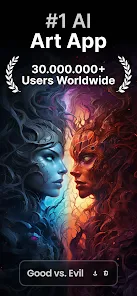
Wonder - AI Art Generator is an image creation app developed by Codeway Dijital that lets you turn text prompts or existing photos into AI-generated artwork. It falls squarely into the growing category of mobile AI art tools, and you can find it on both Google Play and the App Store. I downloaded it because I was curious about how well a free-to-install app could handle complex art styles without requiring a subscription right away. After launching it, the first impression was pretty polished - a clean splash screen with a quick tutorial that shows you how to write prompts and pick styles. The app has racked up millions of installs, which is a good sign, and while it is free to download, there are in-app purchases and occasional ads unless you opt for the premium tier. You do need to register with an email or Google account to start creating, which is a bit of a hurdle but not unusual for these tools.
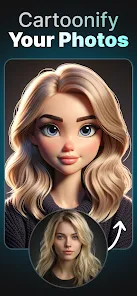
Once you get past the sign-up, the hands-on experience is straightforward. The main screen gives you a text box at the bottom and a selection of pre-set art styles like oil painting, cyberpunk, or watercolor. You type in something simple like "a cat wearing a spacesuit" and pick a style, then hit generate. It usually takes ten to fifteen seconds to spit out an image, which feels reasonable. The interface is clean, with a gallery view for your past creations and a community feed where other users share their results. I found the onboarding smooth, although the sheer number of style options - there are over fifty - can feel a bit overwhelming at first. A small tip: you can upload a photo and apply a style to it, which works better for portraits than landscapes. One confusing moment came when I tried to edit a generated image; the editing tools are quite basic and not as intuitive as I hoped. Daily use involves opening the app, browsing styles for inspiration, and generating a few images, but the free tier limits you to a handful of creations per day before it nudges you to subscribe.
After using Wonder for a couple of weeks, I think it is a solid pick for casual users who want to experiment with AI art without committing to a heavy desktop tool. It is especially fun for social media enthusiasts who want quick, eye-catching profile pictures or backgrounds. However, if you are a serious digital artist or need high-resolution outputs for printing, it falls short compared to something like Midjourney or Stable Diffusion, which offer more control and better quality. What sets Wonder apart is its mobile-first design and the sheer variety of styles baked into the app - you do not need to fiddle with complex settings or external websites. I keep it installed for the occasional creative spark, but I can see someone uninstalling it if they hit the daily limits too often or get annoyed by the ads. It is a decent gateway into AI art, but not a professional tool.
features
- ✅ Style Variety: Wonder offers over fifty preset art styles, from realistic oil painting to surreal 3D renderings. In comparison, Dream by Wombo has fewer options and feels more limited in its creative range.
- ✅ Text-to-Image Speed: The generation time is around ten to fifteen seconds, which is noticeably faster than StarryAI, where longer prompts can take up to a minute to process.
- ✅ Community Feed: The built-in community tab lets you browse other users' creations for inspiration. This feature is missing in apps like DreamStudio, making Wonder feel more social and engaging.
- ✅ Prompt Suggestions: When you type a vague idea, Wonder auto-suggests more descriptive phrases. This helps beginners who struggle with writing effective prompts, unlike in DiffusionBee where you are left to figure it out alone.
pros
- 👍 Mobile Optimization: The app runs smoothly on older phones without lag, which is a big plus compared to Midjourney, which relies on a Discord bot and can feel clunky on mobile.
- 👍 Beginner-Friendly Interface: The layout is simple with clear labels and a step-by-step guide. This is more accessible than Stable Diffusion on Android, which requires command-line knowledge or third-party launchers.
- 👍 No External Sign-Ups: You can register with just an email or Google account, avoiding the need for a separate Discord or web account like in DreamStudio.
- 👍 Consistent Style Application: Once you pick a style, the app applies it consistently across different prompts, which is not always the case with StarryAI, where results can vary wildly.
cons
- 👎 Daily Generation Limits: Free users are capped at around five images per day, which feels restrictive compared to Dream by Wombo, which offers unlimited free generations with ads.
- 👎 Basic Editing Tools: After generating an image, you can only crop or adjust brightness, not refine details or remove elements. Midjourney's inpainting feature is far more capable.
- 👎 Resolution Limits: Outputs are capped at 1024x1024 pixels, which is fine for social media but not for printing or commercial use. Stable Diffusion allows higher resolutions without a paywall.
- 👎 Ads in Free Tier: Ads pop up after every few generations, interrupting the workflow. StarryAI also has ads, but they are less intrusive and often skippable faster.
Recommended Apps
![]()
Daily Horoscope
KADO Apps4.4
![]()
FOX Sports: Watch Live Games
Fox Digital Services, LLC3.7
![]()
Fake Call from Santa Claus
ThunderClap4.2![]()
Google Maps
Google LLC4.2![]()
PhotoLayers-Superimpose,Eraser
handyCloset Inc.4.6![]()
Healthy Benefits+
Solutran, Inc.4.5![]()
SuperMe - Avatar Maker Creator
THE.DEMON3.7![]()
Air Horn
Tenoku4.8![]()
Football Wallpaper HD 4K
Orange Infotech Studio4.6![]()
Artplay - AI Photo & Video
Hideaway Technology Limited4.5![]()
Horoscopes – Daily Zodiac Horo
Mail.Ru Group4.1![]()
Passport Parking
Passport Labs, Inc.2.5![]()
ParkMobile: Park. Pay. Go.
Parkmobile, LLC4.3![]()
FestAI: Ghost Detector App
Now Tech3.2![]()
Photo Tool
COLIFER LAB4





























