

PhotoRoom AI Photo Editor

50M+
Installs
PhotoRoom Background Editor App
Developer
-
Video Players & Editors
Category
-
Rated for 3+
Content Rating
-
help@photoroom.com
Developer Email
-
https://photoroom.com/legal/privacy
Privacy Policy
Screenshots
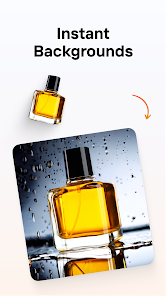
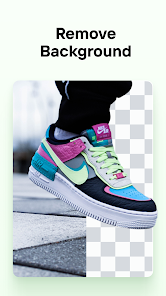

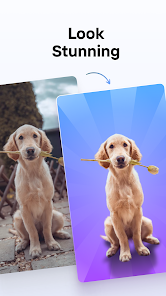
editor reviews
You know that feeling when you need a decent product photo for a listing, but your desk is a mess and the lighting is terrible? That's pretty much why I grabbed PhotoRoom AI Photo Editor. It's an image editing app, specifically built for removing, swapping, or smoothing out backgrounds without needing Photoshop skills. You download it, install it from the Play Store or App Store, and it's free to start with, though there are paid subscriptions and in-app purchases if you want the fancy stuff. The install count is huge, it's one of those apps everyone seems to have tried at least once. My first impression after launching it was just how clean and purposeful it felt. No cluttered toolbar, no confusing layers. It basically says, "Here's your photo, now tap the background." That directness is what hooks you.
Actually using it is surprisingly hands-off. You snap a picture or grab one from your gallery, and the AI instantly cuts out the subject. It's not perfect every time, sometimes it nips a bit of hair or a product edge, but you can touch that up with the brush tool. The main actions are picking a new background, either a solid color, a gradient, or one of their templates for things like Etsy or Amazon listings. For daily use, you just crop, maybe adjust the shadow or the size of the subject, and export. The onboarding is quick, just a few tips, and then you're thrown in. It's smooth for basic edits, but I found myself fiddling with the "retouch" tool more than I wanted to for tiny imperfections. A practical tip is to use the "batch" mode if you have multiple product shots, it saves a ton of time.
After a couple of weeks, I think this app is a godsend for small business owners or anyone who sells stuff online. If you're a casual user who just wants to remove a messy background from a selfie, it works, but you might find the free version a bit restrictive with watermarks on exports. What stands out compared to apps like Adobe Express or Canva is that PhotoRoom is laser-focused on background editing, while the others try to do everything. That focus makes it faster for its specific job. I kept it installed because it's genuinely faster for product shots than opening Photoshop or fighting with Canva's interface. Someone might uninstall it if they don't sell things or if they hit the paywall for removing watermarks on high-res images. It's great, but it knows what it is and doesn't pretend to be a full photo editor.
features
- 🎯 The standout feature for me is the AI background removal itself. Compared to Remove.bg, which is also good but often struggles with fine details like hair or glass reflections, PhotoRoom is noticeably sharper. It catches the edges of a transparent bottle or a curly-haired product model without mangling them. You can actually trust it for professional-looking outputs without spending ten minutes on cleanup.
- 🖼️ Their template system is another big win. Unlike Canva, where you have to hunt for the right size and layout, PhotoRoom has ready-to-use templates for Amazon, Etsy, and social media. You just pick one, drop your cutout in, and the sizing and resolution are already set. It's not about designing from scratch, it's about fast, consistent results.
- ✨ The "retouch" and "shadow" tools are deceptively powerful. Many apps like PicsArt let you add a shadow, but PhotoRoom's AI generates realistic floor shadows or reflections that match the lighting in your original photo. It's a small thing, but it makes your product look like it was shot on a studio floor, not a kitchen counter.
pros
- 💡 Speed. This kills me, but PhotoRoom processes an image in about two seconds, while Adobe Express's background remover takes longer and sometimes needs a manual crop first. For someone editing fifty product photos, that time adds up fast.
- 💡 Simplicity. Compared to Canva's cluttered interface where background removal is buried under "Effects," PhotoRoom puts it front and center. You open the app, and the first button you see is "Remove Background." It's designed for a beginner who doesn't want to learn a whole design suite.
- 💡 Batch processing. This is huge. Remove.bg charges per image for batch work, and Canva's batch editing is clunky. PhotoRoom lets you do multiple images in one go without re-uploading or re-cropping, which is a lifesaver for small shop owners with new inventory.
cons
- ⚠️ Watermark. The free version slaps a watermark on every exported image. Unlike some apps like Snapseed that only nag you with ads, PhotoRoom's watermark is aggressive. You either pay or you're stuck with "Made with PhotoRoom" plastered across your work. For a quick edit, it's frustrating.
- ⚠️ Limited photo editing. If you're used to a full editor like Lightroom or even Snapseed, PhotoRoom feels bare. You can't adjust curves, fix exposure, or do serious color grading. It's a one-trick pony, and if your shot has bad lighting, you're stuck fixing it elsewhere first.
- ⚠️ Subscription cost. The Pro version is monthly, not cheap compared to a one-time purchase like Affinity Photo. If you only need background removal twice a year, it's hard to justify. Remove.bg's pay-per-image model is actually cheaper for infrequent users.
- ⚠️ AI missteps on complex images. It handles hair well, but throw in a transparent object like a wine glass or a mesh fabric, and the AI might turn parts of it into a solid block. You have to manually restore the transparency, which defeats the purpose of "automatic."
Recommended Apps
![]()
Daily Horoscope
KADO Apps4.4
![]()
FOX Sports: Watch Live Games
Fox Digital Services, LLC3.7
![]()
Fake Call from Santa Claus
ThunderClap4.2![]()
Google Maps
Google LLC4.2![]()
PhotoLayers-Superimpose,Eraser
handyCloset Inc.4.6![]()
Healthy Benefits+
Solutran, Inc.4.5![]()
SuperMe - Avatar Maker Creator
THE.DEMON3.7![]()
Air Horn
Tenoku4.8![]()
Football Wallpaper HD 4K
Orange Infotech Studio4.6![]()
Artplay - AI Photo & Video
Hideaway Technology Limited4.5![]()
Horoscopes – Daily Zodiac Horo
Mail.Ru Group4.1![]()
Passport Parking
Passport Labs, Inc.2.5![]()
ParkMobile: Park. Pay. Go.
Parkmobile, LLC4.3![]()
FestAI: Ghost Detector App
Now Tech3.2![]()
Photo Tool
COLIFER LAB4





























