
Prisma Art Effect Photo Editor

50M+
Installs
Prisma Labs, Inc.
Developer
-
Video Players & Editors
Category
-
Rated for 3+
Content Rating
-
contact@prisma-ai.com
Developer Email
-
http://prisma-ai.com/privacy.html
Privacy Policy
Screenshots
editor reviews
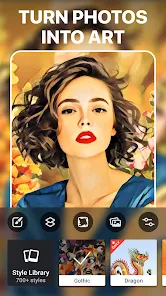
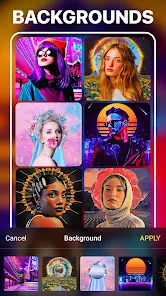
Prisma Art Effect Photo Editor is a photo editing app that uses AI to transform ordinary photos into artwork that looks like it was painted by famous artists. It sits in the photography and creativity category, and the main draw is that you upload a snapshot, pick a style, and the app redraws the image in a specific artistic look. A regular person might download it because they want something more interesting than basic filters, and when I first launched the app, the interface felt clean but a bit flashy. On Google Play and the App Store, it's free to install with optional in-app purchases, and the install count is high enough that it's clearly popular. I didn't need to register right away, but some features are locked behind a subscription, and ads pop up occasionally, which can disrupt the experience. The first impression is that it's exciting to see your photo turn into a Van Gogh or Picasso piece, but the app nags you to upgrade quickly.
After using it, the hands-on experience is a mix of simple and frustrating. The onboarding walks you through picking a photo, and then you scroll through a grid of styles. From there, you tap one, wait for the AI to process, and the result appears. Common usage steps involve taking a fresh photo or picking from your gallery, choosing a style, adjusting the filter strength, and saving. The interface is smooth when it works, but it often feels sluggish because the processing takes time, especially on older phones. One confusing moment is that some styles are marked "premium," and they're grayed out until you pay. A small tip I figured out is that portrait photos with simple backgrounds work best, so avoid busy group shots or landscapes. The app also has a community feed of other users' edits, which is fun to browse for inspiration, but it's not essential for the main action.
After using it for a while, I think it's a cool gimmick but not something I need daily. People who enjoy showing off unique social media posts or experimenting with art will probably like it, but a casual user might get bored after a few tries. What sets it apart from similar apps like PicsArt or Snapseed is the specific focus on artistic painting effects, which are genuinely impressive and don't look like standard filters. However, compared to something like DeepArt or Dream by WOMBO, Prisma feels more polished but less creative because it's restricted. I'd keep it installed if I travel and want to make postcards from my photos, but the ads and premium prompts might drive me to uninstall later. It's not a bad app, but it feels more like a novelty than a daily tool.
features
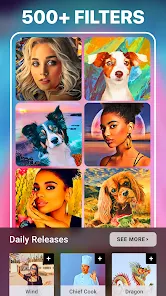
- 🎨 AI Art Styles: The core feature is a library of over 500 artistic styles, ranging from classic paintings like Edvard Munch's The Scream to more modern abstract looks. This is more extensive than what you'd find in VSCO, which focuses on film looks, or PicsArt, which has filters but nothing this art-specific.
- 🖼️ Real-time Preview: Before you commit to a style, the app shows a live preview of how the photo will look on your screen. This saves time and feels more responsive than Google Snapseed, where you have to apply a filter and undo it if you don't like it.
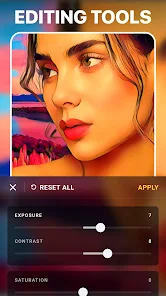
- 📊 Style Customization: After applying a style, you can adjust the intensity, so the artistic effect can be subtle or strong. This level of control is better than DeepArt, where you get a single result and can't tweak it. It makes the app feel more flexible for different tastes.
pros
- 🎨 Unique Artistic Filter Library: Compared to standard editing apps like Adobe Lightroom, Prisma's strength is its dedicated library of over 500 artist-inspired filters. These aren't generic adjustments but true painting replications, which is hard to find elsewhere without paying for custom presets.
- 📸 Fast Processing: The AI processing is surprisingly quick for the quality it produces, often taking under 10 seconds. This beats slower apps like Dream by WOMBO, which can take minutes to generate similar art effects. It makes the app feel snappier for impatient users like me.
- 🖌️ High-Resolution Output: When you save an edited photo, the resolution stays high, up to 4K, which is better for printing or sharing. This is a clear advantage over PicsArt, where saving sometimes compresses the image and reduces quality for free users.
cons
- 🪫 Heavy Ads: The free version is plagued with video ads after every save or style change, which ruins the flow. Other apps like Meitu have fewer interruptions, making Prisma feel more aggressive with monetization.
- 💸 Paywalled Styles: Many of the best styles are locked behind a premium subscription, and the free set feels limited. VSCO offers more free filters without pushing you to pay, so Prisma feels stingy in comparison.
- ⏳ Slow Interface: The app lags when scrolling through the style grid, especially after the first few uses. Google Snapseed is smoother overall, with no lag during navigation, which makes Prisma feel less polished for daily use.
Recommended Apps
![]()
Daily Horoscope
KADO Apps4.4
![]()
FOX Sports: Watch Live Games
Fox Digital Services, LLC3.7
![]()
Fake Call from Santa Claus
ThunderClap4.2![]()
Google Maps
Google LLC4.2![]()
PhotoLayers-Superimpose,Eraser
handyCloset Inc.4.6![]()
Healthy Benefits+
Solutran, Inc.4.5![]()
SuperMe - Avatar Maker Creator
THE.DEMON3.7![]()
Air Horn
Tenoku4.8![]()
Football Wallpaper HD 4K
Orange Infotech Studio4.6![]()
Artplay - AI Photo & Video
Hideaway Technology Limited4.5![]()
Horoscopes – Daily Zodiac Horo
Mail.Ru Group4.1![]()
Passport Parking
Passport Labs, Inc.2.5![]()
ParkMobile: Park. Pay. Go.
Parkmobile, LLC4.3![]()
FestAI: Ghost Detector App
Now Tech3.2![]()
Photo Tool
COLIFER LAB4





























